
![How to Watch MLS on PS5? [28th MLS Season]](https://techthanos.com/wp-content/uploads/2023/03/How-to-Watch-MLS-on-PS5-28th-MLS-Season.jpg)
Watch the top Professional Soccer League by the United States Soccer Federation on your PS5 game console. You can live stream every Game of MLS on PS5 with the MLS Season Pass from Apple TV and with other simulcast channels. Get to know the procedure to catch up with MLS on your PlayStation console with the help of this article. Make sure that you have an Apple ID to easily subscribe to MLS Season Pass on Apple TV.
Table of Contents
Can I Watch MLS on PS5?

Yes, you can watch all the games of MLS on your PS5 game console using the streaming service apps available in its PlayStation Store. Using the Apple TV app and other streaming service apps with Fox Sports Channel in its subscription channel lineup, you can watch live MLS Games on PS5.
How to Watch MLS on PS5?

Apple TV now holds the broadcast rights for every MLS Game for the next ten years. Catch up with every MLS game that lives on your PS5 using the Apple TV app and MLS Season Pass. Fox Sports 1 has the broadcast rights to simulcast MLS Games from MLS Season Pass.
To watch MLS on your PS5 console, you need to either get an Apple TV app or the FS1 channel. You can easily get the Apple TV app from PlayStation Store. But the Fox Sports app is not available on PS5. To get the FS1 channel on your PS5, you need to subscribe to live tv service providers available on PlayStation Store with FS1 in its subscription channel lineup to watch MLS on PS5.
How to watch MLS on PS5 using Apple TV?

All you have to do is to install the Apple TV app on your PS5 console. Sign In and get MLS Season Pass. Once you have purchased the pass, you can watch MLS live on your game console. If you have not used Apple TV on PS5, follow the simple steps and start to stream MLS on your device.
How to Get Apple TV on PS5?
- From the PS5 home screen select Media.
- Navigate to the Apple TV option and select it.
- You will be directed to the Apple TV app information page.
- Tap on Download and wait for the Apple TV app to get installed on your PS5.
You have now successfully installed the Apple TV app on your PS5 game console. But to access its content you need to Activate or Sign In with your Apple ID.
Activate Apple TV on PS5:
- After installation, you can tap on start to launch the Apple TV app on your PS5 console.
- Tap on Start Browsing and select any option at Device Analytics.
- You can get Apple TV+ free for the first 6 months by pressing Continue or selecting the Not now option.
- Visit activate.apple.com on your smartphone web browser.
- Enter the Activation code from the screen and press Continue.
- Use your Apple ID to Sign In.
- The Apple TV app refreshes and shows all the contents available in it.
You may also like to learn about How to Get Apple TV on Samsung smart TV?
How to Get MLS Season Pass on PS5?
The MLS Season Pass comes along with your Apple TV app. You can pay for MLS Season Pass from your Apple ID directly. Follow the simple procedure to get MLS Season Pass on PS5 and to watch the soccer game live on it.
- Launch the Apple TV app on your PS5.
- Select MLS Season Pass from its home page.
- Tap on the Subscribe option and choose a plan of your choice.
| MLS SEASON PASS SUBSCRIPTION | ||
| Per MONTH | Per SEASON | |
| Apple TV+ Subscriber | $12.99 | $79 |
| Non-Apple TV+ Subscriber | $14.99 | $99 |
- Again select Subscribe under the MLS Season Pass plan.
- Complete the payment with your Apple Account balance or use your Credit Card details.
After a subscription, you can enjoy watching all the MLS games on Your PS5 using the Apple TV app.

You may also like to learn about How to Install & Watch Apple TV on LG TV?
How to watch MLS on PS5 with Fox Sports Channel?

If you have already subscribed to any streaming service with Fox Sports channel on it. You can also watch MLS on FOX, FOX Deportes, and Univision. Not all games MLS are available on FOX Network, if you want to watch all the games, then subscribe to MLS Season Pass. With the FOX Network channels you can watch,
- 34 Regular Season Games per Annum
- 8 Audi MLS Cup Playoffs every season
- MLS Cup on FOX
- League Cup games of 10 Group Stages on FS1 channel.
- You can also watch 4 rounds of 32 matches and 2 rounds of 16 matches from each tournament on FS1.
The Streaming services that can be used to watch MLS on PS5 are YouTube TV, Fubo TV, Sling TV, DIRECTV Stream, and Hulu+Live TV. You may also like to learn about How to Watch FOX Sports on PS5?
Major League Soccer live on PS5 using YouTube TV:

The YouTube TV app can be installed from the PlayStation store on your PS5 console. After installation, you need to activate it with your YouTube TV subscription credentials. After activation, you can easily find the FS1 channel on the YouTube TV app and watch MLS live on your game console. The subscription plans offered by YouTube TV to watch MLS are as follows,
- Base Plan – FOX and FS1 (Fox Sports 1)
- Spanish Plan – Unimas and Univision

You may also like to learn about How to Get YouTube on Samsung Smart TV?
MLS with Fubo TV on PS5:

You can easily get the FS1 channel on your Fubo TV app at PS5 by subscribing to the Fubo TV Elite plan. It costs $84.99 per month and can watch up to 205+ channels including Fox Sports 1. The Fubo TV app is very much compatible with PS5 and can be installed from its default app store. After installing you need to Activate the Fubo TV app on PS5 using subscription credentials with FS1 channel in its channel lineup to watch MLS on PS5.

MLS on Sling TV:

You can easily get both the Fox and FS1 channel on your Sling TV app at PS5 by subscribing to the Sling Blue plan. The subscription costs just $40 per month, which is lesser than YouTube TV Base Plan and Fubo TV Elite Plan. You can visit the official site of Sling TV to know more about the subscription can channel lineup.

You may also like to learn about How to Watch Sling TV on PS5?
MLS on Hulu+Live TV available on PS5:

Hulu+Live TV has been one of the most loved live TV streaming service providers. You can easily watch MLS on Hulu+Live TV by subscribing to its plan with or without ads. After subscription, you can install the Hulu app on your PS5 console and activate it to get MLS broadcasting channels. With Hulu, you can get FOX, FS1 (Fox Sports 1), and Fox Deportes channels on your PS5. With these channels, you can catch up with most of the MLS Games on your PS5.

You may also like to learn about How to Install Hulu on PS5?
MLS on DIRECTV Stream in PS5:

With your DIRECTV Stream subscription and DIRECTV app on PS5, you can easily access FOX, Fox Sports 1 (FS1), Fox Deportes, Univision, and Unimas. With these channels on PS5, you can watch most of the MLS games simulcast from MLS Season Pass now. The subscription plans offered by DIRECTV Stream are as follows,
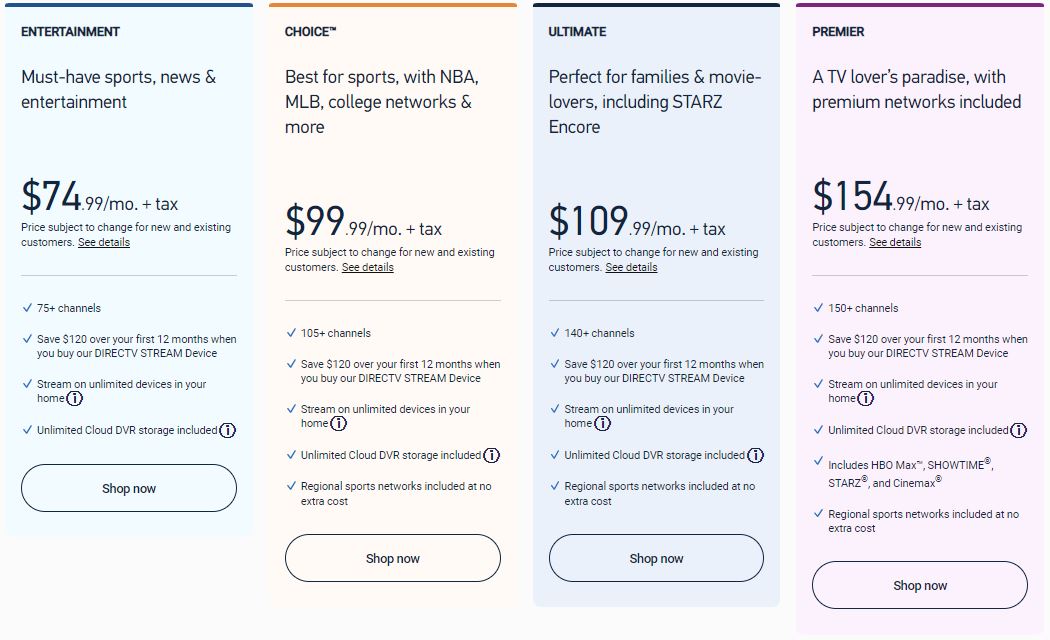
You may also like to learn about How to Close Apps on PS5?
THE END
Enjoy watching all the games of MLS on your PS5 with apple TV. If you are already a streaming service subscriber of the mentioned services, you can get the app directly on PS5 and watch the MLS simulcast from MLS Season Pass on FS1. If you have MLS Season Pass on yoru Smartphone, you can screen mirror or screencast it to your console-connected screen over a WiFi network.
Frequently Asked Questions:
Can I Watch MLS on ESPN?
Sorry, but you cannot watch MLS on ESPN in 2023. The long broadcast rights of MLS by ESPN from 1996 ended in 2022, and Apple TV bought the rights for the next 10 years.
Is it possible to watch MLS on Xbox?
Yes, you can get the Apple TV app on your Xbox from its default app store, The Microsoft Store. After installation, you can use MLS Season Pass to watch all the MLS games live on your Xbox.