

Table of Contents
A Short Note about NOW TV:
Now TV is also called NOW, and it is a pay-based top internet TV streaming service. Sky British satellite TV provider operates this service. First, it was launched in the UK in 2012, then this service extended through Ireland, Germany, and Italy, and it works as a Sky Ticket. Now TV is available live TV and on-demand without a contract.
Also, they provide Passes for different types of video content with monthly fees. The passes include movies, sports, and all entertainment from Sky, like material from Sky Atlantic and Sky Cinema, and third-party licenses from British and American services like Fox.
This service is included in consumers via retail Roku-based Now TV digital media players from the set-top boxes and HDMI dongles. Although available through an application on PC, smartphones, gaming consoles, as well as set-top boxes. It is combined with Sky Go internet service or else through Sky online satellite TV service Sky Q.
More Info, HBO Max on PS5
Does NOW TV compatible with PS5?
Ofcourse, you can download Now TV directly from the Play Station 5 gaming console, which is compatible with Now TV.
Subscription of NOW TV:
Now TV has four main packages, and it is categorized to get your desired pack. This service offers all entertainment at an affordable price to pick the right plan to get what you want from your subscription. This service has a monthly basis plan as well as an annual plan. You can choose whatever your Choice. You can stream only two devices at a time.
- The sports subscription package starts from £33.99/month. The sports package includes on-demand content and can access the entire line up sky sports channels with live TVs such as Premier League, Main event, cricket, Football, NFL, F1, golf, Sky Sports News, and Arena. Instead of getting this, you can claim the special offer of £25/month for up to 6 months. Also, add a day membership + month for only £9.98.
- Entertainment– This plan starts from £9.99/ month with live TV, kids’ channels, and other channels. It includes Sky Max, Sky comedy, Nick Toons, and Sky Atlantic.
- Hayu- This plan starts from £4.99/month with catch-up and on-demand content on United States reality TV shows that offer everything Kardashian does and Queen Eye.
- Additionally, you can buy Now Boost for £3/month to get the best video quality for 1080p and audio around 5.1. However, you can stream a further 2 to 3 devices simultaneously from this pack.
Features of NOW TV:
Now TV has some fantastic features that are highlighted here for your reference. If you thought about why you should I purchase NOW TV, then these features would let you help you to know more about NOW TV.
- You can watch without interruption while watching the video content because they offer Ad-free streaming.
- Every 11 Sky sports channels are available at 50 frames per second.
- Video quality with a fully immersive audio experience, including Dolby Digital 5.1.
- You can stream three devices simultaneously instead of one.
- Stream all Sky live TV entertainment channels such as Sky max, Sky Comedy, Sky Arts, MTV, and many more.
- With Now TV, you can access the Sky TV channels as well.
- Watch with subtitles on certain on-demand movie shows from the Now Cinema and Now Entertainment package.
- You can add to My TV to add a video to your watchlist for watching later.
Also, Read FOX Sports on PS5
How to Download NOW TV on PS5?
Now TV app is compatible with Play Station, and you can get this directly from the Play Station store. This process is easy to access, so observe the below-given instructions to get the NOW TV app on your Play Station5.
Step 1
First, switch on your Play Station 5 and set it up with internet connectivity.
Step 2
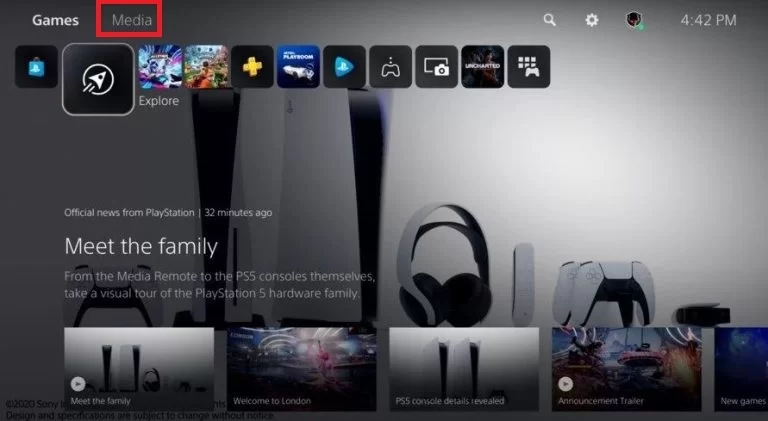
Now go to the PS Home screen and choose the Media tab.
Step 3
Then tap on the All Apps icon, located in the left corner of the PS screen.

Step 4
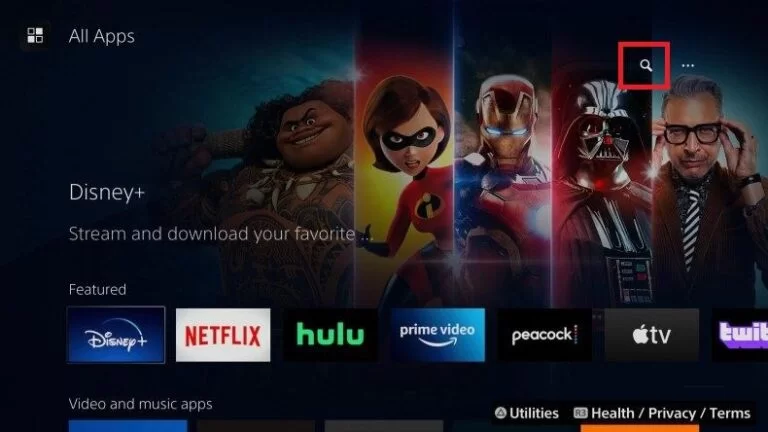
Now tap on the Magnifying glass and find the Now TV application.
Step 5
Then search for Now TV using the search bar and tap on the Now TV app to install or Get.
Step 6
Once it gets downloaded, launch it to the PS Home.
Step 7
Further, proceed with the login process with your Now TV account credentials.
Step 8
Now you can relish the Now TV on-demand content on your Play Station 5 from your Smart TV.
How to log into Now TV on PS5?
Step 1
Go to the official web URL of Now TV and then press the enter button to go.
Step 2
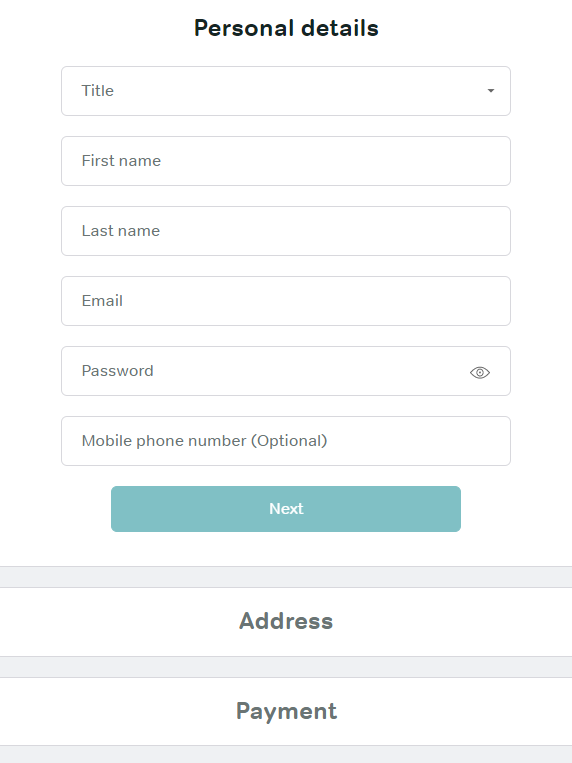
Afterthat, register your email ID, name, password, and mobile number in the required field.
Step 3
Now select the subscription package you want and pick your payment option to proceed with the process.
Step 4
Then complete the process which is shown on your screen.
Step 5
Now start streaming your desired Now TV content on your compatible devices.
How to Fix Now TV is Not working on PS5?
Most of the time, the issues happened related to the network Speed and other technical issue. Here in this part of the section, Let’s get learn about fixing the Now TV that is not working on PS5. Read this section and follow the commands and Fix Now TV is Not working on PS5.
Check Internet Connection:
If you are not getting a Stable internet connection to stream your content, Then the service gets struggles to load the content. Note down the upcoming instruction to get better Quality of video and audio on the Streaming service.
- First of all, you have to remove the numerous devices connected to the same network. If your network is connected to many devices, then you will receive less speed quality.
- After that, you have to do not download any content when it is running with another connected device. If the device is fixed to install some app or any content, then the downloading content occupies much network bandwidth. In this case, you have to stop downloading and then stream your content.
- Atlast, Suppose you face an issue with a slow connection of speed. Then you have to do the Speed test. For this, you have to turn off the internet and again connect the internet to your device.
To Get More Info, Paramount Plus on PS5
Clear Cache:
Sometimes your device has unwanted files and data. This is also one of the issues. NOW TV is not working on PS5. For this reason, you have to clear all the unwanted data and give your device enough space to stream any content. Follow the steps.
- From the home screen, click the setting option.
- Following this, select the History option.
- The History shows the unwanted and recent file’s history.
- You have to choose the files and click to clear history.
For this process, you will get enough space to stream the content.
Uninstall and Reinstall the application:
If you see any problem with the application, then you have to uninstall the application and reinstall it again.
Steps for Uninstall:
- Direct to the setting option.
- And you should click the App section.
- By using the Search box, find the application (Now TV).
- Press the Uninstall option.
Steps for reinstalling:
- From the Home screen, click the App section.
- Search for the application (Now TV).
- Hit the application from the list.
- Click the Install Button.
- The new version of the application is installed on your device with more efficient and advantageous features.
Wrapping UP:
We are coming to a conclusion, for Now, TV on Play Station5. Now TV is a more affordable one to utilize for all consumers. This service has a wide range of channels with a variety of choices. Now TV is compatible with smartphones, iOS, PC, Mac, Play Station, and Xbox devices. So all the gaming console supports Now TV to stream, and it has on-demand and live TV channels with additional Sky TV channels on this subscription. It will benefit two and pay for one service.
If you have any feedback regarding this article, mention them in the given comment box, and we will clear your doubts. And in case you have any inquiries or questions, let me know in the comment section. We will respond to all your questions and queries.
FAQs:
1. Does the Now TV compatible with PS5?
Ofcourse, as we said above, this article Now TV is compatible with Play Station and other gaming consoles as well as streaming devices, smartphones, and Desktops.
2. Can I watch NOW TV for Free?
The answer is NO. Because it is a subscription-based TV service that is available in the UK, Ireland, and some other countries as well. To stream, you need to subscribe to any plans and log in with their account credentials. Then start streaming plenty of on-demand and live content.
3. If the Now TV doesn’t work on PS4?
You need to update the Now TV app to the latest version, then start the app and start streaming on your Play Station5.