
Are you looking for a Guide on How to Get Zoom on Samsung TV? Zoom Metting on the Samsung TV is the better choice to attend or conduct a meeting with a comfortable View. You can able to see all the Meeting participants and other options on the Single big Screen. But everyone should know that the Zoom app is the most popular for Video Chatting. There are some models of Samsung Smart TV that have a Camera.
If you have a Samsung Smart TV with a non-Camera option then the only option you have is to cast or project the Zoom app from other devices such as a smartphone, PC, or laptop. Here in this article will share the steps and methods to get Zoom on Samsung Smart TV.

Table of Contents
How to Get Zoom on Samsung TV?
There are many ways available to Get Zoom on Samsung Smart TV. Most important, the app is officially available on the Samsung TV App Store. So you can install it directly from it. If sometimes the app store cannot able to work properly on that you can get Zoom on Samsung Smart TV through some other methods and tricks. Now we are going to say all the possible methods to get Zoom on Samsung Smart TV.
Direct Method
- Using a Samsung TV remote and clicking the Menu button.
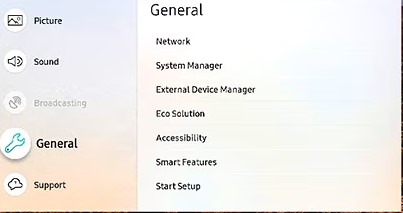
- Navigate to the setting option and you will select the general Menu option.

- Following this, you have to Tap the Network option.
- Now you have to fix a stable and strong internet Connection to your device.
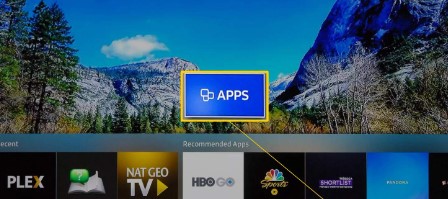
- Direct to the Samsung TV App Store.
- Using a search Bar and type the keyword “Zoom App”.

- Hit the app from the list and Click the ok Button.


- Once the application is installed then you have to sign in with your account and join the meeting with your friends and employees.
Check the Post: How to Install Zoom on Xbox One
Zoom on Samsung TV Via Screen Mirror using Smart View:
This is one of the easiest ways to get a Zoom meeting on a Samsung Smart TV through the screen Mirroring method using a Smart View. You can use this trick when the Application is not on the Samsung Smart TV. Also, you can get an option for Screen recording that allows you to watch all on your PC or smartphone display to the Samsung Smart TV screen. In addition, you can obtain a better view and comfortable meeting Zone with the app on a Samsung Smart TV screen.
The steps are:
- Initally, you must fix the same internet connection with your Smartphone or PC to Samsung Smart TV.
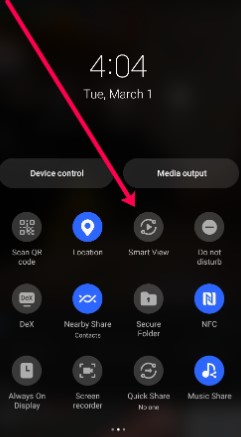
- Launch the Quick Setting panel. And scroll down and click the Smart View icon.
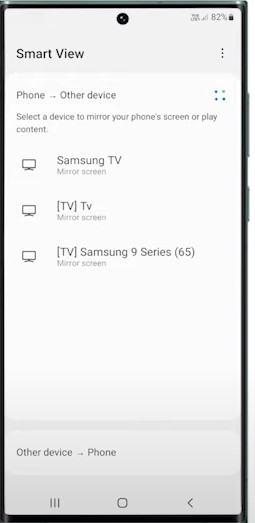
- From that, you have to choose the Samsung TV device name from the list.
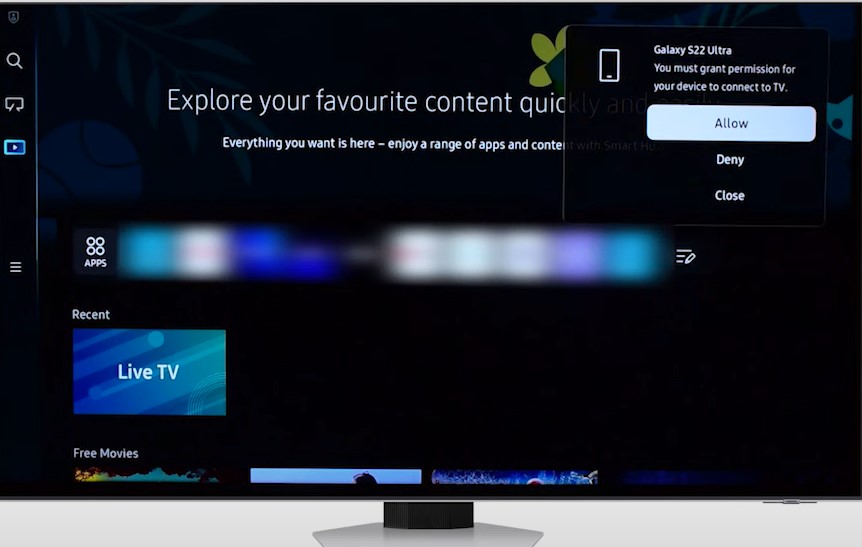
- Afterward, enter the PIN or Press the Allow option.
- Once the device is connected then you have to launch the Zoom app from another device and join the meeting with the Samsung Smart TV big TV screen.
Also, Read How to Get Zoom on PS4
Using HDMI port
You can also use the HDMI port to the Samsung Smart TV to one end and the other end connected to the laptop or PC. If the connection is done then you can see the Laptop Screen on the Samsung Smart TV.
- If you have an old laptop then you have to need a Mini Display Port to HDMI Adapter.
- Suppose you have the latest laptop Model then you can use Type C Port.
- Plug into the USB Cable/ HDMI Adapter into the USB-C port on your Laptop.
- Connect one end of your HDMI Cable to your Samsung Smart TV.
- Also, attach your External webcam to one of the TV’s USA Ports.
Mini Display Port:
- Connect the Mini Display Port to HDMI adapter into the Mini Display port on your Laptop.
- Switch One end of your HDMI Cable to your Samsung Smart TV.
To Get Zoom on Samsung TV using Chromecast
For this process, we use a Google Home application to cast the app to the Samsung Smart TV screen.
- Fix the current version of the Chromecast device to your HDMI Slot.
- Then you have to Set up the same Wifi network for your Device as a Smartphone and a Casting device.
- Download the Zoom app to your Smartphone. Also, install the Google Home application.
- Open the Google Home application and press the Profile button and then press the Mirroring device option.
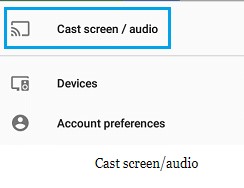
- Click the Cast screen and Audio option.
- Following this, you have to select the Chromecast device from the list.
- Then Launch the app on your Smartphone.
- And the devices each other. Now you can start the video or Metting with the Zoom app and it will display on the Samsung smart TV.
For More Info, How to Connect to Zoom Meeting on Smart TV
To Install Zoom on Samsung TV using a Streaming device

If you have to connect a Streaming device like Firestick, Roku, or Apple TV to your Samsung Smart TV. Then you can use that device to install the Zoom app and stream it on Big Screen. Moreover, this is the easiest and most secure way to get Zoom on Samsung Smart TV through a Streaming device.
- Firestick: You can get the application on Firestick. Tap the Link to know the steps on How to Install Zoom on Firestick.
- Roku: Click the link to get Zoom on Roku.
- Apple TV: Press the Link to acquire the information on Zoom on Apple TV.
- Google TV: Hit the Link to Install the Zoom app on Google TV.
These above links simply explain to get the application on the Samsung Smart TV through a Streaming device.
To Cast the Zoom on Samsung TV Through PC/ Laptop
You can install the Zoom app on your PC or laptop. Otherwise, you can use a Zoom website to access the app.
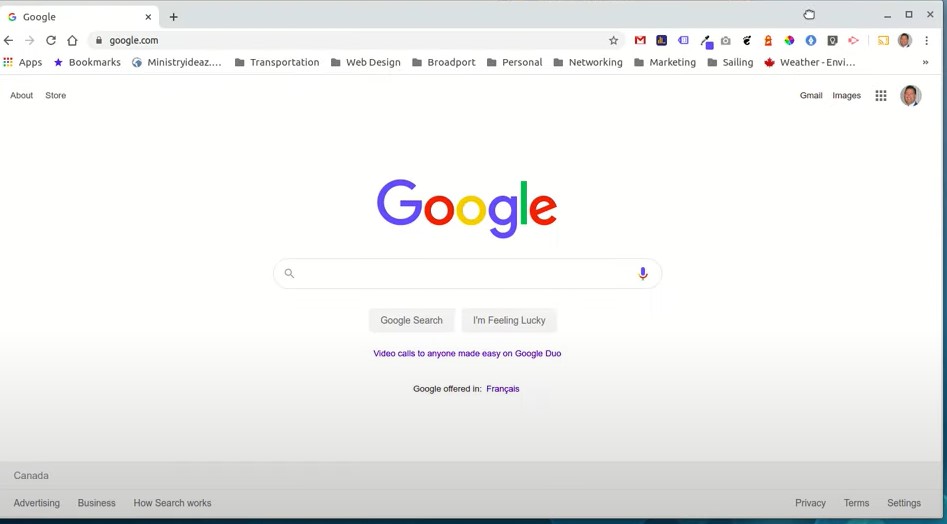
- From the PC you have to open the browser and tap the menu icon at the right top corner of the screen.
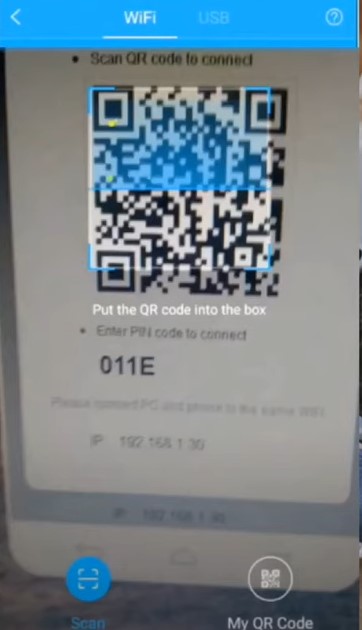
- Then you have to Press the Cast icon and scan the device. Make sure that, connect the devices with the same wifi Network.
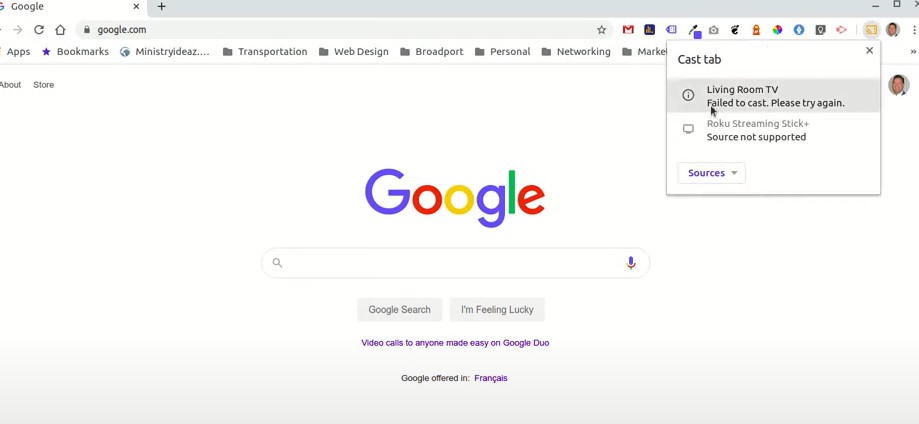
- Now you should select your device name from the suggestion list.
- Once the device is connected then you have to Launch the app and conduct the meeting on a PC/ Laptop with a Samsung Smart TV screen.
Ending Words
We hope that this article is helped you to get Zoom on Samsung Smart TV. We included some methods to get Zoom App on your smart TV. Only you can install the application directly and use it if the Samsung Smart TV has Camera. For those users can install the app from the app store and use it directly. Other than that users can cast the app on their Samsung Smart TV. Refer to the above article and get the solutions. If you want to learn more about the Zoom application and its related topics then you can text a comment in the Comment division.
Frequently Asked Questions
How Can I Fix the Samsung Smart TV Full Screen?
- Click the Home Button by using your Remote.
- Then you have to select the setting option.
- Press the pictures tab.
- Following this select the picture Size settings.
- Click the picture Size.
- Then you can choose the Picture Size displayed on the TV screen.
What Picture Mode is best for Smart TVs?
Always you can avoid the modes such as vivid and Dynamics that overemphasize Contrast and also provides a Lower Brightness. Instead, you can choose the modes such as Movie, Exper, and Cinema. These are giving a better experience.
Which has Better picture Quality Cable or Streaming?
If you want to get a better experience then you can choose Live Cable and satellite TV. Furthermore, it gives the higher Quality picture as 1080p and 4k picture definition to your Smart TV.