
If you want to watch the best Anime movies and shows on Apple Tv then you have to install the Funimation application from the App Store. And it has the biggest collection of anime shows and movies and also has English-dubbed anime movies. In this article, we will teach you How to Watch Funimation on Apple TV. Refer to this entire guide and collect the steps to install the anime application. Moreover, Funimation gives a hundred subtitles for anime shows and tv Movies. Also, you can get all the content in HD Quality.

Furthermore, Funimation is an American television entertainment service it gives lots of content and also you can get this application on many streaming devices. The compatible device is Roku, Android, Google Chromecast, Fire Tv, Playstation, Windows, Xbox, Nintendo, LG smart TV, Samsung smart TV, Sony Smart TV, VIZIO smart TV, Mac, and iPhone/ iPad.
Popular shows on Funimation:
- One Piece.
- Dragon Ballz.
- K.
- Bleach.
- Death Parade.
- Attack on Titan.
- psycho-Pass, and more.
Also, Read the How to Watch cw app on apple tv
Table of Contents
How to Watch Funimation on Apple TV?
Now, we are going to share the steps to obtain information about watching Funimation on Apple TV. Whereas the Funimation application is already available on the App Store. So, you can add the Funimation application on the Apple TV (4th generation) and the Apple TV 4K (Fifith Generation). Most important you have to need a current latest updated OS of your Apple TV. The version at 9.0 or later version.
Follow the upcoming steps to get this application on to your Apple TV.
- Initally, you have to fix up your Apple TV with a stable internet connection.
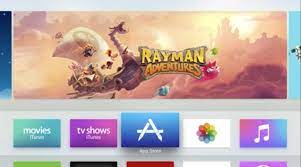
- Then, From the Home screen you have to choose the App Store section.

- After that, hit the search icon section.
- Insert a keyword as Funimation in the search bar and click to find the application.
- Get the application from the list and press the install button.
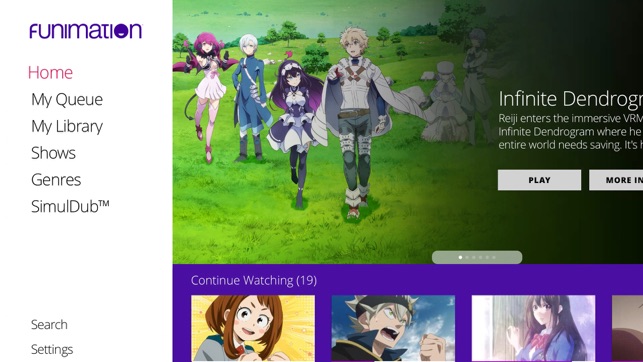
- Once the application is installed on your Apple TV then you should sign in with your account and watch all your favorite Funimation content.
Subscription Package to Watch Funimation on Apple TV
Funimation is a Subscription streaming application, you have to pay for this application to watch its content on Apple TV it has three types of subscription packages. According to your wish, you should choose the package and subscribe to it and get an application on Apple TV and watch all your Favorite Funimation Movies and shows. For more details about the subscription package for Funimation refer to the below image.

Each and every package have various plans and offers. As well as you can get a free trial offer for all these three packages. During the Free Trial days, you can watch all the Funimation content free of cost. Along with the subscription package, you can get many special offers such as downloading episodes, Annual Gifts, and Free Shipping.
For More Info, How to get apple tv Plus on google tv
Another Way to Watch Funimation on Apple TV (screen mirror Method)
This is an alternate way to Watch Funimation Videos by using a smartphone. Note down the upcoming points.
- Download the Funimation application from the App Store.
- Once the application is installed then you have to log in by using your account.

- After that, From the Control Panel choose the Screen Mirroring option.
- Inside the icon, you have to select your device name and pair it.
- If the device is connected then you have to open the Funimation application and stream all your favorite Show on from Funimation shows on the Apple TV screen.
Activate Funimation on Apple TV
Once the Application is installed then you have to activate the Funimation application to stream the content. Follow the upcoming instruction.
- From the Apple TV home screen Move to the App section and get the application.
- Open the application it will show the activation code note it down.
- And move to the browser and open the official site to activate Funimation from your Smartphone.

- Now, You have to enter the activation code in the required field.
- Then you should sign in by using your account.
- Once the process gets done then you have to stream all your favorite movies and shows from the Funimation application.
Related post, How to Install & Watch apple tv on lg tv
Funimation Not working on Apple TV
Sometimes your Funimation application is not working due to some technical reasons. Here we will share the information Funimation is not working on Apple TV and its fixing method.
Check the Internet Connection: Ensure that you should connect to a stable internet connection to stream its content. In case, you see any lack of internet speed you have to disconnect the internet once and wait for a few minutes and again reconnect it. And Now you should check that the Funimation application is working on Apple TV.
Clear Cache: If your Apple TV has lots of unwanted data and memories it gets a struggle to stream new content. For this reason, you have to delete all the unwanted data and files from history. Move to the history section and click the Clear Cache section. If your device gets free storage to run the content.
Uninstall and Reinstall the Funimation Application: This is the better option to get a un buffered application on your Apple TV. Once you have installed and reinstalled the application. While doing this process, you have to get the new and latest version of the application to your Apple TV.
Restart your Apple TV: You can try this method to fix the Funimation application issue on Apple Tv. Once you have restarted your Apple TV. Then you have to open the Funimation application and now check it works properly on Apple Tv.
Update your Apple TV: You should update to Apple TV to the latest version to install the application on it. While updating your apple tv you will get additional features and benefits and also get a speed-up process while watching and installing the application on the Apple TV.
The Ending Words
We sum up this article here, This article contains information about installing Funimation on Apple Tv. Moreover, we included subscription package details for the Funimation application. Referring to the above guide we mentioned that Funimation is not working on Apple TV and its fixing method. We hope this article will help you to stream the Anime content from Funimation. In any case, if you need more references for this article, Let me know in this comment section.
Frequently Asked Questions
Does Funimation leave Hulu?
This is a New announcement from the side of Funimation. That is Funimation’s all Library content will move to the Crunchyroll service and you have to watch the content on that streaming service with the premiere anime Destination.
What streaming Services are available on Apple TV?
There is some streaming service available by default on the Apple TV device. The including streaming services are Prime Video, Hulu, HBO Max, and Disney Plus. Also, you can get prime-time Shows, News, and Live sports content.
Does Anime is Free on Roku?
This is great news for Roku Users. You can watch all Hollywood Videos and Movies, TV series, and original Content videos on Roku for free cost.
Is Funimation Free on Firestick Device?
In the Firestick Device, you can sign up for free and watch a few Tv shows and Movies along with Ads. If you need a Funimation library collection of movies and shows. Then you have to pay the subscription cost and get the service. Also, it gives ad-free content.