

Is your Sunday Ticket app not Working on Samsung TV? Is the app asking for the latest version of the Sunday Ticket app on your Samsung Smart TV? As you have experienced, you have one the Sunday Ticket version 2.3.0 and not the latest 2.3.7 at the Samsung TV App Store. The latest version of the Sunday Ticket app will be available to your Samsung Smart TV through its default app store. Read this article to know what to do when the latest version of the app is released on Samsung TV.
Table of Contents
NFL Sunday Ticket:

You know what? The only way to watch the NFL Regular Season, Out-of-the-Market games would be the NFL Sunday Ticket. You cannot watch them at other NFL services, channels, and streaming partners. Since NFL Sunday Ticket comes in an Application format, you can easily download it on any compatible device like Streaming Devices, SmartPhones, and Smart TVs.
The Only Smart TVs on which you can get NFL Sunday Ticket are Android TVs with OS 5.0 and above and Samsung Smart TVs with Updated Tizen OS 2016 and above. You can easily download them from the respective app stores available on your Smart TVs. For Smart TV without NFL Sunday Ticket App, they can get connected with Streaming devices and get access to NFL Sunday Ticket.
Why is the NFL Sunday Ticket app Not Working on Samsung TV?

When you open the NLF Sunday Ticket app on your Samsung TV, you will get a message to update your Sunday Ticket app to its latest version. Now that your Samsung Smart TV does not possess the updated version of the app at present, it is not possible to make the app work on your TV.
Update NFL Sunday Ticket on Samsung TV:
You have to wait for the NFL Sunday Ticket developer to update the app on the Smart Hub of your Samsung TV to use the NFL Sunday Ticket app again. If you have waited for the Update and it has been released, then you can follow through the steps given here and get the latest version of the NFL Sunday Ticket app on your Samsung TV.
Latest Model Samsung Smart TV App Update Procedure (Automatic Update):
- Grab your Samsung Smart TV remote and press the Home Button on it.
- Move to the Apps and select the Setting Icon in a Gear shape.
- Hover over Auto update and press Ok on your Remote to toggle it to switch on.
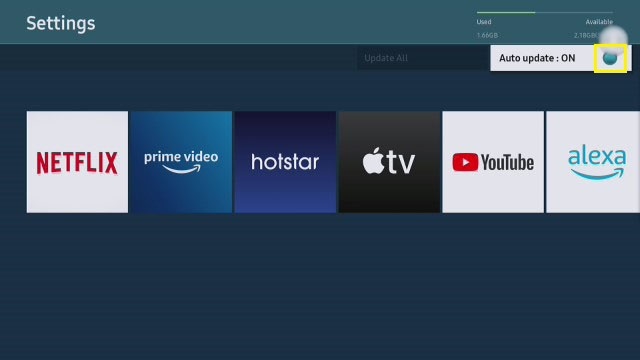
- All apps on your Samsung Smart TV will automatically update to their latest version when released in the App Store.
Older Model Samsung Smart TV App Update Procedure(Manual Update):
- When you are on your Samsung TV home page, press the Smart Hub button on your Remote.
- Go to Featured Menu and highlight the NFL Sunday Ticket app.
- Now Press and hold on to the Enter button until a Sub Menu appears.
- Move to the Update Apps option and press OK.

- Now choose the Select All option and then tap the Update option.
With the following steps discussed here, you have now updated the NFL Sunday Ticket to its latest version and can start streaming the Sunday Afternoon games on your TV. But still, the Sunday Ticket app is not Working on Samsung TV, even after updating. You can continue to article and get some fixes for it.
What to do When the NFL Sunday Ticket app Not Working on Samsung TV?
Even after the update of your Sunday Ticket app on Samsung TV, you are still not getting errors, and the app is not working. Then it is time to try other things to make the app work on your Samsung TV. There are three methods that you can use to revive the Sunday Ticket app on your Samsung Smart TV, which are
Method 1: Samsung Smart TV Firmware Update.
Samsung Smart TV updates its firmware from time to time. If you have not updated it to its latest version, then it might cause some apps on your Samsung TV to not work. This might also be a reason for the NFL Sunday Ticket app not working on Samsung TV. If this is the same reason for your TV, too, then Update your Samsung Smart TV Firmware by following the steps given here,
Update Firmware with USB:
- Get on a browser and go to the URL https://www.samsung.com/in/support.
- Choose TV&AV and select your TV model.
- Under Manuals & Downloads, select Upgrade File(USB type) and press Download.

- Move the downloaded file to an empty USB after extracting it from the zip file.
- Make sure the file path on your USB is USB ROOT > T-KTSUABC (Firmware Name) > IMAGE > upgrade.msd
- Turn on your TV and connect the USB to the respective port.
- Now go to the Settings menu and select Support.
- Choose Software update and then Update now options.
- Select Yes on the Prompt to start the Update process.
Update Firmware Directly Through Internet:
You need to go to Settings of your Samsung TV and, while connected to the internet and select Software Update. Now on the next page, select the Update Now option to get the latest Samsung TV Firmware, if there is any.
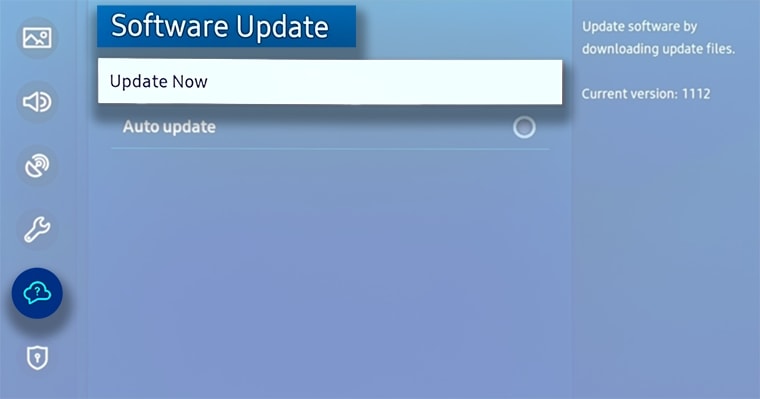
If you are still unable to access the NFL Sunday Ticket on Samsung TV, then move to the next method.
Method 2: Reinstall NFL Sunday Ticket App.
You can reinstall the NFL Sunday Ticket on your Samsung TV by simply deleting the app and again installing it on your TV. When you reinstall, all your app data gets erased, and you have to sign in again to access the app. The simple steps you need to follow through are,
Delete NFL Sunday Ticket on Samsung TV:
- On your Samsung TV remote, press the Home button.
- Move on to the Apps option and find the NFL Sunday Ticket app.
- Now select delete to uninstall and remove the app from your TV.
Install NFL Sunday Ticket on Samsung TV:
- Select the return button on the remote to go back.
- Here select the search icon and enter NFL Sunday Ticket in the search bar.
- Now install the app on your Samsung TV.
With the following steps, you have now reinstalled the NFL Sunday Ticket app on your Samsung Smart TV. If you are still not able to access Sunday tickets on TV, then it is time to try other alternative methods.
Method 3: [Alternative]Use Streaming Devices to Get Sunday Ticket on Samsung TV.
For your information, NFL Sunday Ticket can be downloaded and used on streaming devices. These streaming devices can be connected to your Samsung TV HDMI port, and you can watch the NFL Sunday Ticket on it. The streaming devices that can be added to your Samsung TV and can be used to watch Sunday Ticket games are,
- FireStick
- Roku
- Apple TV
With this streaming service, you can install NFL Sunday Ticket and watch the live Sunday Afternoon games live on your Samsung Smart TV. For the FireStick installation process on your Samsung Smart TV, you can refer to How to Setup Amazon Firestick on Vizio Smart TV? and for Roku, refer to How to Watch Roku on LG Smart TV?
The End
Finally, you can make the NFL Sunday Ticket app work on your Samsung Smart TV. If you are not yet able to access it, it is better to wait for the updated version to be released by the developer on Smart Hub. To avoid further difficulties, it would be best if you follow the steps provided here and update your Samsung Smart TV firmware to its latest version.
Frequently Asked Questions:
How much is the NFL Sunday Ticket?
The NFL Sunday Ticket has a price tag of $293.94 per season. If you want its premium service, you can opt for NFL Sunday Ticket Max at $395.94 per season.
How to Watch NFL Sunday Ticket Without DIRECTV?
After DIRECTV, you can watch NFL Sunday Ticket on service providers like fubo TV, YouTube TV, and Hulu+Live TV.
Can I Get NFL Sunday Ticket Games on NFL+?
No, out-of-the-market Sunday Games are exclusively for NFL Sunday Ticket and cannot be accessed on the NFL+ app. But you can watch LIVE local & primetime Regular Season and Postseason games on compatible NFL+ devices with the app.