
The F1 Motor Racing game is released on 31st July 2023. And it is compatible with many Gaming Consoles as well as streaming devices. Do you want to Play this game on your device? If yes, check out the entire article to learn How to Play F1 Manager 23 game.

Whether it is a Gaming console or a PC, you have to purchase the game from the preferred platform. Okay, let us know more about it in the following section…
Table of Contents
About F1 Manager 23
F1 Manager 23 is an Official Motor Racing Management Simulation Video Game of Formula One 2023. It is based in the United Kingdom. Also, Formula 2 and Formula 3 Championships. And this game is developed and published by Frontier Developments. The second installment of Frontier Development is called F1 Manager Series. The UE ( Unreal Engine ) 3D Computer Graphics is used in the F1 Manager 23 game. And it is released on July 23, 2023. Also, the F1 Manager game is a Single-Player mode game. Move forward to the article to learn more about playing it on your device.
Where Can I Play F1 Manager 23?
You can get the F1 Manager 2000 release on all streaming devices. But, the newly released F1 Manager 23 is now available on PlayStation 4, PlayStation 5, Xbox One, Xbox Series X/S, Windows, and PC. And, you can Purchase F1 Manager 23 on;
- Steam
- Epic
- PS4
- PS5
- Xbox Series X/S
- Xbox One
On these platforms, you can purchase the F1 Manager 23 game. Need a guide for further? Refer to the topic below;
Also, read: How to Watch F1 TV on Xbox?
How to Play F1 Manager 23?
So, now we know the platforms that the F1 Manager 23 game is available and where to purchase it. Now, let us see, how to purchase it on these devices. Come over to the topics given in the following;
How to Play F1 Manager 23 on PC?

Most people are used PC to play their favorite video games. If you too have a PC to play, then check the requirements first to play F1 Manager 23 on PC.
| F1 Manager 23 PC Requirement | |
| Processor | Intel Core i5-4590 or AMD FX-8370 |
| Memory | 8 GB RAM |
| Graphics |
Nvidia GeForce GTX 960 or AMD R9 280x (3GB VRAM)
|
| Storage | 30 GB available space |
If your PC has all these requirements, then follow the steps given here;
- Connect the stable and high-speed Internet to your PC.
- Launch the Web Browser app.
- Search for “Steam” in the browser.
- Select the official Steam website from the search result.
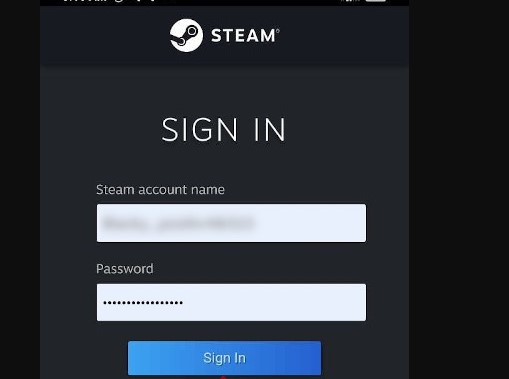
- Sign In or Sign Up with your Steam user credentials.
- Find “F1 Manager 23” on the Steam platform.
- Click, Add to Cart button.

- Heads to the Purchase for Myself option.

- Follow the on-screen instructions.
- Complete the Billing process.
When it is finished, you will receive the confirmation mail from F1 Manager 23. Now, go to the games section on Steam and start playing the F1 Manager 23 on PC.
Also, check: How to Watch F1 TV on Roku?
How to Play F1 Manager 23 on PlayStation?

So, if you have Play Station 4 or PlayStation 5, follow you can download the F1 Manager 23 Standard Edition on your console. Come back with the steps given below to purchase the F1 Manager on PS4/ PS5.
- Turn On the Console.
- Connect it with the Standard Wi-Fi source.
- Go to the PlayStation Home page.
- Launch the PlayStation Store.
- Search for “F1 23”.
- Discover the 2023 F1 Manager from the search result.
- Now, click Add to Cart option.
- Enter your PlayStation user credentials in the required space.
- Choose the Payment and complete the process following the on-screen guide.
Start Playing… Also, you can watch the Live Broadcast of the Developer Play on PlayStation.

How to Play F1 Manager 23 on Xbox?

Microsoft Store is the default on the Xbox gaming consoles. And the F1 Manager 23 game is now officially available on the Microsoft store. You can purchase the F1 Manager 23 Deluxe Edition on Xbox. Here is the step-by-step guide;
- Go to the Xbox Home page.
- Launch the Microsoft Store.
- Search for “F1 Manager 2023.
- Click, Buy option.
- Provide the required details in the given space.
That’s it. Also, the game is Optimised for Xbox Series X/S. You can access the F1 Manager 23 over 14 supported languages. Including, Six F1 Sprint Events, New Circuits Including the Las Vegas Strip Circuit, New Cars, New Drives, and New Challenges.
Also, Check: How to Watch F1 TV on LG TV?
How much is F1 Manager 23?
F1 Manager 23 Standard Edition and Deluxe Edition price differs based on the platforms. Check the cost in the table below;
| Platform | Edition | Price |
|
Steam
|
Standard Edition | ₤21.88 |
| Deluxe Edition | ₤25.69 | |
| Deluxe Upgrade Pack | ₤6.85 | |
| Xbox | Deluxe Edition | ₤30.68 |
| PlayStation | Standard Edition | ₤55.00 |
| Epic | Deluxe Edition | ₤25.69 |
Follow the procedures given above and purchase the F1 Manager 23 on your device.
Finally…
I hope, now you have cleared How to Play F1 Manager 23 on your streaming devices. F1 allows its users to pay via Bitcoins. If you have a Laptop, it must cover the above-given requirements. Also, focus on your device’s software version. If you are using an older version, then the device gets heated, and can the screen freeze. As well as you can purchase the F1 Manager 23 on Amazon App Store. Check out…