

HBO Max has been one of the best streaming services ever offered. The HBO original series, House of Dragon made many Game of Thrones fans get HBO Max. To have a good streaming experience, Samsung Smart TV can provide you with the best video and audio quality. But Can I download HBO Max on Samsung Smart TV? If you are having this doubt then this article can help you in every way to download and stream the HBO Max application on your Samsung Smart TV.
Table of Contents
About HBO Max:

Warner Media had the authorization of HBO Max. It was the most popular worldwide. And you can watch movies, TV shows, Events, Big Programs, HBO Originals, and more entertaining content on the HBO Max channel. And without any doubt, it had Subscription Packages, and you have to get this to stream your favorites and originals on your streaming device. It provides content with HD quality.
Is HBO Max on Samsung Smart TV?
Yes, You can get the HBO Max app on your new Samsung Smart TV. But your Samsung Smart TV must be a model released after 2018. If it is an older Samsung Smart TV, you can use Streaming devices to get the HBO Max app.
How to Download HBO Max on Samsung Smart TV?
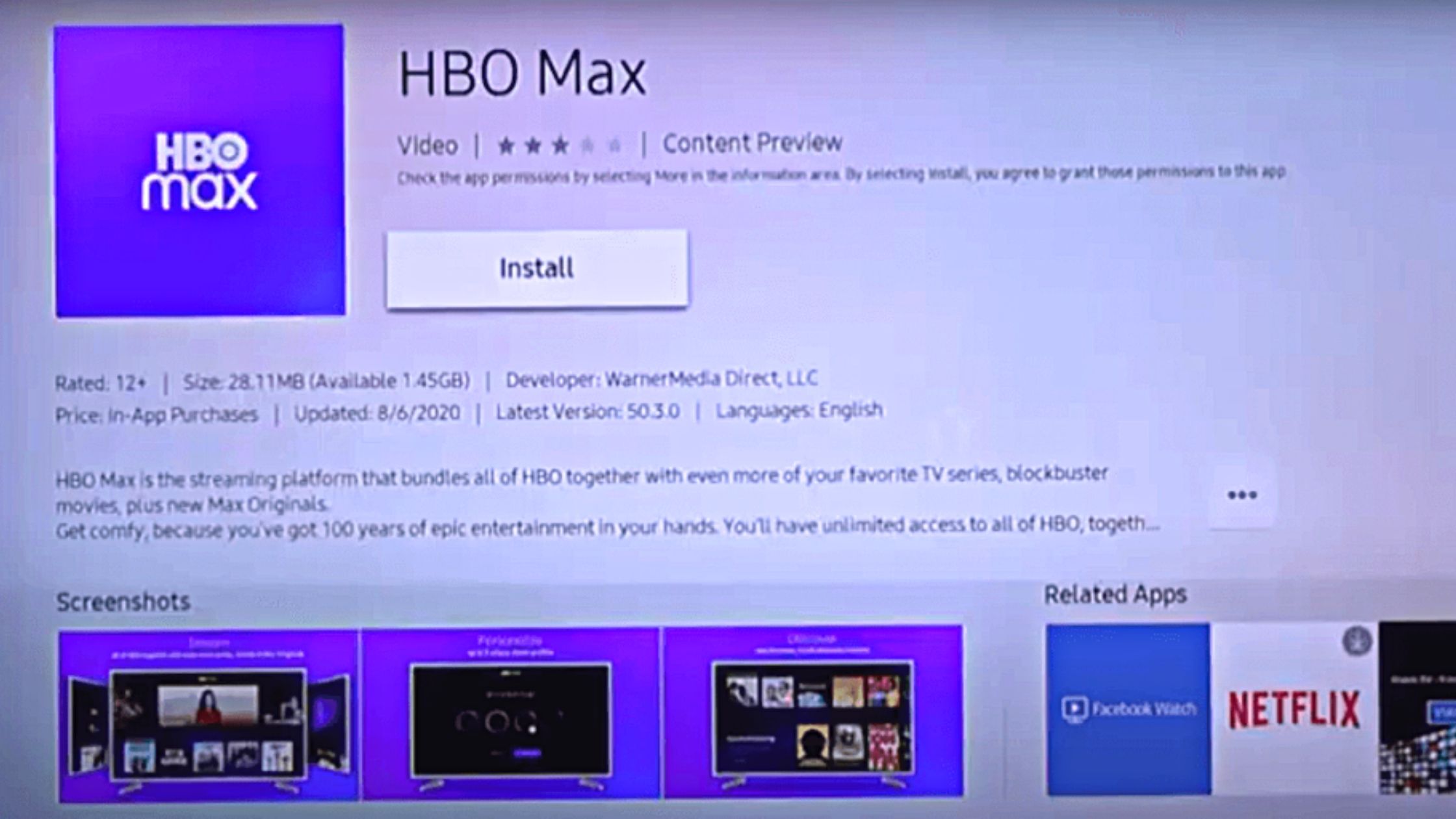
To download the HBO Max app on your Samsung Smart TV, you need to access the default App Store. From there you need to find the app and install it on your Smart TV. The simple procedure you can follow to download HBO Max on Samsung TV is as follows,
- Connect your Samsung Smart TV to a Standard WiFi network.
- Press the Home button on your Samsung Smart TV remote.
- Navigate and select Apps to launch the default App Store.
- Select the Search icon and type HBO Max in the search Tab.
- Press OK and wait for the results.
- Now select the HBO Max app to reach its information page.
- Tap on the Install option and wait for the app.
You have successfully downloaded the HBO Max app on your Samsung TV. You may also like to learn about How to Get Vudu on Samsung TV?
How to Download HBO Max on Older Model Samsung Smart TV?
To watch HBO Max on Samsung Smart TV models that do not have access to App Store, you can use Streaming devices. To use streaming devices your Samsung Smart TV must have an HDMI port. The streaming devices that can be connected to your Samsung TV and download HBO Max are as follows,
1). Chromecast: [$29.99 & $49.99]

Once you connect the Chromecast device to your Samsung TV HDMI port and connect it to a WiFi network. Your TV will turn into a Google TV. You can easily use the Google Play Store app to download the HBO Max app on your Samsung TV with a Chromecast device.
2). Apple TV 4K: [$129.99]

By connecting your Apple TV device to your Samsung TV, you can easily access the Apple App Store. From there you can easily download the HBO Max app on your Samsung TV.
3). FireStick: [$34.99 – $124.99]

When you connect a FireStick device to your Samsung TV and connect it to an internet service, your TV turns into a Fire TV. The HBO Max app can be found in the default app store of your FireStick device. Find the HBO Max app in the Amazon App Store and tap on Download to get the HBO Max app on your Samsung TV.
4). Roku: [$24.99 – $179.99]
Roku devices have their own Channel Store. Connect a Roku device to your Samsung TV and convert it into a Roku TV. From the Channel Store, you can easily download the HBO App on your Roku device-connected Samsung TV.
Alternative Ways to Watch HBO Max on Samsung Smart TV:
Other than streaming devices you can get the HBO Max app on Game Consoles which are connected to your Samsung Smart TV. The Game consoles that can be connected to your Samsung Smart TV and have access to the HBO Max app are as follows,
- PlayStation 4 and 5
- Xbox One
- Xbox X/S
For PlayStation Game Consoles you can download the HBO Max on Samsung TV from PlayStation Store. Similarly, you can download HBO Max on your Samsung TV using the Microsoft Store.
HBO Max Subscription Plans:
The image we are given in the following space is the monthly subscription package of the HBO Max streaming service. Check out the benefits and cost in the picture. Also, it had a yearly subscription package with attractive features and benefits. We have uploaded an annual package of the HBO Max in the following space.

So, this is the annual subscription plan of HBO Max. You can get the benefits and features of the image by getting a subscription to your streaming device. Install the HBO Max on your Samsung Smart TV and choose your convenient subscription package and start streaming your favorite content on this fantastic platform.
HBO Max Features:
HBO Max is a vast network, and it has a wide variety of benefits for its users. All HBO Max users are happy with the help with the subscription. We have listed the benefits and features in the below space.
- Multiple Devices > The HBO Max allows us to stream the content on three devices.
- Profile > You can create five profiles for your kids or adults.
- Download > Stream what you want and when you need to watch the content by downloading it on the HBO Max account.
- Quality > It permits us to watch the content in HD and 4K UHD resolution based on your subscription.
- Parental Control > This feature is included for your children’s safe access to unwanted content.
- Stream > You can watch the most popular and trending movies, shows, upcoming shows clips, and HBO Originals on this platform.
We mentioned these few benefits in this topic, None of these, and we have more advantages and highlights in the HBO Max. Install and obtain all other benefits now! You may also like to learn about How to Log Out of HBO Max on TV?
How to Activate HBO Max on Samsung Smart TV?
After Downloading HBO Max on Samsung TV, you can easily access its contents by activating your account. You can either use your TV provider credentials to Sign In or use the Activate code to access HBO Max on Samsung TV. Here are the simple procedures that you can use to activate the HBO Max app on your Samsung TV.
- Find and launch the HBO Max app on your Samsung Smart TV.
- Select the Sign In option to get the Activation Code.

- Now go to activate.hbomax.com on any web browser.
- Enter the code in the given space and press Next.
- Use your HBO Account credentials or TV provider credentials to Sign In.
The HBO Max app on your Samsung TV refreshes and starts to show its available content on its home screen. You have now successfully activated the HBO Max app on your Samsung TV app. You may also like to learn about How to Get HBO Max on PS4?
Our Last Notes:
HBO Max is the most popular streaming service worldwide and super popular in the United States of America. You can get this streaming service on all your available streaming devices.
I hope the topic, How to Download and Watch HBO Max on Samsung Smart TV? is very interesting to you. We have to provide you with the required information and keys in the comment section as soon as possible. If you need any other extra details about HBO Max, share them in the comment box.