
The Crunchyroll is a Go-To Platform for all anime and Manga enthusiasts. It provides a huge content library from many regions and genres. The subtitle is very important for those who do not know Japanese. And for all anime fans. It is really frustrating when you encounter the Crunchyroll Subtitles Not Working.

You have to check Device Settings, Internet Connection, Specific issues on the Platforms, and some more like this. And find the best problem-solving methods and the instructions to fix it. Scroll down and check the methods and the instructions given in the upcoming sections…
Table of Contents
Why are Crunchyroll Subtitles Not Working?
Crunchyroll is a famous Streaming Site for Asian Content and Anime provides a broad range of TV Programs and Films to its Subscribers. However, one annoying Problem that users Intermittently confront is when Crunchyroll Subtitles do Not Work as expected. This issue can be grand vexing for users who depend on Subtitles to appreciate the Video or Enjoy it in their local language. So, the below-given are the major problems Why the Subtitles on Crunchyroll are not working;
-
-
-
-
-
-
-
- Browser Compatibility
- Technical Glitches
- Internet Connection Issues
- Browser Compatibility
- Video-Specific Problems
- Subtitle Settings
- Platform Updates and Maintenance
- Geographic Restrictions
-
-
-
-
-
-
There we have various reasons for the subtitle on the Crunchyroll not working well. All the problems mentioned in the above section can contribute to this irritating problem. Move to the next topic to learn How to Fix the Crunchyroll Subtitle feature that is not working.
How to Fix Crunchyroll Subtitles Not Working?
So, I hope, now you have an idea about the problems with the Crunchyroll Subtitles Not Working. Here, are the problem-solving methods listed the follows; We have to check where the problem is, whether it is on the Streaming Site or the problem is in the Streaming device. In the following, we are going to investigate both sides. And fix it with the steps given;
Also, read: How to Fix Roku Subtitles Not Working?
Check the Internet Connection
Internet Connection is the important thing to watch online content. If it is not stable or keeps disconnecting, not only the Crunchyroll site but also you cannot be able to watch any online content on your TV. So, first, check your Internet speed and the connection.
Check Internet Speed
-
-
- Launch the Web Browser app on your Streaming device.
- Search for Internet Speed Test in the search section.
- Select, the Run Speed Test option.
-

-
-
- There, you can see your Internet Speed range on the screen.
-
If your device is not showing the Speed Metre, then connect your Streaming device with another Internet Source. If you are watching Crunchyroll on a Smart TV, connect your mobile hotspot and check, whether the Crunchyroll Subtitles Not Working or not.
Power Cycle Wi-Fi Router
Suppose, the Crunchyroll Streaming site is working on your Mobile Hotspot, then restart or power recycle your Wi-Fi Router. Do follow the steps given below;
-
-
- Switch Off your Wi-Fi Router first.
- Then, Plug Out all cables from your Wi-Fi Router and Smart TV.
- Check, is there any cables are damaged.
-

-
-
- If yes, please change to new Ethernet Cables or HDMI Cables.
- Now, replace all cables.
- Connect the Ethernet Cables and HDMI cables back to the Router and Smart TV.
-
Now, Go to the Home Screen play any online content, and check, whether the Internet is working or not. If the network is stable, launch the Crunchyroll Site and Select the content. Click the Play button and check whether the subtitle is running or not. If not, Go to the Subtitle settings page and enable it.
Also, check: How to Fix Mubi Subtitles Not Working?
Check Crunchyroll Server
Sometimes, if the Crunchyroll site is under maintenance, or if any server issues, not only the subtitles, you cannot able to watch any online videos on its platform. So, check the Site server and see what is the problem with why the Crunchyroll Subtitles Not Working.
-
-
- Turn On your Streaming device.
- Connect your Streaming device with a high-speed Internet connection.
- Launch the Web Browser app.
-
You can use it on your Smart TV or on your Smartphone devices.
-
-
- Search for the Downdetector site.
-

-
-
- Launch the Official Downdetector site from the search result.
- Navigate to the search panel.
- Type “Crunchyroll” in the search bar.
-

-
-
- Hit the search icon.
-
Here you can see the Crunchyroll Site server graph in the mini screen. The up-to-date Server graph is shown on the screen with the date and time. If the Crunchyroll server is low, you cannot stream the content smoothly. Once the maintenance work is completed, the Crunchyroll Subtitle issue will fixed. Try it after a few hours.
Restart your TV

The subtitle and content streaming issue is also caused by the Streaming device issues. If there is any technical glitch, it does not support installing the apps or running any online content sites normally. So, Restart your TV or your Smartphone. If you are using a Smartphone, press and hold the power button once. Or, if you are using a Smart TV, click and hold the power button on the remote.
Or, go in front of your Smart TV, and search for the Manual Restart button. Click and hold the restart button or power button. If you do not find the power or Restart button, then, check the manual book of your TV. You can also, Restart your Smart TV with the Settings.
Clear Cache on Browser
Also, if the Cache data is overloaded, you cannot access the Streaming sites or any big sites on the browser. So, check the cache data load and clear it right now. Here is a clear guide to fixing, the Crunchyroll Subtitle Not Working issue.
-
-
- First, launch the Web Browser on your Streaming device.
- Navigate to the top-right corner of the browser screen.
- Click on the Three Vertical Lines once.
-

-
-
- Now, select, the More option.
- Or, it is named More Tools.
- Then, click on the Clear Browsing Data button.
-

-
-
- In the top section, tap on the Time Range.
-

-
-
- And, select, All Time.
- It will erase all browsing history and the cache data.
-
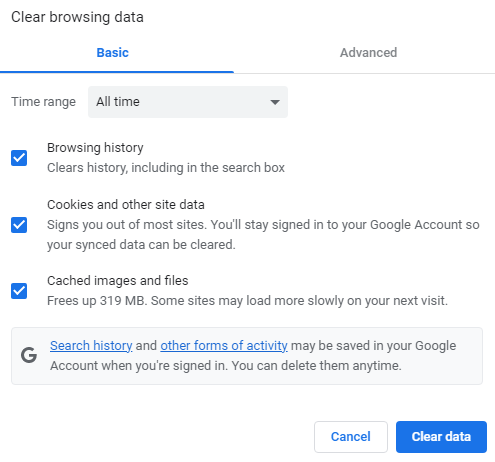
It takes some time to delete the cache files. Do not press any keys or try to go back to the previous screen. Stay until the process gets completed. Now, search for the Crunchyroll website and Play any content. Turn On the Subtitle. And start streaming your favorite anime with subtitles.
Also, read: How to Fix HBO Max Subtitles Not Working?
Disable Extensions on Browser
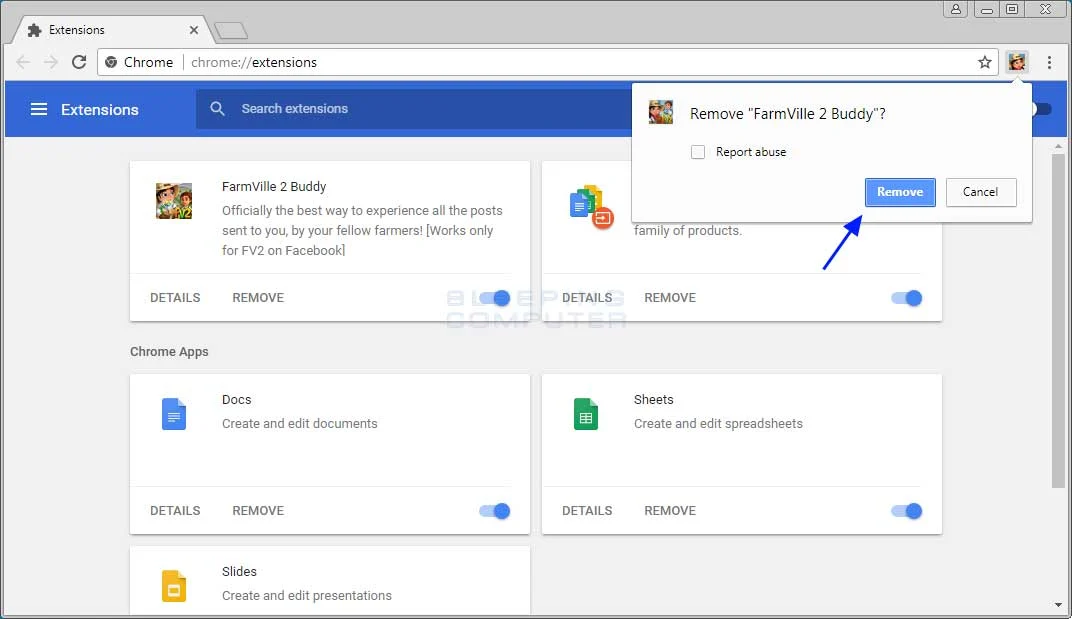
The extensions may also be the main reason for the Crunchyroll Subtitles Not Working on the browser. So, disable the unwanted extensions or everything. Follow the steps given in the following;
-
-
- Launch the Web Browser on your streaming device.
- Click the Options icon.
- Three Vertical lines in the top-right corner of the page.
- Select, the Tools option.
-

-
-
- Then, click on the Extensions button.
-
-
-
- Select the unwanted and not-used extensions.
- Click the Disable button.
-
The Disable option is located under the plugin. Now, refresh the page. Or, close the Browser page and reopen it. Now, visit the Crunchyroll Website. And, Watch all Anime content with the proper subtitles.
Finally…
For Manga and Anime Enthusiasts, Crunchyroll is the Best site. If the Crunchyroll Subtitles Not Working, encounter the issues which are mentioned in this article. Check all the problems mentioned. And, do follow the methods and the steps as given in the topics. Not only that, but also do the process of, Using Different Browsers, Updating Browsers, Update Smart TV, testing with other Content, Adjust Subtitle Settings, Switch Subtitle Language, and contacting Crunchyroll Customer Support.
Get the Crunchyroll contact number on its official website or in the Crunchyroll app. Explain to them that the issue of the Subtitle is not working. They will guide you until the problem gets fixed. After that, get back to the vibe of enjoying your favorite anime content with subtitles.