
![How to Pin Someone on Snapchat [UnPin Coutomize Pin Icon]](https://techthanos.com/wp-content/uploads/2022/12/How-to-Pin-Someone-on-Snapchat-UnPin-Coutomize-Pin-Icon.jpg)
Do you want to hold onto a conversation with your favorite person without losing them in the sea of chats on Snapchat? You can make that person’s account to be always available at the top of your chats. Snapchat has provided this beautiful feature to pin conversation with anyone you like to the top of the chat page. Want to know how to pin someone on Snapchat? Read out this article, and don’t miss the conversation with your favorite person.
Table of Contents
How to Pin Someone on Snapchat?

When you pin someone on Snapchat
- Open up the Snapchat app on your Smartphone.
- Swipe to the left side of the camera page to open the Chat page.
- Find the person you want to pin.
- Long press the person’s name on the Chat page to open a Pop-up menu.
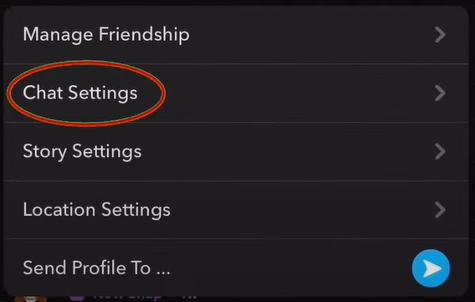
- Select the More option and choose the Pin Conversation option.
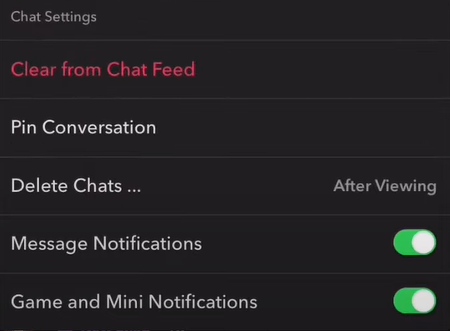
- Your conversation thread can be pinned to the top of your Snapchat chat page.
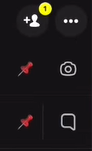
With these steps, you can now pin anyone on Snapchat. You can also pin multiple persons to your chat page.
NOTE: The Pin feature is available on your Android Phone only if the Snapchat application is updated to its latest version.
How to UnPin Someone on Snapchat?
You can do it easily if you want to unpin someone from the top of your Chat page. If the person you are chatting with initiates any kind of abuse, you can report them to Snapchat. Now to Unpin anyone on Snapchat, the steps to be followed are,
- Go to Snapchat, chat page, and long press the pinned conversation thread of anyone to open the pop-up menu.
- Here, you can select the More option and choose Unpin Conversation.
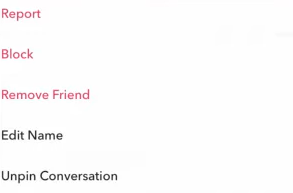
- This will remove them from the top of the chat page.
How to Change Pin icon on Snapchat?
Hold on to your favorite chat person on Snapchat by pinning them to the top of the chat page. You can customize the pin icon to recognize the conversation thread easier from other pinned accounts. The steps are very simple, and there are many emojis you can choose from to change the Pin icon.
- Move to your Snapchat account page and select the Settings Icon.
- Under Settings, scroll down to find the Manage option.
- Now select Friend Emojis and choose Pinned Conversation.
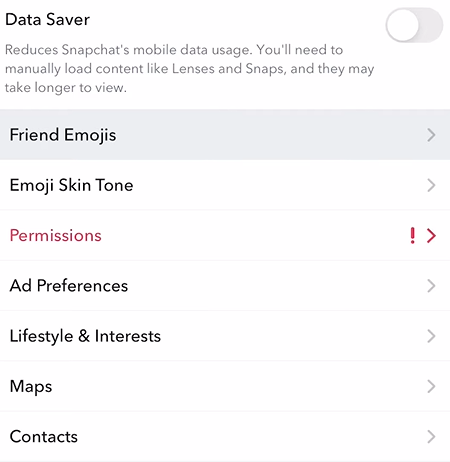
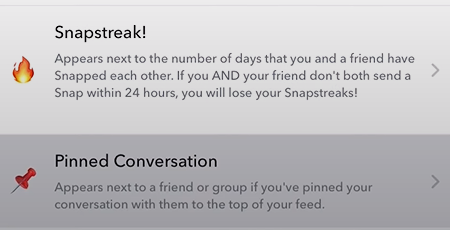
- Select any emoji you want to replace the default Pin icon and go back.
- There is no need to save any setting, and the change will occur immediately.
You can go back to the chat page and check the changed Pin icon on the person you have pinned on Snapchat.
THE END
Now with this article, you can pin, unpin and change the pin icon on your Snapchat application on your Smartphone. This will make your conversation threads with your favorite person even more fun. You can now never miss the person you want and chat with them by pinning them to the top of the chat page using the steps provided in this article.
Frequently Asked Questions:
Why Can’t I Pin Someone on Snapchat?
If you are using an Andorid device and have not yet updated it to its latest version, this will stop you from pinning someone on the Chat page. You can solve it by updating the Snapchat app to its latest version on your Android device.
What Happens when your Report Someone on Snapchat?
Once you have reported someone on Snapchat, the Trust & Safety Team will either remove the content or suspend the account with the Community Guidelines. Snapchat will reach Law Enforcement when needed.