

Paramount Plus is an online streaming application used by around 33 million subscribers all over the world. Paramount Plus offers access to various TV programs, shows, movies, etc., with a basic package for $4.99/month or $49.99/year. You can easily install the Paramount Plus application on your Samsung Smart TV through the app store of the Smart TV, SmartHub.
When you switch to your favorite Paramount Plus streaming app to watch a series, you have wanted to see for a long time, and your Paramount Plus is not working on Samsung Smart TV? It might be confusing when it suddenly happens out of nowhere. Here is our guide that explains how to fix Paramount Plus not working on Samsung TV.
Table of Contents
How to Solve Paramount Plus Not Working on Samsung TV issue?
You need to try out all the methods and the steps given here to make your Paramount Plus app work on your Samsung TV.
Check if Samsung TV is compatible with Paramount Plus App:
The Paramount Plus app is not compatible with all models of Samsung TVs. You can access Paramount+ on 2017 and later models of Samsung TVs. Even if you are having compatible Samsung TV models, you still need to be in the Paramount+ app-accessible area. The Paramount Plus app is geo-restricted to the United States and it is not possible to use it out of this region.
You may also like to learn about How to Fix Xfinity Stream Not Working on Samsung TV?
Check the expiry of your Paramount Plus subscription:
There are chances you might have lost track of the Paramount Plus subscription period and forgot to subscribe. This might be one of the reasons why your Paramount Plus is not working on Samsung TV. Here is the way by which you can check your subscription status on Samsung TV.
- Launch the Paramount Plus application on your Samsung TV and navigate to the PROFILE.
- Select and scroll to the BILLING option and check the BILLING DATE of the Paramount Plus account.
- Check the expiry and subscribe if needed and enjoy watching Paramount Plus on your Samsung Smart TV.
Ensure a secure internet connection:
You can only stream the Paramount Plus application through internet connectivity. If you face an unstable network or low bandwidth, then this could be one of the reasons. Check your internet connection and get to know if it is stable and is at a minimum speed of 50Mbps.
How to Restart Samsung Smart TV?
This is the basic technique that solves most of the minor technical issues with your TV. Restarting your Samsung Smart TV is as easy as given below,
- Turn off your TV and remove the plug from the power source.
- Now Wait for some time; 30 seconds is preferable, and after that, plug back your TV into the power outlet.
- Now Turn on your TV and check your Paramount Plus.
Restart your Paramount Plus Application to Fix the Not Working issue on Samsung TV:
If the Paramount Plus is not working on Samsung TV, then try restarting your Paramount Plus app by logging out and then logging into the account.
- Navigate and select Paramount Plus from the app section
- Select the app and choose LOGOUT FROM THE ACCOUNT
- Now Login back to the account with your user ID and password and confirm if it fixes the issue.
How to Reset Samsung TV Smart Hub?
Sometimes issues with Samsung Smart Hub can cause a black or blue screen when you launch the Paramount Plus app. If this is your problem, then follow the steps to reset your Samsung Smart Hub.
- Press the Home button on Samsung TV remote.
- Go to the Settings icon and press OK.
- Tap on the Support option and choose Self Diagnosis.
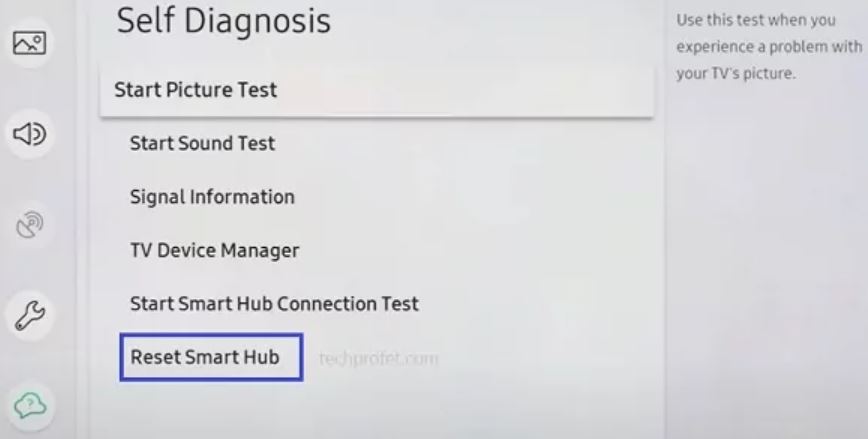
- Under the Self Diagnosis menu select the Reset Smart Hub option.
- Wait until the restart of Smart Hub is complete and then restart your Samsung TV.
Reboot your Samsung Smart TV and Router:
This method can help you quickly fix the problem of your Paramount Plus not working on Samsung TV. Follow the steps given below to reboot your Samsung TV and router.
- Disconnect your Samsung TV and router power cables from the power source
- Wait for a while and allow them to reboot. Now connect your Samsung TV and router cables and turn on your TV.
- Make sure Samsung TV is connected to the internet and solve the issues if there are any.
Fix Paramount Plus Not Working on Samsung TV by Clearing Cache and Data:
Clearing unwanted cache and data can quickly fix various minor issues of the app or the Samsung TV.
- Select HOME and select the SETTINGS option of your Samsung TV
- Scroll and choose APPS AND SERVICES and navigate to the Paramount Plus app
- Find the CLEAR DATA AND CACHE option and select it to clear.
Now launch and check if still, your Paramount Plus is not working on Samsung TV. You may also like to learn about How to Fix Paramount Plus Not Working on LG Smart TV?
Update your Paramount Plus app:
Allowing your Paramount Plus app to update can help you fix technical issues. Use the following steps to update your Paramount Plus on Samsung TV.
- Move on to the Home screen of your TV. Select APPS and select the SETTINGS icon present on the top right corner of your Samsung TV screen
- Now click on the UPDATES tab and check for the UPDATE option for your Paramount Plus on the screen.
- Choose UPDATE if the option is available to update your Paramount Plus app
How to Update Samsung TV to Fix Paramount Plus Not Working issue?
If you still find your Paramount Plus not working on your Samsung TV, try updating your Samsung TV. Smart TVs can be updated from time to time to fix technical issues. Follow the given below steps to update your Samsung Smart TV.
- Go to HOME, select the SETTINGS option, and choose the SUPPORT option
- Navigate and select SOFTWARE UPDATE and press OK

- Select the UPDATE NOW option on your screen, and this will update your Samsung TV. Check if still, your Paramount Plus is working on the Samsung TV
Reinstall your Paramount Plus App on TV:
The last method is to reinstall your Paramount Plus with the following steps,
- Go to HOME, and select the SETTINGS option. Now navigate and select APPS AND SERVICES
- Scroll to find Paramount Plus and click UNINSTALL.
- Now go to the SmartHub store in your Samsung TV and search Paramount Plus
- You can Now choose the Paramount Plus app and select INSTALL
- Now launch the Paramount Plus app on your TV, log in to your account, and confirm if it resolves the issue.
Factory reset your Samsung TV:
Factory resetting or Hard setting your TV might help you solve various issues on your TV. Here are the steps to factory reset your Samsung TV,
- Click on the MENU option on your Samsung TV and select the General option.
- Select the RESET option Enter your TV Pin (default pin is 0000) and click YES to confirm.
Conclusion:
Even after following all the given above steps, if still, Paramount Plus is not working on Samsung TV, then report to the Paramount Plus help desk as it might need the experts. You can contact them and post a query through their official website, and they will get back to you in some time. Hope you find this article helpful. Happy Watching!