
![How to Fix Neptune Rising Not Working Issue [Solution]](https://techthanos.com/wp-content/uploads/2023/01/How-to-Fix-Neptune-Rising-Not-Working-Issue-Solution.jpg)
Neptune Rising is one the best Kodi Addon to watch movies and TV shows. But lately, it has been reported that the Neptune Rising addon is not working properly on Kodi Media Player. It might be heartbreaking for you to find that addon not working on Kodi. Do not worry; you can easily fix the Neptune Rising add-on and make it work well again on Kodi. To know the details about the causes and the solution to How to fix Neptune Rising not working issue, continue to read this article.
Table of Contents
Neptune Rising Kodi Addon:
The Neptun Rising Addon for Kodi media player is very famous for its categorization of the contents available on it. You can find information about the content you are to watch on the Neptune Raising addon, like its posture, info, update time, and more. Since this is an addon specifically for Kodi, you can access this on all Kodi-supported devices like Andorid, Windows, Fire TV, and more. Due to its larger media source, you can watch the latest movies and TV shows without any registration or subscription.
Why is Neptune Rising Not Working?

There are many factors that influence the working of the Neptune Rising addon on Kodi Media Player. If there are any errors within these factors, then you can find the addon not working. Some of the common errors causing Neptune Rising not to work are as follows,
- Kodi Media player and Neptune Rising addon are not being updated to their latest version.
- Having low-quality internet connection.
- Not clearing Cache memory and removing unwanted data from your device.
- Getting the Kodi addon from an unknown source
You may also like How to Fix Kissanime Not Working on Kodi issue?
How to Fix Neptune Rising Not Working Issue?
Now that you know the causes for Neptun Rising not working on Kodi, you can easily fix this issue. There are three methods that you can use to fix this issue. They are all discussed here; make sure not to skip any methods and leave any steps. the method to fix Neptune Rising is as follows,
Clear Cache of Neptune Rising Addon:
- Open the Kodi media player on your device.
- Select the Neptune Rising Addon and access more options.
- Now select the Tools option from the menu.
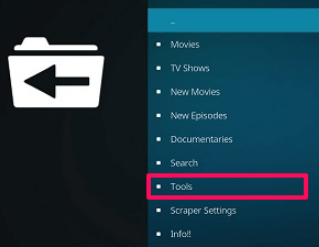
- Tap on the Clear Cache option and press Yes.
This will clear all the Cache memory of the Neptun Rising addon. You need to restart the Kodi media player app to access Neptune Rising addon again. You can find the addon working perfectly.
Turn off Hosters with Captchas:
- Open Kodi and open the Neptune Raising addon.
- Go to its Settings menu and check if the provider’s Timeout is 20 or not.
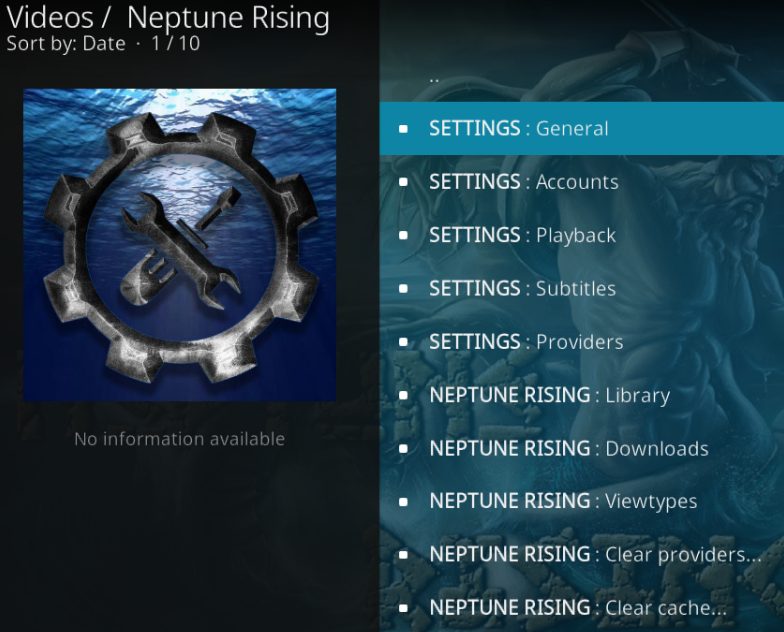
- If it is not 20, edit it and press OK to save the changes.
- Now select the Playback option and turn off the “Hoster with Captcha” option.
- This will get rid of the errors that cause the “Neptune Rising not showing sources” error.
- On your Neptune Rising library, you can turn off the Check Movie before adding it option.
- Press OK to keep the changes on the addon.
These steps will clear out the major errors that cause Neptune raising to not work on your Kodi media player. You may also like How to Fix Kodi No Streaming Available?
Update Neptune Rising Addon:
- Go to the Addons section on the Kodi media player.
- Highlight the Neptune Rising Addon and select the Information option.
- Here you can find more details about the addon.

- Tap on the Update option and select the Latest version from Balmo Repo.
- Wait for the Addon to get updates.
This will solve the errors that are caused due to the bugs present on Neptune Rising Addon.
Alternatives for Neptune Rising Addon on Kodi:
If you still can solve the issues with the Neptune Rising Addon Not working Problem. It is time that you uninstall the Addon and move to a more suitable add-on with the same features. The Kodi addons that are perfect replacements for the Neptune Rising addon are as follows,
THE END
With the method to fix Neptune Rising not working issues provided in this article, you can enjoy watching your favorite TV show and movies back on your Kodi media player. If you are not able to fix the addon, you can move on to other addons that have similar to Neptune Rising Addon or greater than it. Try to restart your device before trying out the methods given here.
Frequently Asked Questions:
What is the Latest Version of Kodi?
The latest version of the Kodi media player is V20.0. If you are not using the latest version, you can find that some features and addons are not working properly. Update the Kodi Media Player app to its latest version and enjoy using it.
What are the Kodi-supported devices?
You can access the Kodi media player application on devices like Windows, Linux, Android, Raspberry Pi, macOS, iOS, and tvOS. The app is available at the official app stores. If not found, go to Kodi’s official site and learn the method to get it on your device.