
Somedays, when you wish to watch something that is On demand, Somedays you wish to watch something Live like sports, Somedays you feel like if you can get all that on your device, Then do not hold your hand on your heads and rub, because you can get all that through the ITV Hub. Yes, You heard it right. You can watch On-demand and Live Programs on your big screen. Get into the article, and learn How to Get ITV Hub on Samsung Smart TV.

Table of Contents
ITV Hub Application:
ITV Hub is an app developed by ITV Consumer Limited. It is an SVOD, Video On Demand Service accessible through the official ITV website. This online streaming app is a service that offers an Online home for all the contents with a great library. It provides Shows, Movies, Series, Sports, and many more. The app is compatible with a number of different devices, including Smartphones, Desktops, Streaming devices, and Smart TVs. If you are a Samsung Smart TV user, move into the article to know if the app is available on your device.
Is ITV Hub available on Samsung Smart TV?
Ofcourse, Yes, The ITV Hub is available on Samsung Smart TV. To get the app, you need to install the app on your Smart TV, or you can use any alternative method to get the app on your Samsung Smart TV.
Is ITV Hub on Samsung Smart TV free?
The ITV Hub app is free to download on Samsung Smart TV. In spite of being available on the app store, which makes it completely free to download, the app does require a subscription for ad-free streaming. The paid subscription of the app is a service that is ITV Hub+ which costs up to £3.99 per month.
How to get ITV Hub on Samsung Smart TV:
In order to get the ITV Hub on your Samsung Smart TV, There is a straightforward method, as well as alternative methods. First, we will discuss the direct method to download the app and, later, the alternatives. But to get the app on your device, users will need to have ITV Hub account access to the app. Continue reading to learn how to create an account.
Create an ITV Hub Account:
To access the app, you will need to create an account with the ITV Hub app. Follow these steps to create an account and access the app on your TV.
- Connect your smartphone to a stable internet connection.
- Go to the app store and search for the ITV Hub app.
- Select the app and click to install the app on your device.
- On your phone, open the app and specify the My ITV section.
- Click on the Sign in option and select Sign in now.

- Enter all the necessary information, such as your First name, Last name, Email ID, Password, and other titles, to fill in the required space.

- Tick all the checkboxes to enable permission regarding the emails to notify on the programming.
- Accept all the terms and conditions of the app.
- Now, Click on the submit option.
- Your ITV Hub account has been created successfully.
Another way to create an account via the website:
- You can also use the official website of the ITV Hub: www.itv.com.
- Follow the above steps to create the account via the website.
Once you have created an account with ITV Hub, you can use the credentials to access the app on any compatible device by simply signing in to your account.
Direct Method to get ITV Hub on Samsung Smart TV:
As mentioned before, the installation process of the app is quite straightforward. You can get the app on your TV by following these simple steps.
Steps to install ITV Hub on Samsung Smart TV:
- Turn ON your Samsung Smart TV.
- Connect to a stable internet/Wifi connection.
- Go to the Home screen on your TV using the Remote.
- Navigate to the Smart Hub and go to the Apps Section.
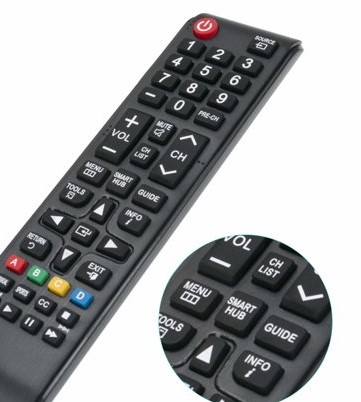
- Search for the ITV Hub app on the search bar.
- Click on the Download option.
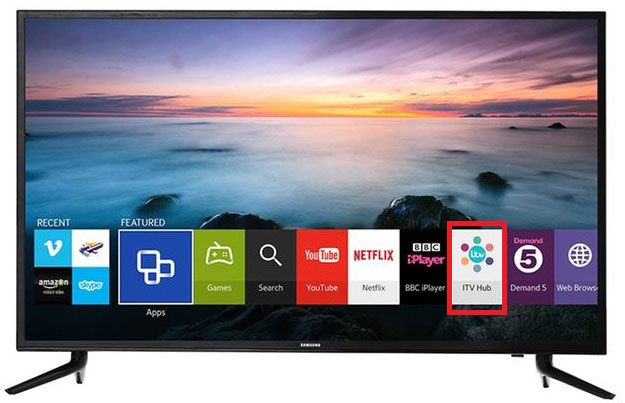
- Wait for the app to get installed on your Samsung TV.
- Log in with the credentials to complete the procedure.
- You can use your membership information on the ITV Hub app.
- Now, you can start streaming the video content you desire with the app on your device.
As soon as you install the app, though it is free to download from the Samsung App store, it requires to be activated with your ITV Hub account.
Also: How to Get Paramount Plus on Samsung Smart TV?
Activate ITV Hub on Samsung Smart TV:
Activation of the app is required in order to access the app on any device. Go through the below-mentioned steps to activate the app on your TV.
- First, Turn ON your Samsung Smart TV, and connect to an internet connection.
- Access the ITV Hub app on your device.
- Navigate to the My ITV option and Choose to Sign in.
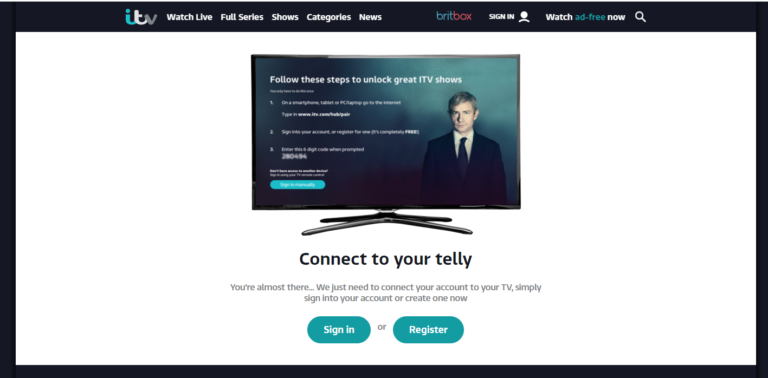
- You will get a 6-digit activation code displayed on your TV screen.
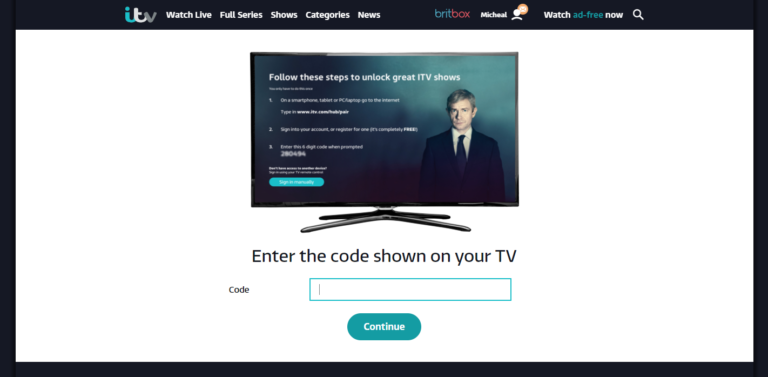
- Go to any desired Web browser, either on your PC or Smartphone.
- Access the URL:itv.com/tv.
- If you already have an account (If you have followed the above section on how can you create an ITV Hub account ), You can sign in to your ITV Hub account using the credentials. In case you don’t own an account, create one to access the app by clicking on the Register option.
- Type the 6digit activation code in the required space.
- Wait for the verification. Now click on Continue.
Finally, the ITV Hub app is activated on your Samsung Smart TV. You can access the app on your smart TV and start streaming. For some users, if you cannot install and access it, we have provided you with an alternative you can use to access the app.
If you have a Firestick device, you can visit to know More: How to Get ITV Hub on Firestick?
An alternative method to get ITV Hub on Samsung Smart TV:
Screen Mirroring ITV Hub on Samsung Smart TV via Smartphones :
Screen Mirroring is an advanced level of technology that allows users to view their smartphone screens on their TV screens. In simple words, Screenmirroring is like projection; it projects the small screen viewing from your phone into the big screen like a TV.
Mandatory Requirements for Screen Mirroring on Samsung Smart TV.
To conduct a Screen mirror on your Samsung Smart TV, some essential things need to be done.
- A stable, strong, and common Wifi /Internet connection.
- In case you don’t have a Smart TV, You will need a casting device to support screen mirroring on your television.
Steps to Screen Mirror ITV Hub on Samsung Smart TV:
- First, Set up a common and stable internet/Wifi connection.
- Connect the internet with your Samsung Smart TV and Smartphone.
- On your smartphone, Go to the App store.
- Search for ITV Hub and click to install the app.
- Log in to the app to complete the installation and launch the app.
- To enable the Screen mirroring, Access the control center on your smartphone.
- Turn On the Screen mirroring option on your phone.
- From the available devices list, Choose your Samsung smart TV.
- Click on the TV to connect Your Smartphone and TV.
- Launch the ITV Hub app on your phone.
Now, you can view your phone screen on your Samsung Smart TV screen. Play any content you want to watch to screen mirror from the ITV Hub app.
Crucial Information:
As stated in the recent updates on the help page of ITV, It is said that ITV Hub will stop working; to be precise, the app will not be compatible anymore on some devices, including Samsung TVs. Users with Samsung TVs that models prior to 2015 will not be able to access the contents from the ITV Hub app.
This can be due to the changes made in the app that will make the devices lose their compatibility with the app. However, you can consult with your providers to know about the incompatibility if you access an older version of the Samsung TV.
Visit: How to Get City tv on Samsung Smart TV?
Conclusion :
Now that you have learned the ways to get the ITV Hub on Samsung Smart TV. Access the app on your device and enjoy streaming on the big screen with a bigger experience. In the hope that we have provided you with the best ways to enjoy your streaming, Thereby I am signing out and letting you enjoy your binge-watching on ITV Hub.