

Icdrama Kodi is an online streaming application which helps you to watch dramas and plays. To watch dramas this will be a very good choice. This application is available on Kodi player 17.3 and 17.4. It is considered the topmost rated addon in the online market.
Most of the people prefer Kodi player to use all kinds of applications. You can get good quality video content with a strong internet connection. Icdrama is situated in the Aznhusband repository which has Japanese, Korean, Chinese TV programs, movies and so on. There are two ways to download the Icdrama Kodi addon.
- Direct method
- File manager
In this article, we will see how to install the Icdrama Kodi addon Kodi player.
Table of Contents
How to Install Icdrama Kodi Addon?
#1.Direct Method
This method takes a few minutes and simple steps to complete the installation process.
1: Install the “Icdrama repo zip file”.
2: Launch Kodi player 17.3/17.4.
3: Search for the “Addons” option and tap it.
4: Switch on the “Unknown sources” option to get other available sources.
5: Now choose the “Add-ons icon” which is located on the top left corner of the screen.
6: From that, you have to select “Install from zip file”.
7: Type https://cthlo.github.io/cthlo-kodi-repo/ and download the repo.
8: Wait for some time to receive the addon enabled notification which indicates that your installation process has been successfully completed.
9: Now your Icdrama is ready to use.
10: Then back to the main menu and select “videos”.
11: Select “addons”.
#2. Step to Install Icdrama Kodi Addon by Using File Manager
If the direct method will not work better for you, then you will move to the file manager.
1: Launch Kodi player.
2: Go to the “Settings” in the Kodi home page.
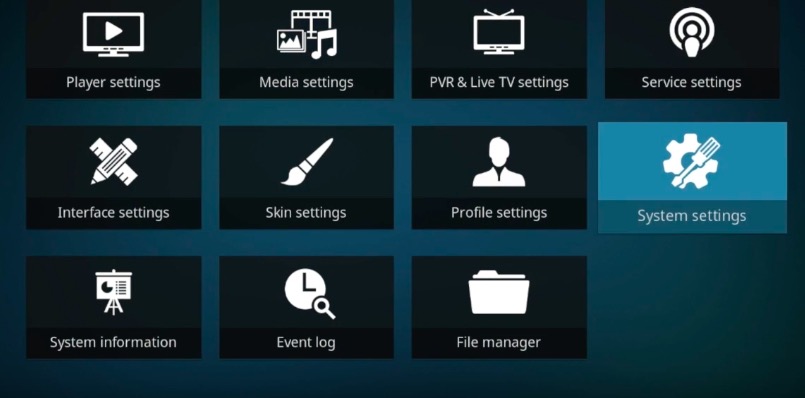
3: Select the “File Manager” option.
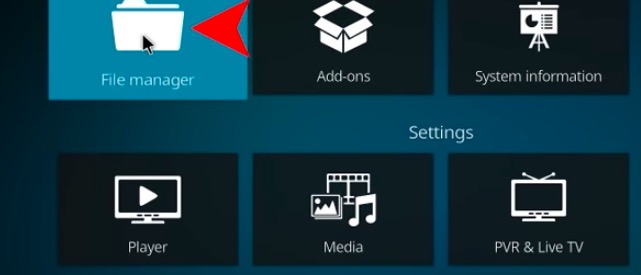
4: And choose the “Add source option” in the file manager.

5: Now you will get pop up and click “none” option in the pop-up.
6: Type the URL https://cthlo.github.io/cthlo-kodi-repo and enter it.
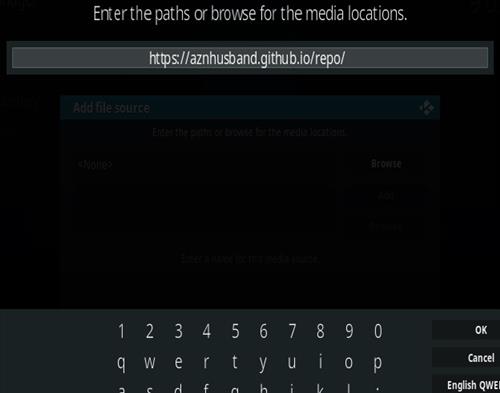
7: You have to put a name for your media file and tap the “ok” button.
8: Now move on to “Install from zip file”.

9: Select the file that you have entered for your media and tap the “ok” button.
10: Then you can find a “zip” option. Click it.
11: From that, you should select “ Icdrama zip file”.
12: Download the tardiest version of the Icdrama zip file.
13: Wait until receiving the notification to confirm the installation process.
Features of Icdrama Kodi Addon
- It has a vivid and simple interface which makes the addon best one.
- You can watch videos, movies, dramas, plays on High quality.
- It has a wide range of video collections.
- You can get a huge collection of Asian movies and video content.
- Generous interface and menu.
- The installation process takes simple steps
- You can get all kinds of dramas in different genres.
Wrapping up
Icdrama is the best choice to stream all kinds of drama on the big screen. For that Kodi is considered the best player. The above-given information and methods help you to install the Icdrama Kodi addon on Kodi Player. We hope this article will help you to know about the Icdrama application.