
Hulu kodi addon: Hulu is the best streaming service in America. It is given the best service to its subscribers. Hulu is standing the second position of given the service to the subscribers next to Netflix.
We can watch live streaming TV shows using low cost which is compared to Netflix. The main issue, Hulu was updated every TV live shows. It is the main point to stand in second place of the streaming network.
We cannot access the Hulu to nearby the USA country. Users of Hulu are the best and great subscribers. Because the subscribers watch the updates of the live program with the period time as instantaneously. We cannot watch Hulu in other countries without any external help. Using the Vypr VPN option watch the live relay of the Hulu in other countries.
Similar Post: Vader Streams Kodi Addon,By using this Kodi 17.6 Krypton, you can watch and enjoy your favorite channels. We hope this will help you to install Kodi Addon easily.
Table of Contents
KODI Application:
Kodi is a program for streaming media content. It is a free app and anyone can contribute it. It began with the name of the Xbox Media Center. which is changed the name into Kodi in 2014. Nowadays this is maintained by the original developers.

Available areas
Now, this application is available on Android, Windows, Linux, Ios, and Mac Operating systems.
The coding of Kodi is easy to create. So, this is the best application for usage for watching live streaming programs. We can connect the Kodi app into the smart TV with the help of Amazon firestick.
This app is working with the source of the internet.
We can see the other online services using this Kodi application. The add-on option is used to add some other services, just like Youtube and the BBC iPlayer, etc.
The Kodi application is entirely legal. Because the application is a simple media player. So, we can use it legally.
Don’t miss this post: Ultimate Guide to Install Stream Hub Kodi Addon | Help
How to Install Hulu addon for Kodi
#Step 1. Open the Kodi application.

#step 2. Go to the system and select the File manager option.

#step 3. Click the add source option and select the NONE option.
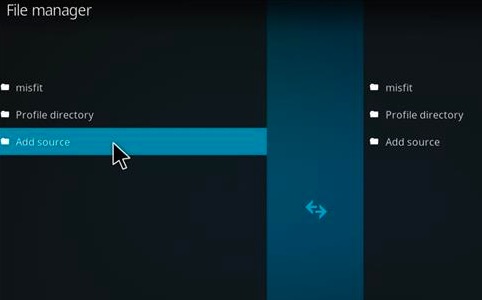
#step 4. In the search box type as http://fusion.tvaddons.org./
#step 5. Touch the ok button.
#step 6. Here shows the option of entering the name of the source.
#step 7. In the box type the fusion and click ok
#step 8. Now go to the system settings and add-ons in the order.

#step 9. Click the Install from the zipping files.

#step 10. Select the fusion option to get downloading the Hulu on the Kodi application.
Choose the xmbc-reports and in English option listed the option of entertainmentrepo.backup-1.1.4.zip. This is the installation of an entertainment repo program procedure.
After installation from the home screen go to the system settings and select the add-ons option.
Here, choose the option of install from the repository and now, you can get the entertainment repo option initially select the video add-ons
Now, listed the apps on the add-ons here, we can select the Hulu movie TV option and select the install button for installation.
Related Post: Step by Step Guide to Install Atomic Kodi Build
After Installation:
After successfully installation of the Hulu application addon on the system, now we go to the Kodi app and select the videos and select the add-on option to get the add-on applications.
Here shows the Hulu add-on. we can also watch the non-stop streaming programs using the Hulu app.
Conclusion:
we discuss the installation and working procedure of the Hulu on the Kodi application. Here, somebody has some doubts about the installation. Any doubts or corrections immediately contact us by using our website or comment on it. Techthanos.com