
How to Cancel Twitch Prime Membership: Twitch is one of the best long-lasting entertainment tools for streaming live gaming videos. This exceptional service makes people play popular games such as Minecraft, FIFA 18, PUBG, and many more. Here you can get connected with people through live chats. Twitch includes Amazon Prime, and Prime video membership users use Twitch Prime.

Table of Contents
Twitch Prime
Above all, the Twitch Prime subscription service is nothing but the advanced version of the Twitch Turbo. Using Twitch Prime, you can get the channel’s subscription options, loot gifting, bonus games, and in-game content.
This Amazon Prime-connected Twitch Prime is available in countries like the US, UK, Canada, Italy, Mexico, Germany, Austria, Netherlands, Luxembourg, France, Spain, Japan, Singapore, and Belgium. People who reside in other countries can get Twitch Prime if they have Prime video, too, without any additional cost.
Twitch Prime subscription service is associated with Amazon Prime. Twitch Prime is free for people who have an Amazon prime account. People who are not interested in using Twitch Prime can cancel. But if you cancel Twitch Prime, you will not get ad-free content, emoticons, free game content, group chatting, and much more.
Simple Steps: How to Watch Braves on Apple TV?
How to Get Twitch Prime?
Suppose you are an Amazon Prime user, then you want to link your Twitch account along with your Amazon Prime account. To link this account, go through the below steps.
Amazon Prime Users:
- Head to Twitch Prime’s official website.
- Tap on the Sign in option, then proceed to log in with your Amazon account.
- Further, choose to Connect a Twitch account tab.
- Then sign in with your Twitch account.
- Finally, you have linked your accounts, and then now you have Twitch Prime.
For those who don’t have an Amazon Prime Subscription, follow the given below instructions.
Amazon Prime Non-Users:
In case you dont have an Amazon Prime account subscription. Then you have to log in with Twitch Prime from the official site via an Amazon account. After that, choose the Amazon Prime account. If you are a new user, then you will get a 30-day free trial, so there after you have to subscribe to its service.
Twitch Turbo Users:
If you are a Turbo Member, then get to know the procedures to connect the Twitch account with Amazon Prime. Avail the steps to do in the below instructions.
- Launch Twitch from your official site.
- Then tap on the Profile icon on the right side of your screen.
- Move to the Settings section.
- Further, tap on the Twitch Turbo option.
- In order to cancel the subscription, tap the Don’t Renew tab.
- Log in to Twitch prime with the help of an Amazon Prime account.
How to Cancel Twitch Prime?
You can cancel your Twitch Prime account by using two easy methods that are mentioned below. Follow the below-given steps to cancel only Twitch prime.
- Go to your Amazon account.
- Select Settings.
- Click Manage Prime Membership.
- Click Twitch account.
- Tap on cancel.
With this second method, you can cancel your Twitch Prime subscription using the below instructions.
- Get into the Twitch official site.
- Sign in to your account using its credentials.
- Tap on the Profile from the upper right corner.
- Head to the Settings section.
- Tap on the Connections tab.
- Go to the Amazon Prime under Connections.
- Tap on the Disable tab.
- And then tap on the Confirm button in order to remove Amazon Prime from Twitch.
If you want to cancel Twitch Prime free trial, then follow the below-given steps.
- Log in to your Amazon account.
- Click Accounts and list.
- Select sign-in.
- Enter your login details.
- Click Accounts & lists and choose Twitch account settings.
- Click the unlinked account.
- Choose to unlink this Twitch account from the pop-up message.
Now, your Twitch account would have been disconnected from your Amazon account.
Since you don’t have any direct method to cancel Twitch Prime, you have to unlink Twitch Prime from your Amazon Prime. The only way to cancel Twitch Prime entirely is to cancel your Amazon Prime account. Because you can use Twitch Prime even after canceling just by relinking with Amazon prime. But relinking is possible only if you don’t cancel the Amazon Prime account.
Related Post: How to Download and Access ZiniTevi Firestick App?
How to Cancel Your Amazon Prime account?
If you think that you want to cancel your Amazon Prime, follow the below-given steps,
- Go to the Amazon Home page and click the Amazon account.
- Go to Settings.
- Tap on Manage Prime Membership.
- Select Cancel the Membership.
And if you think that you want to cancel only Twitch Prime and not the Amazon Prime account, that is not possible. But then, you can deactivate Twitch from the Amazon account.
Related Post: How to Watch YouTube on Smart TV
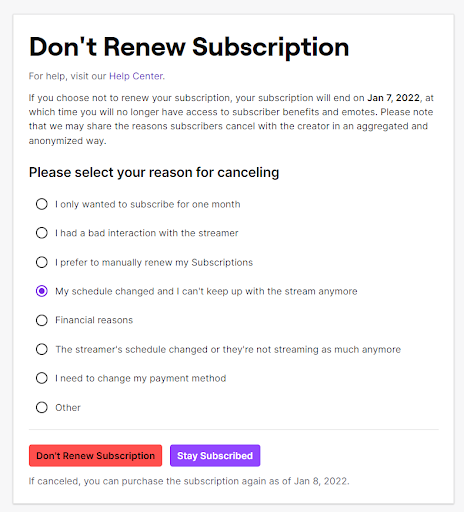
How to Cancel a Twitch subscription?
- Open a Twitch account and go to the Subscription page.
- Select the particular subscription which you want to cancel.
- Choose Payment Info.
- Now it displays the date in the options Benefits will end on, and then choose Don’t Renew so that your subscription will end on the given period.
Conclusion
Twitch Prime, which is owned by Amazon Prime, can be canceled completely only when the Amazon Prime account is canceled. So if you want to cancel only Twitch Prime, you have to unlock it from Amazon Prime. We hope this article will help you surely to cancel Twitch Prime.
FAQs:
1. How to cancel a Twitch subscription on a mobile device?
- Launch the Twitch app from your Android SmartPhone.
- Tap on the Profile icon from the upper left of the screen.
- Choose Subscriptions under the menu.
- Choose what you like to unsubscribe from.
- Hit the Cancel Subscription.
2. Why there is no cancel subscription button on iPhone?
In case you dont see the Cancel Subscription option, it denotes you have already canceled your account. After you cancel the free trial, then you no need to cancel it anymore.
3. Why did my canceled account still active?
After canceling your subscription then, you will still use the subscription for the time being since you have paid. Once the plan expires, then it will be automatically inactive until you subscribe.