
BET Plus is an online streaming Platform and it is a premium Streaming service you can get over 2000+ hours of On-demand content. There are many new and latest content available on this service. Roku users are Very lucky this fantastic BET Plus application is compatible with the Roku device, But only accessible on the Newer version of Roku devices. If you have an older one then you must use the alternative way. Don’t go anywhere to find the alternative. We are going to share everything in this article. Read the article on How to Get BET Plus on Roku. Scroll down the page to learn more.

Table of Contents
How to Get BET Plus on Roku?
BET is an entertainment Channel and it is compatible with the Roku device. It contains lots of amazing content Such as TV series, Comedy shows, Music, Live TV Channels, Special events, and more. Whereas Bet Plus is officially available on the Roku streaming device.
BET Plus on Roku
Here we are going to mention the steps to download the BET Plus application on your Roku device.
The steps are:
- Switch on the Roku device, using an Roku remote and press the Home Button.
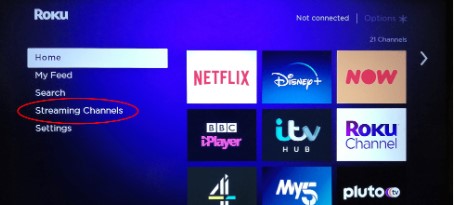
- From the Home screen option, Move to the Streaming Channel option.

- Click the Search Option and Type the keyword “BET Plus”.
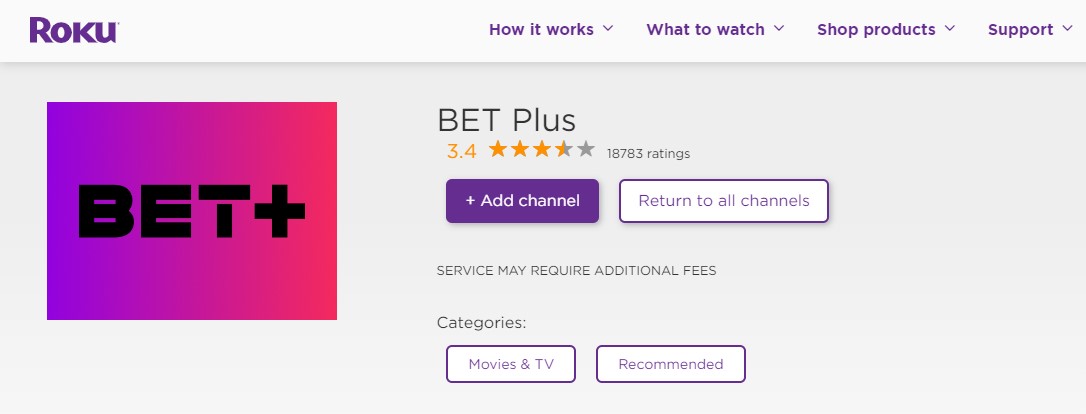
- Choose the Add Channels button.
- Once the App is downloaded you can Click the Go button.
Check the Post: How to Get Peacock on Roku
How to Watch BET Plus on Roku? Website
This is one of the official ways to get a BET Plus application on Roku devices. You can also use this method to watch its content through the Website.
The Steps are:
- On the browser, search for the Roku Channel Store.
- Click the website

- Sign in with your Roku Account.
- And find the application “BET Plus”.
- Tap the download button.
- Once the channel is added to your device then sign in with your account and stream your favorites.
How to Activate BET Plus on Roku?
Activation is the process of stimulating the app to access the content on your device. There is a seven-digit code given by the Network. You must enter it on the official site to stream the content on your Roku device. Here we mention the proper steps for activating the BET Plus application.
The Steps are:
- Open the BET Plus app on your Roku device.
- Click the Sign in Button.

- It will show the Activate Code. Make a Note.
- Move to the official site of the Activating BET Plus application.
- In the respective field enter the seven-digit Activation Code.
- Press the Continue Option.
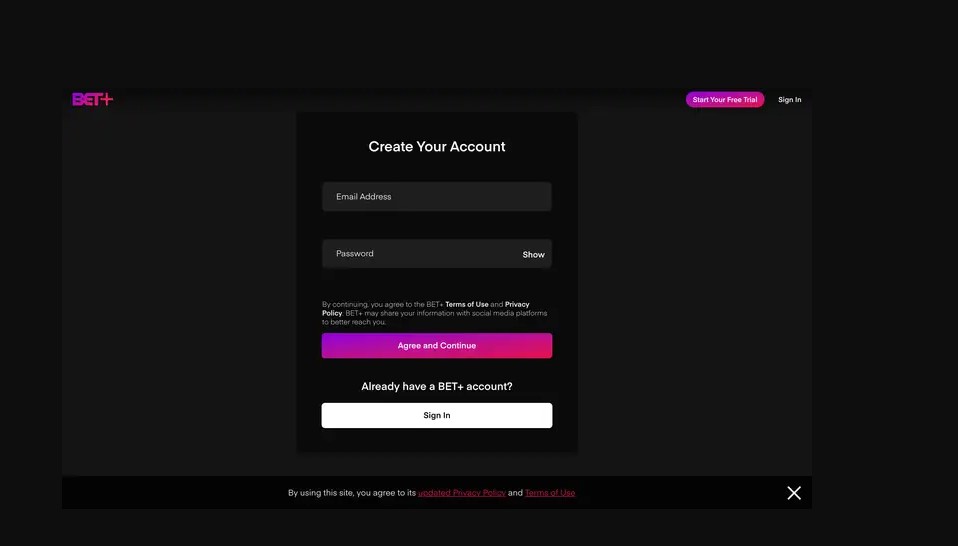
- The Click Sign in option.
- Stream your favorite shows and Programs.
Additional Info, How to Watch Discovery on Roku
How to Sign in to BET Plus on Roku?
Sign-in is the main process to access the content on the Application. While in the Sign-in process, You must give the Username and Password. As well as it will protect your account from others Without your Password they can’t access your Account.
The Steps are:
- Open the application.
- Click the Sign-Up option.
- Choose the Subscription package.
- Complete the payment.
- Enter all the information they asked for.
- Finally, click the Submit button.
- Once the process is done then you can stream all the content from the BET Plus application.
If you want to cancel the BET Plus Subscription. Then click the Link to know the steps and procedure to Cancel it. How to Canel BET Plus on Roku
How much is a BET Plus Subscription?
Whereas the BET Plus application is a Subscription streaming service. You must pay the cost to stream the content. There are two types of subscription Packages offered by BET Plus. Monthly and yearly packages are available on the BET Plus app.
You can get the monthly package at the Cost of $9.99 for one month. And $94.99 for one year. Other than that, you can subscribe to the service on its official BET Plus website.
How to Watch BET Plus on Roku?
Also, you can use the Alternative ways to stream the BET plus content on your Roku Devices. The BET Plus application is officially available on the New version of the Roku device. Suppose you have an Old version Roku device then the app is not available. So you need to choose an alternative way to get the content on your Roku Device.
Here there are two types of alternative ways available that are more comfortable for you. Choose them to get the BET Plus app on your Roku.
- Screen mirroring.
- Using Without Cable Streaming Services.
Cast BET Plus on Roku
Before you proceed with the Screen mirroring method you must enable the Screen mirroring mode on the Roku device. This is the easy process of getting the content from the smartphone to the Roku streaming device. Free to download on your device. Most importantly, the Smartphone and Roku must be connected with the same Wi-Fi connection.
Here are the steps to enable the screen mirroring mode on Roku:
- Using your Roku Remote.
- Click the Home button.

- Move to the setting option.

- Next, navigate to the screen mirroring option.
- Tap to Enable it.
Now it’s ready to stream the content from a smartphone to a Roku device.
Check the Post: How to Watch USA Network on Roku
The Steps are: [Screen Mirorring]
- Download the BET Plus on your Smartphone.
- Sign in with your credential
- Then Move to the Notification Center.

- Click the Cast Icon.
- inside the Icon Choose Your device name from the suggestion list.
- pair the devices.
- once the devices get paired you can see your Smartphone screen on your Roku device.
- Now you can stream whatever content you need to stream from the BET Plus app.
What to Watch on the BET Plus app?
There are many popular shows and programs that are streamed on the BET Plus Application. Time is not enough for all the Amazing content on BET Plus Service. Very Good entertainment shows, Comedy series, TV programs, and More. Here we mention some of the Top Popular Content on BET Plus.
- After Happily Ever After.
- America in Black.
- Zatima.
- American Soul.
- Being Mary Jane.
- College Hill: Celebrity Edition.
- The MS. Pat Show.
- Average Joe.
- College Hit.
- BET Her Presents: The Couch
- The Bobby Brown Story.
- Block party.
- Trophy Wife
- North of the 10.
- Dear Best Friend.
The Final Words
From this article, you get to know How to get BET Plus on Roku. We have mentioned the direct method to get the app on the Roku device. In addition, if you are a user of an Old Roku device then the BET Plus is not available on the Roku Channel Store. So you can use the Alternative ways. We have shared the steps and ways too in this article. Also, read the features and the popular shows on the BET Plus application. Share your comments in the Comment section if you have any related doubts.