
FS 1, is a popular Sports Streaming Platform. Moreover, it contains lots of amazing sports content and other entertainment channels. This year starting to ending many sports events and Tournaments are going to be conducted. It’s time to watch your favorite sports matches. If you want to know that FS1 is available on Roku devices and know the way to watch its content. Scroll down this page and read this article on How to Watch FS1 on Roku.
Table of Contents
Highlights of FS1 on Roku:
FS1 is everyone’s favorite sports Channel. Every Sports fan can use this application to watch their favorite games events and Tournaments. Here we will share some unknown important features of FS1 on the Roku device.
- You can get every update on the Channels of your favorite sports team or League.
- Moreover, you can get to Watch Live Stream matches and Study Shows on these Channels and Fox sports applications.
- It will telecast Live, On-demands, Highlights, and Replay the matches.
- You can obtain much variety of sports categories.
Also, Read How to Watch MSG Go on Roku
Can I Get FS1 on Roku?
Yes! Of Course, you can obtain the most popular sports Channel application accessible on the Roku device. In addition, you can also get the content from the Sister Channels of FS1 such as FS2, BTN, and Deportes. Also, you can use the Fs1 application and Fox Sports Go application to watch all its content. Moreover, Live and On-demand contents are available in this Application.
How to Watch FS1 on Roku?
There is a Direct solution available to download the FS1 on your Roku device. Without using any third-party application to install Fs1 on Roku. Whereas it is officially available on the Roku Channel Store.
The Steps are: [Direct Way]
- First of all, you have to fix your TV with your Roku device through the HDMI port and Turn on the Switches.
- Choose the Home button from the Home page of Roku by using a Remote control.

- Move to the Streaming Channel option to Launch the Roku Channel Store.
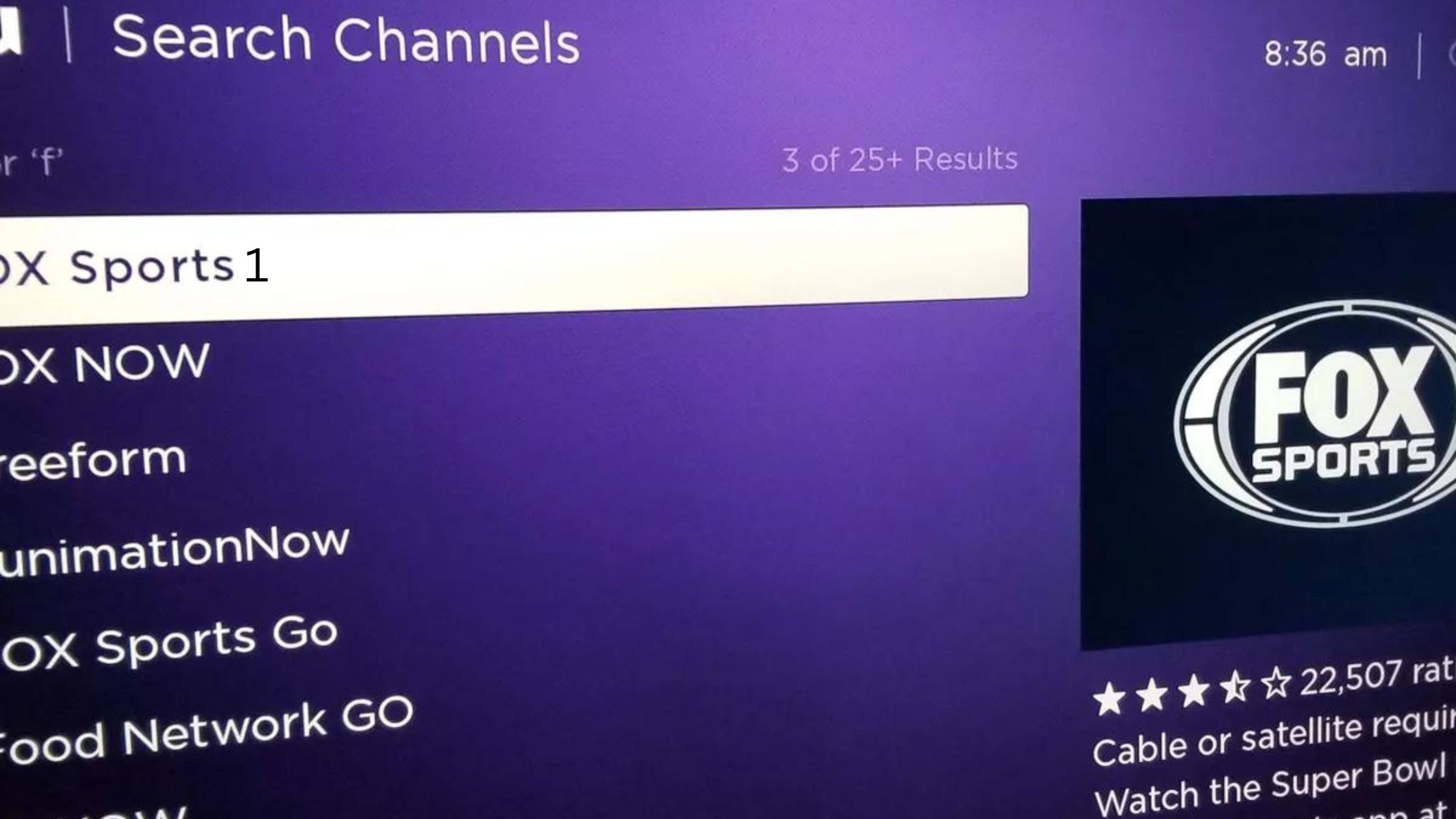
- Click the Search Channel Option Type the Keyword “Fox Sports” or “Fox Sports Go” and click to find it.
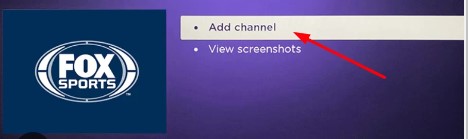
- From the result, you have to select the application and Click the Add Channel option.
- If the application is installed then you have to click the OK button.
- Then you can see the pop-up message on the Roku screen.
Steps to Watch FS1 on Roku using the website:

- Launch the Web browser and See the Roku Channel Store Website.

- Press the Sign in option on the website.
- By using the search field Type the keyword “Fox Sports” and Click to search the Channel.
- Hit the Application and Click ok on the Add Channel button.
- If the application is installed you have to watch all your favorites.
For More Info, How to Use Chrome on Roku
How to Activate FS1 on Roku?
Once you installed the application on your device then you have to activate the app to get permission to access its content on the Roku device.
The Steps are:
- Move to the Channel Section and Launch the Fox Sports application.
- After that, The Activation code appears on the screen. Make a Note of it.
- Then move to visit the browser on your PC or Smartphone and enter into the site for Fox Sports activation Website.
- You should enter the Activation code in the required field and Click the Ok Button.
- Further, you have to enter the TV provider details.
- If the application is activated then you can access all the sports and Programs content on the Roku device.
Alternate Way to Watch FS1 on Roku:
This is an alternate way to watch its content with the subscription service Package. Moreover, You can access this FS1 channel on the Roku device with its supported streaming services. based on the streaming service platform the subscription cost gets varied.
YouTube TV:

This service is available at the cost of $64.99 for one month. With its subscription, you can get more than 85+ Channels and unlimited DVR storage space to record your favorite content and save it on the cloud storage. With this cost of service, you may obtain entertainment channels, Cooking Channels, Sports Channels, and Lifestyle channels.
Fubo TV:

There are three subscription services available to watch FS1 on this Fubo TV streaming service. Along with the subscription package, you can get 1000 hours of DVR Storage space and two users can stream the content at the same time.
- Fubo TV pro- At the cost of $74.99 for one month.
- Premium- Service at the rate of $84.99 per month.
- Elite- You can purchase this package at the Price of $94.99 for one month.
Sling TV:

This is the most popular streaming service you can get FS1 Channel on this service in the package of Sling Blue + Orange package at $60 for one month. You Can Obtain more than 50+ Channels with 50 hours of Cloud DVR Storage space and three users can stream the content at the same time.
Check the Post: How to Install and Activate Shudder on Roku.
What does the Sports telecast on FS1 application?
Currently, FS1 has covered the events and Tournaments from College Basketball and Football, MLB, NASCAR, PBC, USGA, and World Class Soccer events broadcast on this Fs1 Channel. More than 5000 hours of live events Sports events, Original Programs, and News are carried by this Application. Additionally, the FS1 has coverage of the regular season Big 12, Big Ten, Pac 12, and Mountain West games.
Unless you can get to see the NASCAR Cup series and NASCAR Xfinity series events. For that, you can stream the Highlights and replays of matches from World-class Soccer with the Coverage of the FIFA world cup and Concacaf Champions League.
Can I get to stream Live Sports on Roku?
The Roku Device provides different and the Most popular Live Sports Channels. And you can get the channels in both free and paid subscription Packages. Furthermore, you can get to stream events from Tennis, Football, Basketball, Soccer, Snowboarding, and Surfing Fanatic events are available to stream Live events.
Many Live-Streaming applications are available to use these upcoming application to get a better experience and it offers Free to access its content on Fox Sports, FS1, FS2, Fox Deportes, Fox Soccer Plus, Fox College. In addition, you can get to stream NBA, NHL, MLB, Olympics, Bowling, and more College Football for free cost on Roku devices.
Closing Words
We have mentioned the steps to watch FS1 on Roku. Moreover, this article contains a direct method and uses the website to download the application onto your device. In addition, we have included the activation steps, And which popular sports are telecasted on this Channel. Refer to this article, If you have any doubts or need any other additional information. Let me know in this Comment section.