
To stream your desired on-demand and live TV content, you no longer need any costlier streaming service or cable TV provider. Since IPTV service offers an all-in-one destination to stream any of your favorite content on your compatible device at an affordable price. Then get to know one amazing IPTV Kodi Addon named Death Star IPTV that will let you stream a one-stop destination for all the content to watch on your screen. If you are looking for how to get and stream Death Star IPTV? Get to know everything through this guide.
Table of Contents
Death Star IPTV
The Death Star IPTV is an upcoming exclusive Kodi Addon that is available in the markets to stream various on-demand and live TV content such as entertainment, movies, TV shows, news, sports, kids, and so on. However, it is the top most destination to get and stream all your content through this IPTV Kodi Add-on. This Kodi add-on is mostly similar to all other IPTV services found in the market. Besides, it will let you get all the library content through its package to stream on the Kodi Addons.
Since it offers a Kodi Addon so you may get easily confused with Deathstar along with its preloaded addons. Nevertheless, it is no longer available as an in-built Death Star to addon on with your IPTV. Eleven developers create this Addon since it is new, and yet it doesn’t become more popular among IPTV users. In this guide, we will let you know the procedure to install the Death Star Kodi Addon on your device in order to watch its content.
How to Get Death Star IPTV?

Before we enter into the installation process, you need to change the unknown sources from the security settings on the Kodi in order to let the addon. So get to know the process from the below steps.
Turn on Unknown Sources:
Initially, you need to enable the unknown sources from the settings in order to get the Death Star IPTV Kodi Addon on your device. Use the instructions given below for all the Unknown Sources features.
- First of all, you should need to add Kodi to your device.
- After that, tap on the Gear icon beside the power icon.
- Further, tap on the System option from the Home menu.
- Move to the Addons from the left side of the menu.
- Now enable the Unknown Sources when it is not enabled.
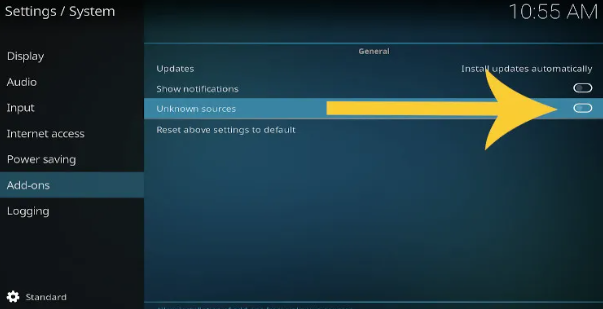
- Next, click on the YES option from the popup notification.
That’s it. Now install any IPTV service from your device. Further, move back to the main menu by tapping on the ESC key from the keyboard. Next, you can add the Source file from your device using the given below steps.
Check the Post: Titan IPTV
Install Death Star Addon on Kodi:
- Tap on the Settings section from your Kodi’s main menu.
- Further, tap on the File Manager from the second screen.
- Search for the Add Source option and then tap on it.
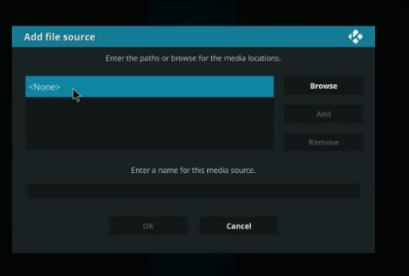
- Next, move to the screen that shows and then tap <None>.

- After that, add a new window in order to enter the source URL.
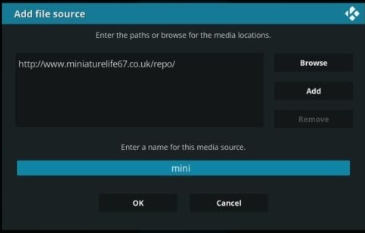
- Next, copy the http://ezzer-mac.com/repo and then hit the OK button.
- Further, enter the source name on the Enter the paths or browse for the media locations.
- Once you input the source name on the respective field and then tap to OK.
- Now you have added the source and then choose the Kodi on the server from the Kodi addon installed.
- Further, hit the back button and go back to the main menu of your Kodi addon.
- Choose the Addons menu from the left side menu bar.
- Next, navigate to the upper right edge of your screen.
- Then tap on the Package Installer, which is on the upper left side of your screen.
- Again open the Install from Zip file and then get the source name that you previously added.
- And then, move to the add-on and then tap on the repository.EzzerMacsWizard.zip file.
- Wait for some time when the zip file gets installed.
- A Notification displays on the upper right side of the window screen.
- While installing the add-on from your device, don’t hit any keys until the installation completes.
- Now tap on the Install from Repository zip file.
- Launch the EzzerMacs Wizard repository.
- Tap on the Video Addons tile and then look for the Death Star add-on.
- Pick the IPTV and then tap to install it.
- To install, tap to Install icon from the lower right corner of your screen.
- Proceed to the OK button in order to continue the installation process.
- Go back to the last window and then wait for some time until it gets installed.
- You will get a pop-up notification once it gets installed on your device.
- That’s it. Now you have installed the Death Star Kodi Addon on your device.
Additional Info, How to Get Kodil Repo on Firestick
How to Watch Death Star Kodi Addon?
- First of all, prompt to the Kodi add on the home page and then tap on the Addons.
- Furthermore, tap on the Video Addons from the next window screen.
- Next, tap to open it, and then choose the Kodi video addons from the Death Star add-on.
- Move to the addon page and open it by tapping on it.
- Now start to stream any of the content as per choice and then enjoy streaming on your screen.
Is Death Star Kodi Addon Safe?
Certainly, you can watch Death Star Kodi add-on without any hurdles since it is entirely safe and legit to stream on your compatible device. Besides, it offers only copyrighted content to stream on your device, so it is entirely safe to use without any issues. But use any VPN service in order to stream all your on-demand and live TV content from your compatible device. So use any VPN service to watch interrupted video streaming without any issues.
How to Add VPN on Fire TV?
- Prompt to the Amazon App Store and then get the app by downloading it on your Fire TV.
- Once it gets downloaded and then taps to open it.
- Get into the login page and then enter the valid credentials in the respective field.
- And then tap on the Power icon in order to connect with your VPN service.
- Set up your current location as per your choice, and then open the Death Star IPTV.
- Start to stream its content even if you are in a geo-restricted area.
Also, read How to jailbreak Firestick
Wrapping Up:
In this article, we have mentioned the ways to install and stream Death Star Kodi Addon IPTV. Also, it is entirely safe and secure to watch its content from your compatible device. Since you are a cord cutter, then this is the best way to stream all your on-demand and live content on your device. Suppose you have any questions, let me know in the comment section.
FAQs:
1. Does Tiny Death Star available?
Since it was launched in 2013 over the world, you can get it on your Android SmartPhone, Windows 8, and Windows RT devices as well. Though this game was unavailable from the app store and play store since 2014 by DIsney.
2. What is upgraded for Death Star?
The Death Star II mobile battle station has a code-named Second Sun, and it is also called Death Star MK 2, second Death Star, and Death Star Mark 2. However, it completed the moon-sized battle station that the Galactic Empire constructed from the first Death Star successor.