
![Why Does Samsung TV Keeps Turning Off [Cause Solution]](https://techthanos.com/wp-content/uploads/2022/07/Why-Does-Samsung-TV-Keeps-Turning-Off-Cause-Solution.jpg)
Samsung TV keeps turning off due to the enabled Eco solution or sleep timer feature. It might also be due to overheating or errors on the motherboard. Sometimes it might be due to faulty cables and surge protectors. Know to method to make your Samsugn TV from turning off.
Table of Contents
Why is my Samsung TV Keeps Turning Off?
Your Samsung TV keeps turning off due to internal factors like,
- Using Old Software
- Enabled Eco-Solution Settings.
- Enabled Sleep Timer Settings
And External Factors like,
- Wires Not connected properly
- Due to an error in Surge Protector
- Error on Motherboard
- Overheating of TV
Samsung TV Keeps Turning Off. What is the Solution?
Here is the list of the solution to make your Samsugn TV from turning off,
Soft Reset:
- Remove all the power supplies to your Samsung TV.
- Wait for at least thirty seconds.
- Plug back the power cords.
The Soft Reset is done, and now your Samsugn TV must work properly.
Power Cycle:
- Remove all the power supplies to your Samsung TV.
- Press and hold the power button for at least thirty seconds.
- Plug back the power cord
The Power Cycle is done, and now your Samsugn TV must work properly.
Change Eco Solution Settings:
If you are not giving any inputs to your Samsugn TV, it turns off due to the inbuilt Eco Solution feature. To make sure it does not happen, you need to turn off the feature. To do soo, go through the steps,
- Go to Settings on your Samsung TV.
- Navigate to General and select the Eco Solution option.
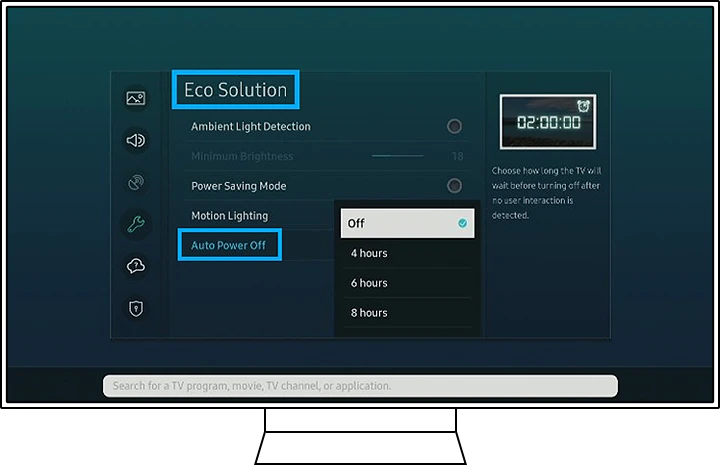
- Now choose Auto Power Off and tap on the Off option.
This will turn off the Eco Solution feature and makes your Samsung TV work properly.
Change Sleep Timer Settings:
When you enable the Sleep timer feature, your TV turns off after a fixed time. To disable this feature go through the steps given,
- Go to Settings on your Samsung TV.
- Navigate to General and select the System Manager option.
- Choose Time and select Sleep Time.
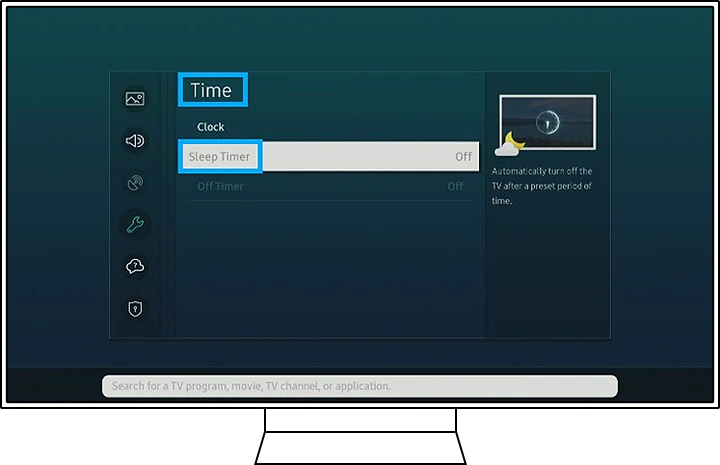
- Now tap on Off to turn off the Sleep Timer feature.
After this, your TV will not turn off at a fixed interval of time.
Update to Latest Software:
Sometimes using old software on your Samsung Smart TV can cause your TV to turn off. To update to the latest software, the steps to be followed are,
NOTE: Make sure your Samsung Smart TV is connected to a Good WiFi network with High-Speed Internet.
- Go to Settings on your Samsung TV.
- Navigate to Support and select the Software Update option.
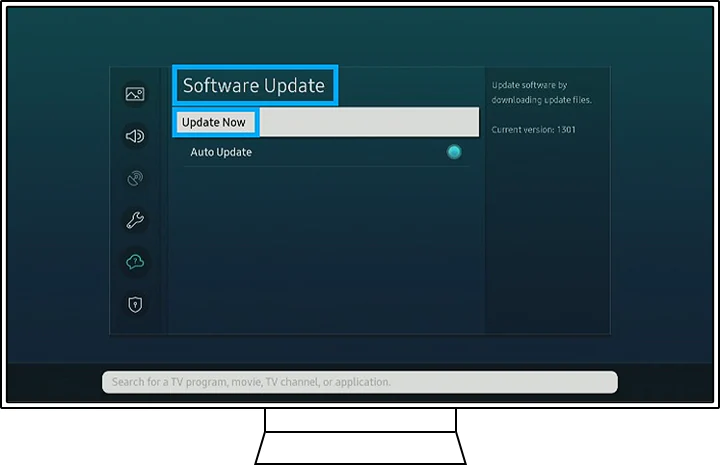
- Now Choose Update Now to check for the latest software.
- If Update is found, wait for the TV to download and install the Update.
After the update is finished, your Samsung TV will restart, and it will never turn off again.
If your Samsugn TV keeps turning Off every after updating, then it might be due to hardware problems.
Remove Surge Protector:
If you are using a Surge Protector for your Samsung TV, then you have to check if the Surge Protector is at fault or not. To do so, try to connect Samsgun TV directly to the power socket and see if it works.
If your TV works finely, then you need to replace your surge protector or not use one.
Check Cables:
Check all the cables connected to your Samsugn Smart TV. Because if you use wires with low standards, there may be power leakages that may cause your Samsugn TV to Turn Off.
If you find that your Samsugn TV keeps Turinig Off try to replace all the wires with new ones.
Samsung TV Motherboard:
Even after doing the above methods and still, your Samsung TV keeps turning off, then it would be due to defects in your motherboard. Call the Samsugn TV help centre for further instructions.
If you have a warranty, then claim it and replace your Samsugn TV with a new one.
Read Samsung TV Not Connecting to WiFi and know more about it.
How to Stop Samsung TV from Turning Off?
if your Samsung TV keeps Turning off, then you need to follow this thing to avoid it,
- Dont use your TV for a prolonged time.
- Reduce overheating of your TV.
- Keep your Samsugn TV software up to date.
- Disable the Sleep Timer feature
- Disable the Eco Solution feature
- Check your Samsugn TV connecting cable periodically.
- Use a better Surge Protector device.
Read Disney Plus Not Working on Samsung Tv and learn more about it.
The End
If your Samsugn TV still keeps turning off even after following the method mentioned, then you need to replace your TV with a new one. If you have a Warranty for your TV, then claim it to get it replaced. Follow this article to get more updates.
Frequently Asked Questions:
What is the Life Expectancy for a Samsung Smart TV?
If you are buying a new Samsung Smart TV, then the life expectancy for it would be between 4 – 7 years. If it is taken care of properly, life may increase.
Does Samsung TV have a Fuse?
Yes, your Samsugn Smart TV has a fuse in the power supply board. If the fuse is broken, then your Samsung TV will show a black screen.