
![SNL on Spectrum. [Satruday Night Live | All Episodes]](https://techthanos.com/wp-content/uploads/2023/06/SNL-on-Spectrum.-Satruday-Night-Live-All-Episodes.jpg)
Did you enjoy the 48th Season of Saturday Night Live (SNL)? The last episode was on 15th April 2023 with Ana de Armas as the guest. Did you miss the live show? Don’t worry you can watch it on demand. Spectrum On Demand service provides you with all SNL episodes of the 48th Season for its subscribers. If you watch to watch SNL live on Spectrum, then you have to tune in for the NBC channel. But the season has ended, and the 49th Season of Saturday Night Live is expected to at the end of this year.

Table of Contents
What Channel is SNL on Spectrum?
You can watch Saturday Night Live (SNL) on Spectrum using the NBC app and access to On Demand section. The Channel number for NBC Changes with respect to the location you are at. So the best way to find the channel number will be from Spectrum Guide on the Spectrum TV Box. But if you want to watch the 48th Season, you will have to access the Spectrum On Demand section to watch its episodes.
In case SNL is broadcasted live or on-demand on the NBC channel on Spectrum, Follow What Channel is NBC on Spectrum?

How to Use Spectrum Guide?
- Press the Menu Button on your Spectrum TV remote.
- Select the Search option and use the On-Screen keyboard to type the name of the channel “NBC”

- Now tap on the channel Logo and get navigated to it
or
- Select the Guide option and find the NBC channel logo.
- Highlight and press OK on the NBC channel to watch it on your Spectrum TV.
You can Live Strem SNL through The NBC App with your Spectrum TV credentials during the broadcast of the next season. To access the NBC Channel, NBC app, and Spectrum On Demand services, you just need to subscribe to its TV Plan or Internet plan. Check out the plans offered by Spectrum from its official site, spectrum.com. The Plan offed by Spectrum TV is as follows,

How to Watch SNL on Spectrum On Demand?
You just need to navigate to Spectrum On Demand section and search for Saturday Night Live episodes. There are a total of 18 Episodes from Season 48 and 2 Episodes from Season 47, currently available on Spectrum On Demand. Follow the simple procedure to navigate and watch these episodes on your TV.
How to Access On-Demand Content on Spectrum?
- On your Spectrum TV Remote press the Menu button.
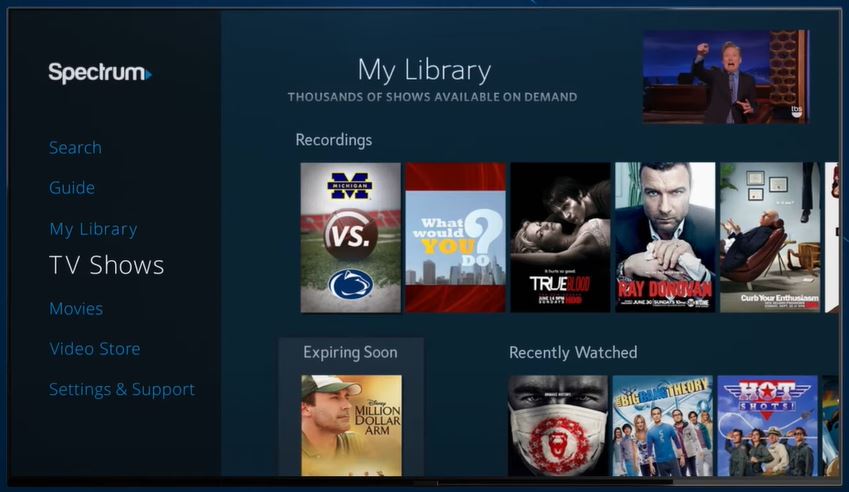
- Select the TV shows option from the menu.
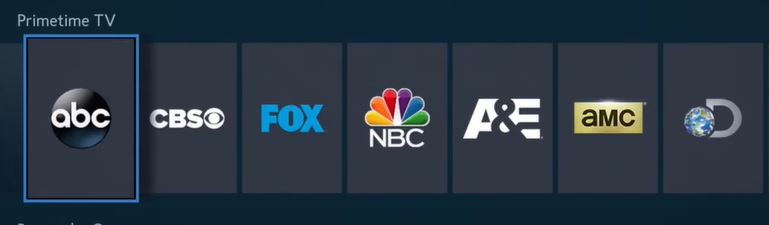
- Go to the Primetime TV section and select NBC.
- Select Saturday Night Live TV show and go to its information page.
- Now tap on Browse Episodes, and choose the Episode you want to watch.
Sit comfortably on your couch and enjoy the best TV show ever made and have loads of laughter.
Can I Watch Saturday Night Live, SNL on Spectrum TV App?

Spectrum TV subscribers can carry live TV channels and On Demand TV shows and Movies with them through the Spectrum TV app. All you have to do is install the Spectrum TV app on its supported devices. And then use your Spectrum TV subscription credentials to Sign In. You can use the Spectrum TV app to watch Saturday Night Live on your Favorite Devices on the go. The devices on which you can access the Spectrum TV app are as follows,
iPad | iPad mini | iPhone | iPod Touch | All Kindle Fire Models | Android phones & tablets | Xbox One | Samsung Smart TV | Google Chromecast | Roku
- Install the Spectrum TV app on your device from its default App Store.
- Use your Spectrum ID to Sign In.
- Go to the On Demand section and select NBC.
- Tap on the Saturday Night Live TV shows.
- Select the Season and choose the Episode you want to watch.
If you are using Insignia Fire TV at your home, then you can easily install the Spectrum TV app on your TV, by referring to How to Watch Spectrum TV App on Insignia Fire TV?
Alternate Ways to Watch Saturday Night Live. [SNL on Peacock]

Peacock TV from NBCUniversal offers you All Season and All episodes of Saturday Night Live on demand. This will be the best place to binge-watch your favorite Saturday Night Live shows. You can either use your DIRECTV subscription account credentials or subscribe to a Peacock TV subscription. The subscription plans offered by Peacock TV are as follows,
- Peacock Premium – $4.99/month (With Ads)
- Peacock Premium Plus – $9.99/month (Without Ads)
NOTE: Spectrum TV and Internet subscribers can use Peacock Premium for 12 months with no extra charges.
How to Access Peacock TV Using Spectrum?
- On your Phone or PC web browser visit peacocktv.com/spectrum
- Create a Peacock TV account using your credentials
- Use your Spectrum ID to link your Spectrum Account with your Peacock Account.
Now that you have activated Peacock Premium access, you can access Peacock TV with its credentials on all of its supported devices. the Devices on which you can access Peacock TV are as follows,
Amazon Fire TV | Apple TV | Google Chromecast | Roku | Android TV | iPhone | iPad | Android Phone | Android Tablet | Mac | Windows | PlayStation | Xbox | LG Smart TV | Samsung Smart TV | Sony Smart TV | VIZIO Smart TV | Hisense VIDAA | Google TV | Meta Quest 2 | Meta Quest Pro
Suggestions
It is better to watch Saturday Night Live on Peacock TV using your Spectrum TV credentials. Because it gives you access to All Season, All Episodes of SNL. The number of devices you can access is also more than Spectrum TV app devices. Even without Spectrum TV credentials, the subscription costs just $4.99 per month.