
In this social media dominant world, we depend on social media for almost everything. We make new friends and also chat using the in-built chat option. As it supports numerous stickers and Emoji, chatting is a fun one. Nowadays, everything has become fun with stickers, instead of typing, people just exchange smileys and stickers. Apart from being fun, it also saves your energy and time. Facebook has been introducing new features from time to time, early it had the Poke feature. Recently it has introduced the “Wave” feature in FB Messenger. In this article, you will see how to wave back on Messenger.
Table of Contents
Wave Feature in Messenger
Be it FB or Messenger, it is a popular way to connect with your family, friends and even make new friends. Just a few years back, FB added a wave button to its messenger app. It’s like a virtual Wave to start a conversation. At times, when you are initiating a conversation you might be hesitant about how to start a conversation. At that point, you can use the “Wave” feature. Wave back on messenger is a feature to grab someone’s feature when are stuck at “Hi” or “Hello”. Also, you can use the wave feature only with those who are on your FB friends list. However, you cannot use this wave feature in the middle of an active conversation.
The wave option is only available when you are friends with that person or when you are having a first-time conversation.
How to use wave on Messenger?
The wave back option is enabled when you are chatting with someone for the first time, when you are friends with that person, and when your friend is active online.
Let’s see how to enable wave…
1) The foremost thing to do is to install “Messenger” on your Android Platform.
2) In the bottom bar, you will see a “People” Tab wave back on Messenger.
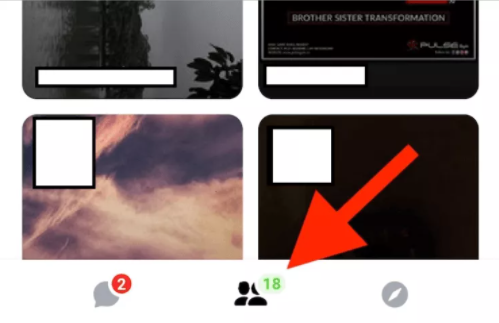
3) After that, you will see a people’s tab with two separate mini tabs as “Active” and “Stories”.
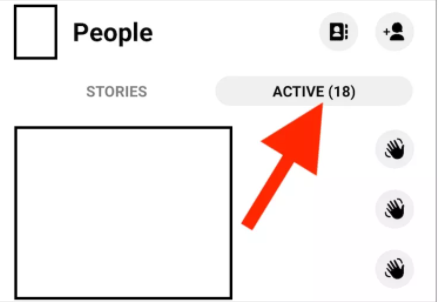
4) Secondly, you will see a Grey wave icon for the person who is online in the active tab.
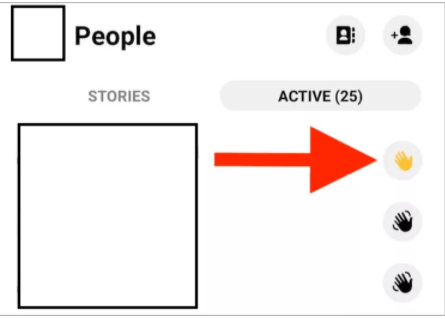
5) Thirdly, tap on the grey icon to wave back on messenger and once you have used it, this will turn to yellow.
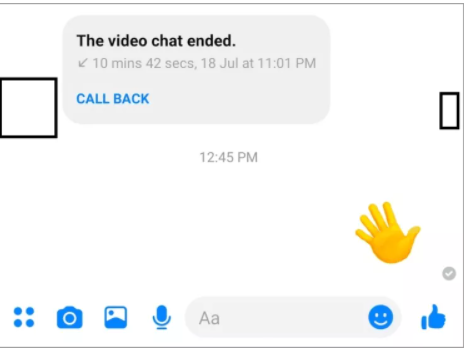
6) As a result, the recipient will see a waving hand in Messenger’s chat dialog.
How to wave back on Messenger?
1) If someone has waved at you in the messenger, you can also wave back at them.
2) As usual, open the Messenger app to see who has waved at you.
3) Immediately, you will see a “People” Tab wave back on Messenger.
4) A yellow wave will be shown saying that someone has waved at you and will give you the option to wave back.
5) Once you tap the icon, you will see that you both have waved at each other.
Know about it, How to Get Tempest Addon on Kodi [Updated Guide]
How to undo the Wave on Messenger?
1) Like always, launch the messenger app to undo the wave on Messenger.
2) Kindly open the conservation of the person who has waved at you.
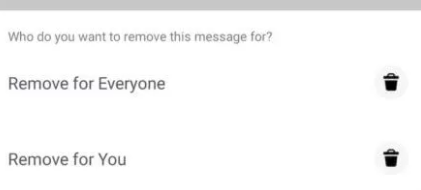
3) Then long tap on the wave icon to remove it, sometimes you would have waved at someone by mistake.
4) There you will see two options as “Remove” or “Remove for everyone” to undo the Wave back.
Wrapping Up
Everything has become fun with stickers, instead of typing, people just exchange smileys and stickers. Despite being fun, it also saves your energy and time. A few years back, Facebook has been introducing new features from time to time, early it had the Poke feature. FB has also introduced the “Wave” feature.
Know this, Fix Slamious Build
Frequently Asked Questions
What is Wave Feature?
In short, Wave back on messenger is a feature to grab someone’s feature when are stuck at “Hi” or “Hello”. Besides, you can use the wave feature only with those who are on your FB friends list. Hence, you cannot use this wave feature in the middle of an active conversation.
When can you wave at someone?
It is enabled when you are chatting with someone for the first time, when you are friends with that person, and when your friend is active online.