
Public IPTV Playlist. Those who are searching for a collection of publicly accessible IPTV Channels and Its playlists. Then this article will show you the detailed information for you. Tons of Channels, Shows, and programs are available from the World. All the trending Content is also obtained in all these Publicly available IPTV services. In Publicly you can also get the EPG Channel but those channels didn’t use that info.

Table of Contents
How to Use Public IPTV?
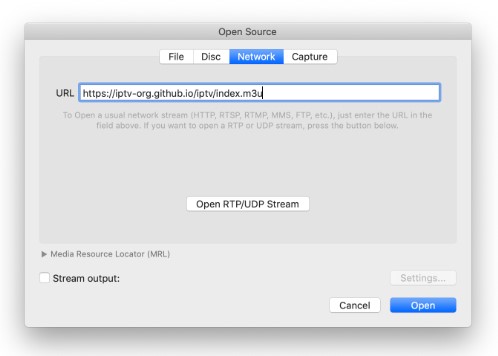
To Use a public IPTV Player just insert any one of the links in the Below video player and check that supports the live-streaming content. If it is accepted then you can stream the content from the IPTV service.
Once the Link is accepted by the service then click the Open button to access the content which are available behind this IPTV service.
Check the Post: Trex IPTV
Public IPTV Playlist
There are many different types of playlists accessible as a Public IPTV. They can be divided into a partition of groups. The main Playlist includes Channels Other than Adult Channels. They can split up the public IPTV service into different ranges such as Category, language group, Grouped country, and more.
| Public IPTV Playlist | |
| category | Channels |
| Family | 41 |
| General | 1079 |
| Kids | 181 |
| Auto | 15 |
| Business | 57 |
| Classic | 55 |
| Comedy | 56 |
| Documentary | 64 |
| Cooking | 23 |
| Education | 116 |
| Culture | 74 |
| Lifestyle | 81 |
| Movies | 283 |
| Music | 479 |
| Outdoor | 45 |
| Relax | 16 |
| Religious | 413 |
| Series | 165 |
| Shop | 74 |
| Science | 25 |
| Travel | 31 |
| Weather | 14 |
| Undefined | 5316 |
Features of Public IPTV
- You can get lots of Popular and premium IPTV services.
- It Includes an IPTV Channel Filter Option.
- Choose the IPTV Service based on category easily.
- Public IPTV service contains various popular Channels including radio channels, RTMP Streams, DASK streams, TV Channels, and More.
- It supports Multiple Sources Such as VLC Media Player, Kodi, and TVHeadend.
Similar Post: Typhoon Labs Iptv Reviews
How to get Public IPTV Channels with TVHeadend?
This is the easiest platform to get a public IPTV Channel. At the same time, only one user can access this content. Suppose to access the same channel Content in various devices simultaneously then the Internet Connection can be affected a bit.
The Steps are:
- In the option of Configuration click the DVB Inputs.
- Following this Press the Network to add new IPTV content Automatically.
- Now you can insert the New network.
- Set the URL in the Field.
- Once you enter the link and Press the OK button.
It will switch to that respective IPTV Channel. Now you can choose the content from it.
For More Info, Blerd Vision IPTV
The Final Words
From this article, Guys you know that many IPTV Services are available to access as a Public IPTV service. They can be divided into categories. You can Github and TVHeadend sites to access the Public IPTV Channels. Tons of amazing shows, Programs, and a variety of events are available on these Services.