
How to Install Plex on Roku? Plex is a Popular premium Streaming Service and a media Player and it gives 200+ Live TV Channels and 5000+ Movies and TV shows. Now the Plex application is available on your Roku Channel Store. Tons is exclusive library content available on this Service. Here in this article, You guys have to know the steps and methods to download the Plex Streaming Service on Roku devices. Scroll down the article to learn more related information.

Table of Contents
How to Install Plex on Roku?
Plex Streaming service is available on the Roku Channel Store. So you can download the application directly, If you can’t see the Plex app on your Channel Store then you have to update your Roku OS version and download the app in straight Way. Follow the Upcoming steps to get the app on the Roku Channel Store.
The Steps are:

- From the Roku Home page.
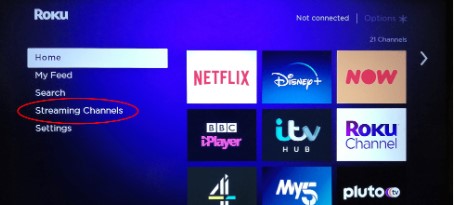
- Move to the Streaming Channel option.

- Click the Search Channel.
- Type the keyword as “Plex”.
- Select the Application from the list.

- Then Click the Add Channel option.
- After installation, Activate your account to stream all your favorite content.
Also, Read How to Get Starz on Roku
How to Get Plex on Roku? [Using Website]
This is another official way to download Plex on your Roku devices. You can also get the app through this Roku website without using a Roku App store. There is no sideloaded method needed to stream the content.
The Steps are:

- Open the Browser on your PC and Move to the Roku website.

- Click the Sign in Button and Log in to your Roku Account.
- Tap the Search bar option.
- Type the keyword “Plex”.
- Choose the Application from the Search result.
- After that, Click the Add Channel option.
- Once the process is done you can see the Plex app in your App list.
- Open the Plex app and Sign in with your credentials to stream the content.
Check the post: How to Watch Discovery on Roku
How to Activate Plex on Roku?
Activation is the process of streaming the content on your devices, Only you can access the content when you enter the Activation to get permission to stream all your favorites. Moreover, it is a process of stimulating content on Roku devices.
The Steps are:
- Open the Plex application on your Roku devices.
- Click the Sign in button.
- It will show you the activation code on the screen.
- Then Visit the Activation site (https://plex.tv/link) on another device like a smartphone or PC.
- After that, Sign in to your Plex account.

- Now you have to enter the Four-digit Code on the Box and click the Submit button.
- Reopen the Plex application on the Roku device and then watch all your favorite shows, programs, and movies.
Subscription of Plex
Plex Streaming service subscription service, You can get the plan through its official website. There are different types of packages available for this service. You can access a monthly, Yearly, and Lifetime subscription for this Service. Lots of channels, shows, Top premium Movies, TV programs, and more events are accessible on this service.
- The monthly Package is available at the cost of $4.99.
- Yearly package is at the rate of $39.99.
- Lifetime plan obtained at the price of $119.99.
Alternative Way to get Plex on Roku
This is an alternative to screen mirroring the content from smartphones to Roku devices. If you don’t have an App Store on your Old Roku TV then you can use this method to get the content.
The Steps are: [Enable Screen Mirroring Mode]
- From the Roku Home page.
- Click the Streaming Channel option.

- Choose Screen Mirroring mode to turn on.
The Steps for screen mirroring:
- Download the Plex app on your Smartphone.
- Move to the Notification center

- Click the Cast Icon.
- Select your device name.
- Pair up devices.
- Once it’s connected.
- Play your favorite Movies, Shows, and more programs.
Similar Post: How to Get Spectrum TV App on Roku
The Ending Word
Hence, the Plex on Roku is available to download in Straightway, If you have the latest version then you can download the Plex application directly. Otherwise, use a Screen Mirroring method to watch your favorite content even in the Older version of Roku TV. You can easily download the Plex app on your Roku devices.
Frequently Asked Questions
What is the Plex Streaming Service?
Lots of Plex Streaming services are available to watch Movies, Shows, and TV programs. It is a Subscription premium service. It contains an exclusive collection of free Live TV Channels that access the channel everywhere in the World.
Can I get Plex on Netflix?
There is a free Plex Account available on the Netflix streaming service, You can get more and more Content. You can Create a universal Watchlist and get popular Content.
How to Activate Plex on Smart TV?
You can download the Plex app and then activate your account to stream its content. After installation, Click the Sign in button to get an Activation code. Then move to another device to visit the plex activation site enter the code and complete the Sign in process to stream its content.