
![OWN on COX. [Channel Number | Live Stream Apps]](https://techthanos.com/wp-content/uploads/2023/04/OWN-on-COX.-Channel-Number-Live-Stream-Apps.jpg)
OWN the Oprah Winfrey Network is one of the best entertainment and lifestyle programs broadcasters. You can watch this channel on your cable and satellite TV services like COX, DIRECTV, Xfinity, and more. To watch OWN on COX, you can refer to this article and enjoy watching all of its shows on your TV. You can also learn about the different methods you can use to live stream the channel on your favorite device from here.
Table of Contents
What Channel is OWN on COX?

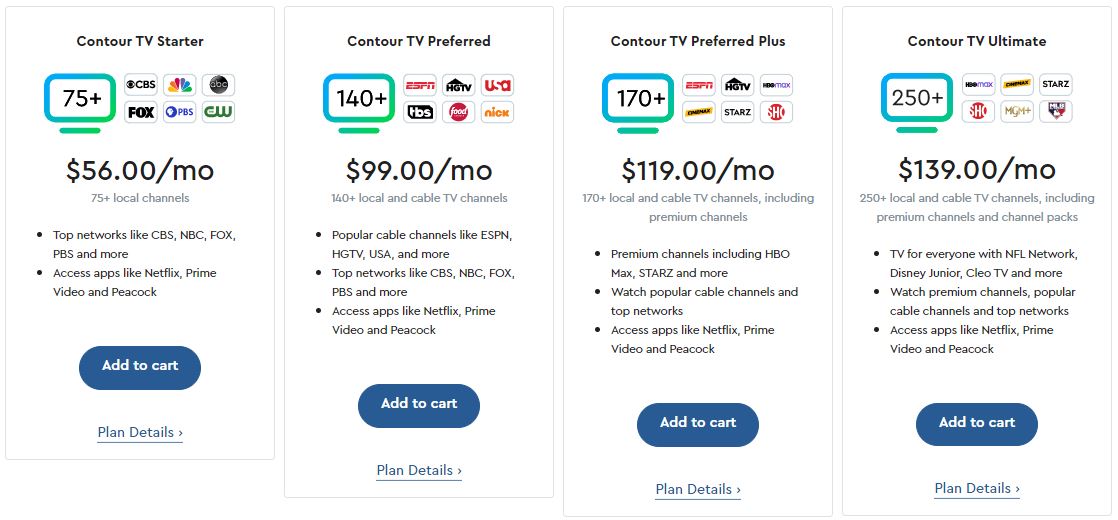
You can watch the OWN channel on your COX TV by subscribing to the Contour TV Ultimate package. The Channel number for the OWN channel varies with respect to the location you are watching it from. But with the help of the Contour TV voice remote, you can easily find the OWN channel on your COX TV cable connection. Follow the simple procedure to get to the OWN Channel on COX with the help of its voice remote,
- Press and Hold the blue microphone button.
- Now say the channel name “OWN” or its channel number.
- You will get directed to the OWN Channel on your COX cable network.

The Channel Numbers for OWN on your Contour Cable service are as follows,
|
SERVICE PROVIDER
|
CHANNEL NAME | REGION |
CHANNEL NUMBER
|
|
COX
|
OWN
|
Fredericksburg | 99 |
| New York | 149 |
You may also like to learn about What Channel is Lifetime on COX?
How to Live Stream OWN with COX TV?
If you are outside of your home, you can still watch your favorite shows from OWN with COX TV using their official apps. Data Charges are applied when you stream on the Watch OWN app and the COX Contour TV app. To access both these applications you will need your COX TV subscription account credentials. Follow up to learn more about these applications.
Watch OWN app

You can watch all of your favorite OWN shows along with 14 additional networks like TLC, HGTV, ID, and more on the Watch OWN app. The programs broadcasted on the OWN channel can be live-streamed on the app at the same time. If you like to binge-watch some of the famous OWN series like Ready to Live, Queen Sugar, Love & Marriage: Huntsville more, it can be done on the Watch OWN app. Browse for your favorite genre of shows and save them to watch later at any time you want. The Devices on which you can use the Watch OWN app are as follows,
Android | iOS | Apple TV | FireStick | Roku | Google TV | Samsung TV Android TV
Chromecast | XBOX
You can easily download the app on these devices from their official app stores. After installation, you need to activate it with your TV provider credentials to access its content.
How to Activate OWN TV?
- Launch the Watch OWN app on your device.
- Note down the Activate Code from your device screen.
- Go to your PC or Phone web browser and visit the start.watchown.tv/link site.

- Enter the Activation Code here and tap on Activate.
- Now use your TV provider’s credentials like COX to Log In.
COX Contour TV

Watch all of your favorite live TV shows and on-demand content with your COX credentials on its official app COX Contour TV app. You can watch all the channels available on the COX TV Plan you have subscribed to. The basic requirements to access the COX Contour TV app to watch the OWN channel on it are as follows,
- A good WiFi or Cellular Data connection.
- COX TV Subscription.
- Your COX profile Username and Password.
You can just use the COX Contour TV app on its supported devices and use your COX account credentials to access Live TV to watch the OWN channel The devices on which you can use this app are as follows,
iPhone | iPad | iPod | Andorid Phone & Tablet
You can also watch live TV on your Mac and Windows PC from its web browsers on the watchtv.cox.com site.
Chrome | Firefox | Safari
Since there are no big-screen devices with access to the COX Contour TV app, you can just cast it from the supported devices to other devices’ screens easily. You may also like to learn about What Channel is LIV Golf on COX?
How to Watch OWN for Free?

You can watch the Highlights, Full Episodes, and listen to Podcasts of OWN from its official YouTube page. Watch behind the scenes and more exclusive content that is not aired now on its YouTube Page. Get YouTube Premium at $22.99 per month and $119.99 per annum to access all the content ad-free.
What is on OWN TV Channel?
OWN TV focuses its programs on African American audiences. You can watch programs on entertainment, lifestyle, and reruns of talk shows from the Harpo Studio libraries. Some of the upcoming and trending TV shows on the OWN channel are as follows,
Love & Marriage: Huntsville | Put a Ring on It | Ready to Love | Love & Marriage: D.C.
All the Single Ladies | Queen Sugar | Cherish the Day | Family or Fiancé
Suggestions
If you are interested in the Podcasts available on OWN, you can just hit on its official YouTube page and listen to them. You can check on the upcoming program schedule for ONN TV shows from its official application and site or use the EPG at the COX Contour TV app. Make sure to have a good internet connection with internet speed for better streaming experiences.
Frequently Asked Questions
What Channel is OWN on DIRECTV?
You can watch the OWN channel on DIRECTV by subscribing to the Choice, Ultimate, or Premier TV packages. After the subsection navigate to channel number 279 and watch the OWN channel in HD video quality on your DIRECTV Satellite Connection.