
Who doesn’t love the Android platform today? Most people are using Android on large scale. Android is an amazing platform that has millions of mobile phone users. It’s because it comes at an affordable price and with lots of features at such a price. Nowadays, there are Smart TVs which get released in android OS. There are so many media players too which are streamable in Android. Basically, the Android box is built-in Android OS as the name suggests and has Amlogic CPU, Quad-core. On this page, you will see how to do the MXQ Pro 4K firmware update.

Table of Contents
MXQ Pro 4K
A device that is much more affordable than Firestick is this Android Box, MXQ Pro 4K. To be precise, MXQ Pro 4K is an affordable streaming device that runs on the Android platform by default. As we already know, it has specifications like Amlogic CPU, Quad-core. In addition, it lets you stream even Kodi in this MXQ Pro 4K. It starts with Android version Lollipop and above as Kodi also supports the same configuration. It is one of the best streaming media players that streams all HD videos. Similar to any Android Smartphone, MXQ Pro will also get regular updates.
Check out, How To Fix SmartCast TV Not Available?
MXQ Pro 4K Highlights
- As the name suggests, it supports a video resolution of 4K and breathtaking pictures.
- The best decoding technology, H.265 is present in MXQ Pro as it helps in displaying a vivid and rich picture.
- Has HDMI support along with the remote of it contains batteries to make them work properly without any hassle.
- Like told earlier, this MXQ comes with an Amlogic processor with bits of help inflexible processing and no slowing of the system.
- By default, MXQ comes with 16GB ROM and 2GB RAM which lets you download extra apps and games for a streamless experience.
How to do MXQ Pro 4K update?
1) The basic step here is to launch the PC and download the latest version of MXQ Pro 4K firmware to do the update.
2) Now in the MXQ Pro 4K device, turn it off and tap on the reset button. The hitch here is you should not release the reset button until you complete the update process.
3) Immediately, download the USB burning tool and insert the device in your USB port of PC.
4) Just like any installation, run the .exe file and install the USB burning tool on your PC to do MXQ Pro 4K update.

5) On the screen displayed, choose File and then tap on “Import image”.
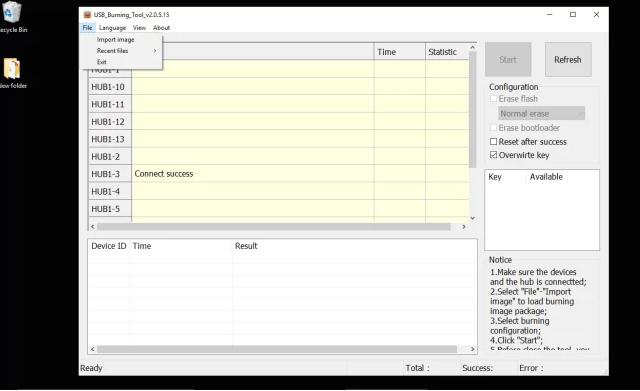
6) After locating the .img file and give overwrite option to perform the MXQ Pro 4K update.
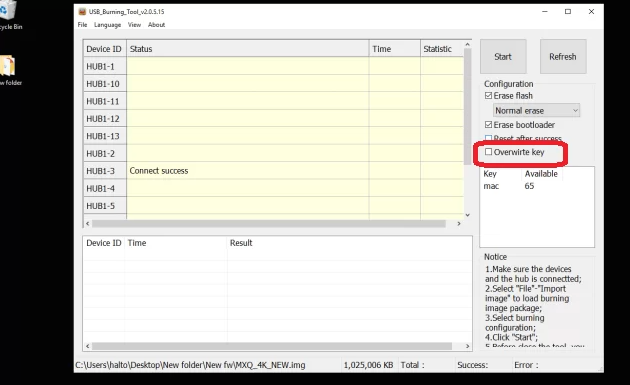
7) Once you give the start, the device will be updated and that’s it will be updated. Finally, release the reset button after the MXQ Pro 4K update.

Wrapping Up
In conclusion, Most people are using Android on large scale. Hence android is an amazing platform that has millions of mobile phone users. It’s because it comes at an affordable price and with lots of features at such a price. Recently, there are Smart TVs that get released in android OS. Yet, there are so many media players too which are streamable in Android. Basically, the Android box is built-in Android OS as the name suggests and has Amlogic CPU, Quad-core.
Check it out, How to Watch Bally Sports on Apple TV?
Frequently Asked Questions
What is MXQ Pro?
MXQ Pro 4K is an affordable streaming device that runs on the Android platform by default. As we already know, it has specifications like Amlogic CPU, Quad-core. In addition, it lets you stream even Kodi in this MXQ Pro 4K. And it starts with Android version Lollipop and above as Kodi also supports the same configuration. It is one of the best streaming media players that streams all HD videos.