

Kodi Bae repository is one of the finest repositories of all time. It represents Exodus, streams, Kodi, sports devil, cloud TV, 9 Anime, Release hub, and so on. It is completely guarded, and also there are no harmful sensitives. In Kodi, the latest update means new versions have been uploaded. Kodi repo will be a useful one for Kodi users. Kodi has an inbuilt option in your device settings. In this context, we are going to show you how to install the Kodi bae repository.

Also, search: Kodi Repo on Firestick
Table of Contents
How to Install the Kodi Bae Repo on Kodi Leia?
- Tap on the Kodi Settings menu icon.
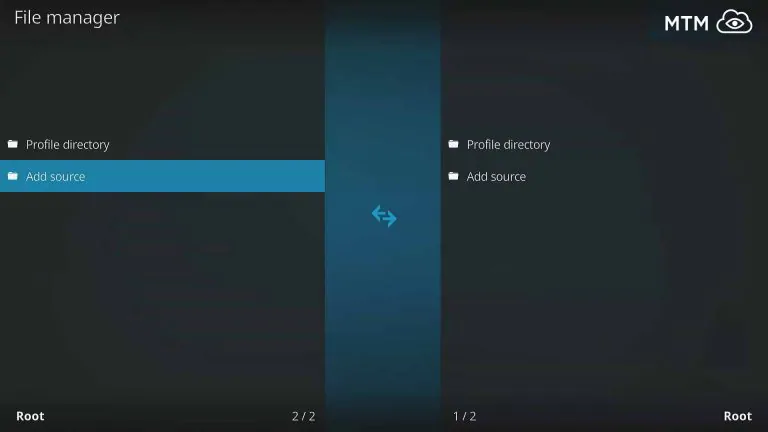
- Navigate to the File Manager.
- Further, move to the Add Source option.
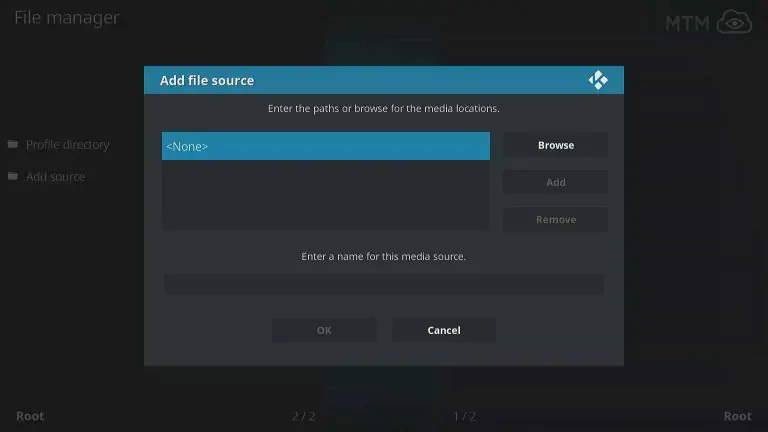
- Choose the None option.
- Enter https://kodibae.github.io.
- Tap on the OK tab.
- Choose a name as Kodibae.
- Press the OK button once again.
- Head to the Kodi Addons and then tap on it.
- Again choose the Add-ons browser.
- Then choose the Install from Zip file.
- Head to the Kodibae.
- Choose the ZIPS.
- Tap the Kodibae.zip from the home repository.
- Tap Install from the repository under the Addons browser.
- Pick the Kodi Bae Repo.
- Tap on the Video Addons.
- Pull down and choose Kodi Bae Repo.
- Tap the Install tab in order to download the Kodi bae.
Similar post, No Limits Magic Build
How to Install Illustrated Kodi Bae Repo?
Enabling the Unknown Sources from the Kodi Settings in order to install the third-party addon in Kodi Leia, Krypton, or any other new versions. Get into the below instructions to provide the Kodi Bae Repository Source URL.
Enter Kodi Bae Repo Source URL:
- Firstly, you have to open the Kodi.
- Hit the Settings menu from the left upper screen.
- Tap on the File Manager under the System.
- Hit the Add Source from the left side of your screen.

- Tap on the None option on the screen.
- Enter https://kodibae.github.io in the respective field.
- Tap the OK button from the on-screen.
- Choose a name for the source as Kodibae.
- Check once again the Kodi Bar repository source URL.
- At last, tap the OK tab to confirm.
How to Install Kodi Bae Kodi Repository?
- Find “Addons” and click it.
- Tap the “Open box” type icon.
- Click “Install from zip file.”Now choose “Kodi bae repository.”
- From the Kodi Bae source, input the -= ZIPS=- directory (not–= Repositories=-).
- Further, tap on the Kodibae.zip file in order to start installing.


Best Kodi Bae Repo Addons
It is the best working Kodi add-on that is available to Leia and Krypton. However, the repository catalog has add-ons like Sportsdevil, 9Anime, Exodus Kodi, cCloud TV, Release Hub, etc.
Also, the Kodi Bae developer maintains the repository and updates the add-ons, as well as provides a current version. Above all, the revised code for the classic Kodi add-ons will work amazingly. Additionally, dependencies like URLResolver always get updates, and the classic add-ons offer many free-flowing streams.
However, many devices may change the resolver dependencies in order to use the Universal Resolver or any other similar to install the addons to work properly.
Is Kodi Bae Repo Not Working or Down?
Without any comments, Kodi repositories and add-ons may go offline for some time frequently. Above all, the Kodi Bae repository has improved and retained as a stable source from the Kodi Add-ons as one of the best among the users. So stay for a while once it gets back online soon at any time.
Finishing Lines:
The Kodibae repository is the best one for users to watch all types of content like sports, news, movies, series, and documents. It takes simple and easy steps to install the application. So You can make use of it. On the other hand, they have been maintained properly by their developing team. This article will help you to get the Kodibae repository.