
How to Watch Weather Channel on Roku? Knowing the Weather reports and updates is the most important thing. Weather Channel telecasts Live and on-demand reports for you. That TWC allows you to stream all the weather-related Analysis. In addition, this application is available on various streaming platforms. If you are a Roku device user then you can follow this guide to know the steps and more additional Information.

Table of Contents
Can I get Weather Channel on Roku?
Without any doubt, you can get the Weather Channel on the Roku device. Because the Roku device includes the Weather Channel officially on the Roku Channel Store. Moreover, you can get the Weather Channel on the streaming service on Roku. Install the online streaming services, pay the subscription cost, purchase the service, and watch the Weather Channel updates on the Roku device.
Whereas the Weather Channel application is a free application you can install the application on your smartphone. Otherwise, you can use some streaming devices or Cable TV providers to watch Weather Channels then you have to subscribe to that particular provider subscription cost to get the Weather Channel. Furthermore, the weather channels available on such providers are Xfinity, Dish, Cox, Optimum, Spectrum, DirecTV, and Verizon FiOS.
Also, Read How to Get Weather Channel on Firestick
Why Weather Channel?
Here we have mentioned the highlights and additional features of the Weather Channel. keep reading and to know extra information.
- You can be able to check the temperature Maps, Winds, Satellites, radar, and more options.
- And you can get to watch the TWC Shows on Video-on-demand.
- Always updates the Current weather condition, winds format, Humidity, UV index, sunset, sunrise, and Moon Phases.
- Moreover, it gives News and regular updates about the Rain and Snow for over 24 hours.
- The most important option is that you can get the particular location’s weather conditions on this Weather Channel.
- It gives entire information and details about the weather condition in the local regions.
How to Watch Weather Channel on Roku?
Now the Weather Channel is Available on the Roku Channel Store so you can install the Application in a Direct Way. Here we will illustrate the steps. Note it down and try it out with your device and get the Weather Channel.
The Steps are:
- Switch on your Roku device and Fix a stable internet connection.

- Navigate to the Home page and click the Home button by using your Roku Remote.
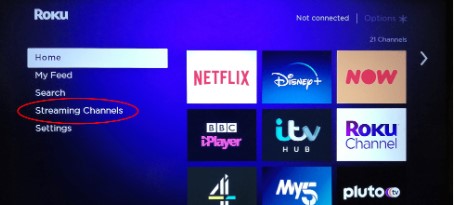
- Choose the Streaming Channel option and it will show a list of menu options.

- Swipe down and select the search Channel option.
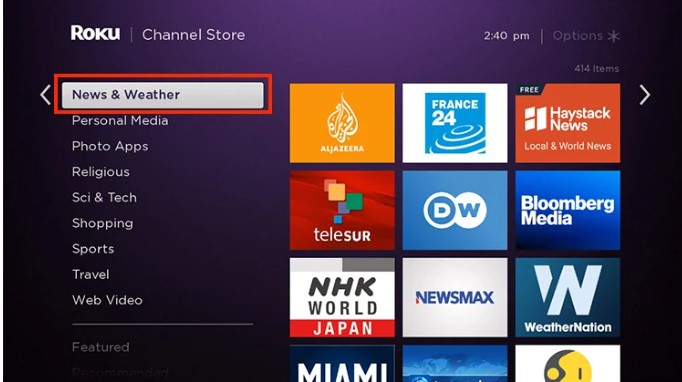
- Find the Weather Channel by using the search bar.

- Tap the application from the list and Click the Add Channel option.
- It will start installation on your device.
- Once it’s installed then you should Press the Go to Channel option and open the application on your device.
- If it’s done then you have to activate your application and watch its content.
Additional Info, How to get Weather Channel on Samsung Smart TV
Watch Weather Channel on Roku Via Website
This is one of the methods to install the Weather Channel on the Roku device by using a Website. For this process, you have to log in to your account. Then proceed with the upcoming steps.
- Open the Browser on your smartphone or PC and enter the Roku Website.

- Then you have to sign in to your Roku account Tap the Search and type the keyword “Weather Channel”.
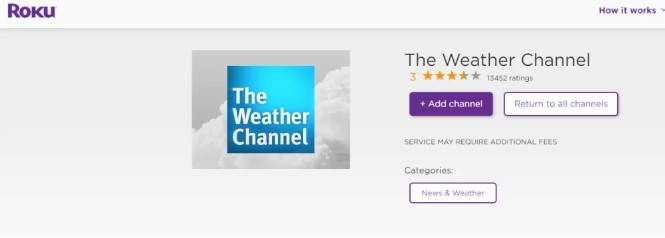
- And it will show the official application.
- Press the add channel option from the Website it starts downloading the application on your Roku account.
- Once it’s done, It will appear within one day on your Roku screen. suppose you need the application immediately then you can update the Firmware of your Roku device.
Activate Weather Channel on Roku
Once the application is installed on your Roku device then you have to activate the application by entertaining the activation code. Then only you can get a permit to access the Weather Channel content on the Roku Device.
The Steps are:
- Open the installed Weather Channel application on your Roku device.
- Then it will show the activation code. Note it Down.
- After that, you have to visit the official site to activate the Weather Channel by using any browser on the other device such as Smartphone or PC.

- Now you can select the Cable TV provider from the suggestion list.
- Afterward, you should enter the Activation code in the required field.
- Once the process is completed then you have to log in by using your Cable TV provider account.
- The process is done then you can watch all your favorite shows, movies, events, and TV programs.
Check the Post: How to Watch Weather Channel on DirecTV
Alternate Way to Watch Weather Channel on Roku
You can access the Weather Channel on Roku by using the streaming Services. Subscribe to the respective Streaming services and get the Weather Channel. Moreover, the upcoming streaming services are supported by the Roku device. So you can install the application and get the Channel.
Fubo TV:

This streaming service gives the Weather Channel. Whereas this Channel comes with three subscription packages on Fubo TV. There are:
- Pro- At the cost of $74.99 for one month.
- Elite- The Service at the price of $84.99 for 30 days.
- premier- At the price of $94.99 for one month.
Along with the packages you can get more than 200+ Channels also gives 1000 hours of DVR cloud Storage Space to record your favorite content.
Frndly TV:

You can get the Weather Channel at the cost of $6.99 for one month. In addition, it gives more than 40 + Channels with seven days of free trial days.
Hulu:

The Weather Channel is accessible on the Hulu streaming service at the cost of $69.99 for one month. You can install the Hulu service on your Roku Device and choose the Weather Channel from the categories and watch it.
YouTube TV:

YouTube TV is a geo Restricted streaming service and it is available in the United States. You can be able to stream the Weather Channel on the Rokud device by using a youtube TV service. The subscription cost of $72.99 for one month and it includes unlimited Cloud DVR storage Space and 21- days of Free trial offers.
Closing Off
In this article, we shared detailed information about getting a Weather Channel on a Roku device. There are two possible ways available using a direct method or installation by using Roku Website. Refer to the Guide and get the Steps for Installation and Activation. Also, you can use streaming services to watch Weather Channel. We hope you like this article, If you have any related queries, Drop your doubts in the comment section.