
What’s the Best Channel for Watching Lifestyle and Entertainment Programs? WE! Not You, Not Me, But We. When Everything Comes Together – It is the Damn Soul Best. So, Let us Find Out the Steps to How to Watch We TV on Roku and Activate it on your Device.

Table of Contents
Is We TV Available on Roku?
Yes, The WE TV is available on Roku. Being available on the Majority of Streaming Devices, You can download the App from the Official Roku Channel Store. It is available under the Movies and TV Categories. Therefore, It is one of the TV Channel that airs Content on Lifestyle, and TV Series comprise Entertainment. All you need to know is How to Install the TV App and Stream.
Read Also: How to Install WE TV on Firestick
How to Watch We TV on Roku?
Install the We TV App on your Roku as you Install any other app. Follow the instructions given below and Get to Stream.
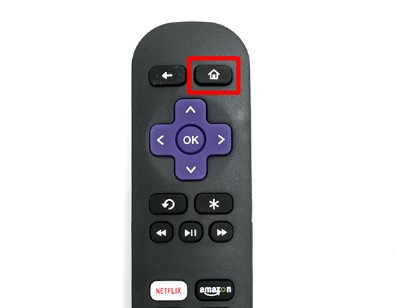
- First of all, Press the Home Button and Access the Home Screen on Roku.

- Click on Streaming Channels and then Choose Search Channels.
- Type WE TV using the On-Screen Keyboard. Find the App.

- Select and Tap on the Add Channel to Install We TV on Roku.
- Once Installed, Launch the app and Log in to Stream the Content.
How to Sign up for the We TV App on Roku?
If you are a New User, You may probably not have an Account or Any Credentials to Log in, So, Refer to the Signup steps below and Create an Account.
- On PC, Access the browser and visit the Official We TV Website.
- Now, Click on the Sign-in tab.

- You will get into the Sign in with your TV Provider Page.
- Choose the TV Provider on which you want to Link We TV and also have an Active Subscription.

- Click on the Provider and Sign in using the TV Provider’s Credentials.
- This way you can Sign up for the app at the same time Link with your TV Provider to get the Streaming.
How to Activate We TV on Roku?
Once you have Signed in to the App on Roku, You will have to Activate the app. Do that with the Simple Steps Right down here.
- Launch the App > Log in using your Credentials of the Linked TV Provider.
- You will receive an Activation Code on your Screens. Note it down.

- Now, Navigate to the We TV Activation Website – https://www.wetv.com/activate
- Insert the Code you received and Click on the Submit Button.

- Once done, You have successfully Activated the app and Now It is Ready to Stream Any Content on your Roku.
Learn More for Various Devices: How To Activate WE TV
Alternative Ways to Watch We TV on Roku
Unfortunately, If you experience any sort of unavailability of the App, There are Some Alternatives that you can try to work around.
Install the We TV on Roku Via Website:
- Use any Browser of your Choice and Go to the Roku Official Website.

- Visit the Roku Channel Store on the Browser and Then Click on the Search bar.

- Now, Type We TV and Find the App, Then Click on Details.

- Click on Add Channel and Then You will be navigated to Sign in to your Roku Account.
- Finally, Refresh your Roku Device and You will get the app on your Device Automatically in Sometime.
How to Screencast the app on Roku?
Apart from the Roku, The app is also available on Android and iOS Devices. So, You can also choose to Cast the App from Phone to Roku.
- Start by Installing the We TV app on Android from the Google Play Store or on iOS from the Apple App Store.
- For Android Users: Notification Panel > Click Cast > Choose Roku > Launch app and Sign in to Stream.
- For iOS Users: Swipe Control Center> Tap Screen Mirroring > Choose Roku > Open App, Log in and Stream.
How to Stream We TV Without Cable?
The We TV App is also accessible Without a TV Provider for the cord-cutters. If you do not have a Cable / Satellite TV Subscription, You can Still get the Channel Via Live TV Streaming Services.
You can also Check Out: How to Get and Watch We TV on Hulu.
YouTube TV:
Stream Live TV Content and Get 100 More TV Channels including We TV. Subscribe to the Base Package at $72.99 Per Month. and Get the Below Benefits with the YouTube TV on Roku ;
- Unlimited Cloud DVR Storage.
- Simultaneous Streams of 3 at a time.
- Supports a Wide Range of Devices.
- Live, Online, and On Demand Content.
- 7 Day Free Trial.
Philo:
One of the Cheapest Streaming Services that carries Entertainment Channels and Sports. Buy a Subscription that costs $25 Per Month and get More than 70 Channels and Add-ons with a Premium Subscription.
- Record with the Cloud DVR.
- Compatible on Various Streaming Devices.
- Free Trial is also available.
DirecTV:
We TV Along with, Get More Than 150 Channels on the DirecTV Stream on Roku. Stream a Good Collection of TV Programming by Subscribing to One of the DirecTV Plans.
However, the We TV on DirecTV is included on these Plans ;
- Entertainment – $74.99 Per Month.
- Choice – $99.99 Per Month.
- Ultimate – $109.99 Per Month.
- Premier – $154.99 Per Month.
And Get Amazing Features such as the Following ;
- Simultaneous Streams of 20 Per Subscription.
- Cloud DVR Recording.
- Multiple Supporting Devices.
Sling TV:
Install the Sling TV on Roku and get the We TV, Subscribe to Either Blue or Orange Package Costing $40 Per Month. You can also add Lifestyle Extra Channel with an Additional $6 Per Month.
- Record with the Cloud DVR Feature.
- Live and On Demand Stream.
- Compatible on Multiple Devices.
Amazon Prime:
With the Amazon Prime App, You can buy or Rent the Movie / Show / or Any Content. Get an Amazon Prime Membership and Stream your Favourite Content with We TV on Roku.
How Much is We TV on Roku?
The We TV App is absolutely Free to download. However, the Users will need to have a Subscription with the Supported TV Providers. Ensure that you either have Cable or Satellite TV Provider Credentials and an Active Subscription.
These TV Providers Compatible with the We TV are as follows ;
- AT & T UVerse.
- Cox.
- DirecTV.
- Dish Network.
- Optimum.
- Spectrum.
- Verizon Fios.
- Xfinity.
Final Verdict
Complete Installing the App on your Streaming Device. With the App, You can Start Streaming Movies, Since, The WE Stands for Women’s Entertainment – Watch and Enjoy What You Love and Support. The Channel is Commercial – Free, Cost Free, But Not Entertainment Free. You will get the best of the Programs Formatted on the Women’s In General.