
Instagram is a United States popular messenger app for sharing your videos and photos on social networking. This app is available on Android and iOS devices. In 2010, it was founded by Kevin Systrom. If you want to know How to Archive Reels on Instagram?
Table of Contents
What is Instagram Archive?
Instagram has an Archive feature,
How to Archive Reels?
There is no longer to archive your Instagram reels. Instead, you can download your desired reels from the below steps.
👉STEP 1
Launch Instagram from your smartphone.
👉STEP 2
Next, play any Instagram Reels on your device.
👉STEP 3
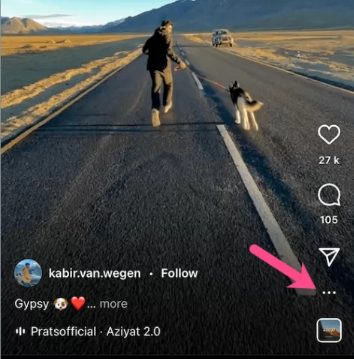
Tap on the three-dotted icon below the right side of your screen.
👉STEP 4
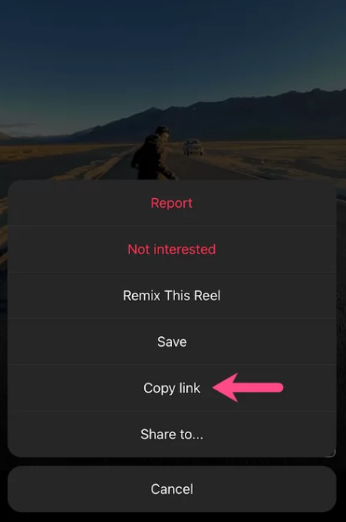
Further, choose the Copy link option on a menu.
👉STEP 5
Afterthat, go to the Instagram link from your web browser.
👉STEP 6
Now paste the Instagram Reels you want to download on the respective field.
👉STEP 7
Then click on the download tile on the screen.
👉STEP 8
Further, it will start to download, and finally, you can save your desired reel video on your smartphone.
To Archive Instagram Posts
👉STEP 1
First, you need to launch the Instagram app on your smartphone (Android or iOS) device and then go to the Profile section.
👉STEP 2
Click on the photos which you want to Archive.
👉STEP 3
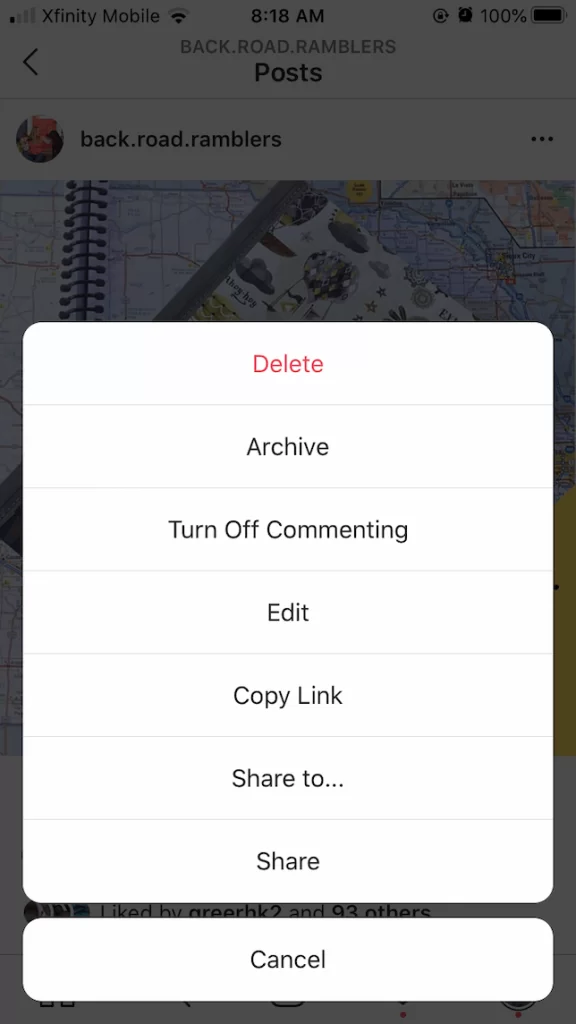
Now choose the three-dotted icons on the right upper edge of your screen.
👉STEP 4
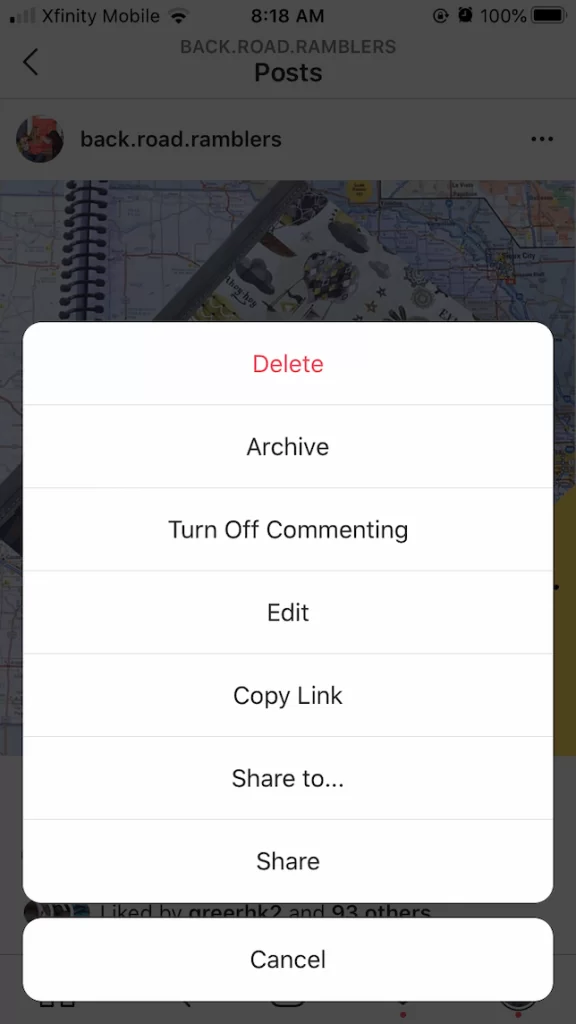
Further, select the Archive option from the menu.
👉STEP 5
Now your image will be disappeared from your profile.
How to search for Archived posts on Instagram?
If you want to unarchive the post or image you want, then do the following steps to unarchive them.
👉STEP 1
Initially, you need to open Instagram and move to the profile section.
👉STEP 2
Further, click on the Menu section from the upper right side edge.
👉STEP 3
Now click on the Archive and select the photo you want to go back to your Instagram profile.
👉STEP 4
Click on the three-dotted icon on your screen.
👉STEP 5
Click on the Show on Profile, and the post will return to its original location on your Instagram feed.
How to Archive Instagram Videos?
👉STEP 2
Click on the photos which you want to Archive.
👉STEP 3
Now choose the three-dotted icons on the right upper edge of your screen.
👉STEP 4
Further, select the Archive option from the menu.
👉STEP 5
Now your image will be disappeared from your profile.
To Archive Instagram Chats
👉STEP 1
Launch the Instagram and navigate to the Profile screen.
👉STEP 2
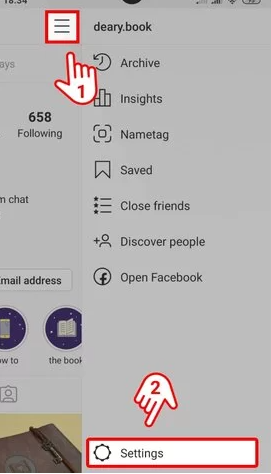
Click on the three vertical line icons and choose the settings.
👉STEP 3
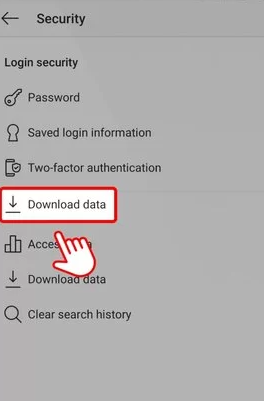
Then choose the security and pick the Downlaod data.
👉STEP 4
Further, register your email ID and password.
👉STEP 5
Afterthat, click on the Request Downlaod tile below your screen.
Also, read How to Get Hbo Max on Lg Smart Tv
Is it possible to archive Reels on Instagram?
In your Instagram account, you can’t archive your posts, stories, as well as live videos because it doesn’t allow you to archive. Recently, Instagram doesn’t allow archives from 2021 for iPhone and Android users. However, you can’t even archive the reel movies you published on your profile. This archive feature removal is due to overloading the Instagram system.
If you delete a reel on Instagram, it will delete it for everyone. Also, it can be restored within 30days when you delete it. When you archive the post, no one can watch it except you. After using the archive feature, your archived content is displayed in an Archive section on your website.
Final Verdict:
Instagram is a messenger app for communicating with people via messaging, sharing voice records, pictures, videos, and emojis. In the past, Instagram has an Archive option for hiding your photos, videos, stories, IGTVs, and Reels, from the profile grid instead of deleting them. If you have any queries or doubts regarding this article, mention them in the comment section.
Also, read How to Install and Watch Discovery Plus on PS5?
FAQs:
1. What does Archive mean?
It is one of the Instagram features available for hiding your posts, stories, photos, and media shared by you from the other users.
2. Is it possible to archive reels?
The answer is No. From 2021, Instagram doesn’t offer to archive the reels due to the overloading Instagram system.
3. Can I hide my reels on Instagram?
- Click on the Explore tab on your Instagram app.
- Further, click on the Instagram reels which you want to hide.
- Then press the three-dotted icon and click to hide option to remove the video content on your feed.