
Are you searching for How to fix ESPN not working? You are in the right place. Sometimes it does not work, but it is easy to solve the problem. Already you guys know that espn is one of the best streaming apps. We can watch live, sports, game replays, and video highlights. For Some users, it didn’t work on smart TVs. Moreover, Many users have complained about an EsPN+ not working issue. The team often fixes the issue but they dont clear it. Now, we go into the main theme of the article. This issue is common for all ESPN, ESPN+. So in this article, we will saw about How to fix espn not working.

Table of Contents
Why is ESPN not working?
If you have experienced ESPN, then you guys will get this problem There will be many reasons for not working. It has several reasons for not working. The reasons are listed below and the solution for the issues is also mentioned in this article, You guys can follow and get rid of the issues.

ESPN Not Working – Internet Connection
Check your internet connection before you start streaming. If you dont have stable and reliable network connections for streaming the content through the ESPN App. If you people using the VPN, just check the connections. If your network connections are slow, intermediate, or continuously using the network it will cause a buffering issue, freezing issue, or inability to load content correctly.
Read also: How to Get ESPN on LG TV?
Check the server issues

Sometimes the server issue will occur. And this is the main issue that occurs often. This happens to many users and the user will directly contact customer support. So dont do that, Before going to customer support just check once on the official website of ESPN. So if the server status is low, wait for some time until the server status turns into good. If the Server status is good, then the problem does not occur in this area.
Account related Problems
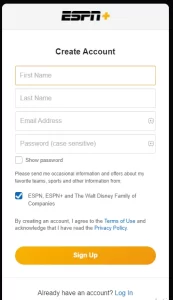
Problems occur when they use the wrong login credentials. If you try the login credentials many times, the account gets locked. Also, if you forget the password or enter the wrong password. You can easily get rid of this issue. It’s too simple. you just tap on forget password and choose the new password. Or contact customer support, which is available 24/7 on ESPN.
Compatibility issues
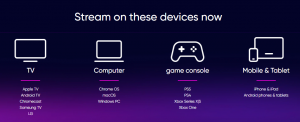
Check if your software or hardware supports this ESPN on the official website of ESPN. Having the device in a different OS did not get support. If you have these compatibility issues, just fix the issue by reinstalling the app or restarting the device. Some issues may not be able to be fixed! on time, you must contact the customer service of ESPN.
How to fix ESPN not working?

We have discussed the reason that happened for all users at least once in a lifetime. Now, we are in the solution part of the article. So this part is the heart of the article. In this section, we will see the methods or ways to solve the problem that occurs while we are watching ESPN. The alternative methods will be listed in the below sections of this article,
Read Also: What Channel is ESPN Plus on Verizon FiOS?
ESPN Not Working – Force stop and Restart the ESPN.

This is the first method that should be used when an error occurs. To force stop just follow the given guidelines one by one,
- For Android users: On your device, go to Settings >> Apps >> Apps & Notifications>> ESPN >> Force stop. Then launch the app again
- For Iphone users: From the home button >> go to the recent apps by swiping up from the bottom>> search for ESPN >> Swipe it up to force close. Then launch the app.
- After completing these steps, just turn off all the devices and connections, After some minutes just turn on all the devices and connections. If you guys are using the app on a smartphone just clear the cache and restart your phone.
ESPN Not Working – Update the ESPN

You should keep on updating the app on your device. Because the developer of this team will keep on updating the app. So at that time, you didn’t update the app means it will cause errors like buffering issues and so on. So if you dont know how to update the ESPN app, No problem just read this below parah.
For updating the ESPN app,
- Press the home button on your TV remote
- Going to featured >>ESPN
- Pressing and holding the Enter button
- Selecting Updarte apps >> All or ESPN>> Update
- This step is for TV users.
Updating the app on mobile is too simple. Just turn on the Mobile data >> go to Play Store>> search for ESPN >> Click on the update button. Wait for some time, until the process is finished. Now you are done!
Other common issues

For other common issues like Buffering issues, subscription issues, black screen issues, and so on. So you guys should do the basic steps to correct the basic errors. If you followed the basic steps that I have mentioned in the above sections, Still facing the issues? Just contact the customer care, which is available on the 24/7. You should make a complaint to the support by attaching the proof. You can raise a complaint via mail or by phone call.
Also, read: XFL on ESPN+
Conclusion
I hope from this article, we learn How to fix espn not working. Also, we see the methods to solve the problems. Also, you can enjoy resolving the common issues, by updating the app or restarting the app or we can use customer support to resolve the problem. If you have any queries related to this topic just comment in the comment section. To learn more tech-related articles, follow the techthanos website. Thanks for reading the whole article.