
Are you using Crunchyroll on Switch? If Yes! you can sometimes face these Not working issues. We will help to solve the error on your Gaming console. Read this article on How to Fix Crunchyroll Not Working on Switch.

Table of Contents
What is the Cause of Crunchyroll not working on the Switch issue?

The Crunchyroll app was launched on the 17th of February 2022. You can enjoy a wide variety of anime titles, read mangas, and play games on it. But lately, some issues can be the Crunchyroll app not working on your Nintendo Switch devices. Here are some of the causes for the Crunchyroll now working on the Switch issue.
Also, Read How to Jailbreak My Nintendo Switch Lite
How to Fix Crunchyroll Not Working on Switch?
Now that you know the cause of the issue, you can easily resolve it and start to stream Anime on Switch. Follow the methods and procedures in the given order to quickly resolve the issue and make Crunchyroll work on your Nintendo Switch device.
Check Internet Connection
Without an internet connection, you cannot access the contents offered by Nintendo Switch. Due to slow or no internet connection, you can find the Crunchyroll app not working on the switch. You can disconnect and reconnect the Switch to a WiFi with good internet speed and with less traffic. Follow the procedure to resolve errors due to internet connection.
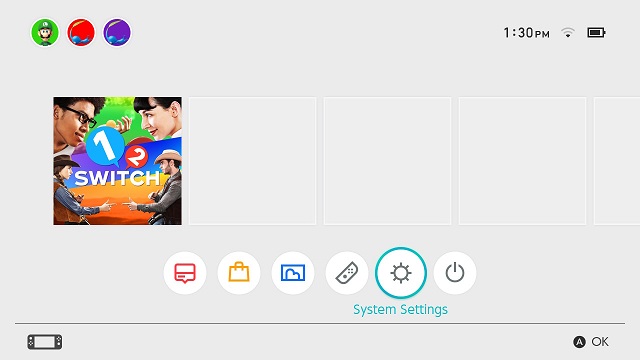
- Go to System Settings from your Nintendo Switch Home menu.
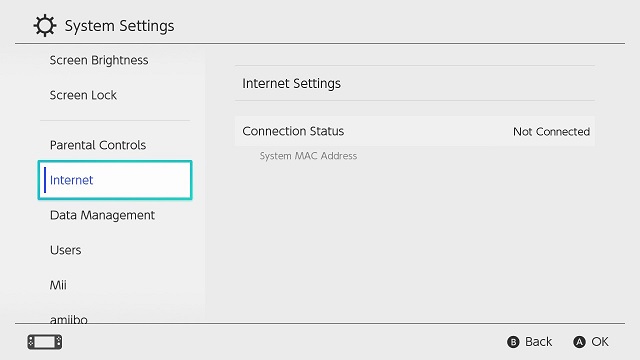
- Choose the Internet option and select Internet Settings.
- Wait for your Switch device to discover nearby WiFi networks.
- Now choose the best WiFi network from the list.
- Enter the WiFi network password if prompted and press OK.
- Network errors will display an error code message on the screen.
- If you see connection errors, just press the Reset button on your router and try to connect to WiFi again.
Crunchyroll Server Down
It is rare to see Crunchyroll server going down, but it is also not impossible. Due to the higher level of traffic, you can get error messages while using Crunchyroll on Nintendo Switch. If the server is down check it by accessing Crunchyroll app on other devices. If the server is down, all you can do is wait till the errors are fixed and made online again.
Check the Guide, How to Get Suika Game on Switch
Update the Crunchyroll App and Nintendo Switch
If you are using an outdated version of the Crunchyroll app on a Nintendo Switch, then it will not work. Having an outdated Nintendo Switch system can also make an app not work. Get down to the procedures update the app and OS to the latest version and fix Crunchyroll not working on the Switch issue.
Update Crunchyroll
- Go to Nintendo System Settings from its Home menu.
- Choose the System option select the Auto-Update Software option and turn it On.
- All the software available on Nintendo is automatically updated to its latest version when connected to the Internet.
Update Nintendo Switch
- Turn on your Nintendo Swithc and tap on the System Settings option from the Home menu.
- Select the System option and tap on System Update.
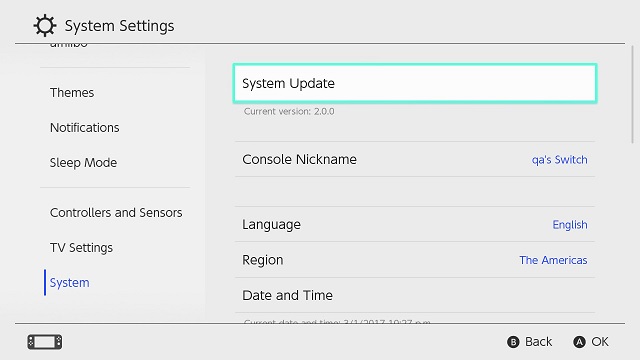
- Wait for your device to find the new system updates.
- If updates are found your device will automatically start to begin the download process.
Clear Cache on Nintendo Switch
If your device doesn’t have a space to stream the content then you have to clear cache and give enough space. After that, you can see the better performance on the switch.
The Steps are:
- Switch Off the console.
- Click and Hold the power button until the Power option appears.
- Turn Off it.
- Press and hold the Volume up and down button and click the power button.
- Select the Initialize Console without Deleting Save, Then Choose OK.
- Tap Clear your Cache and delete any Crunchyroll App data.
- Uninstall the application from the device.
- Now Reinstall it.
Once you have done this process then Check whether the Crunchyroll Not Working on Switch error is clear. While in this process of reinstalling, you can get the better and latest version of the application.
Check the Guide, How to Play Super Mario Sunshine on Switch.
Contact Customer Service
This is the final chance to clear your Crunchyroll Issue with Switch. You can contact the Nintendo Switch service through Email or using the toll-free number. They will share the solution follow the steps and get back your Crunchyroll application on your console
THE END
I hope now your Crunchyroll error is solved. From this article, you guys know How to Fix Crunchyroll Not Working on Switch. We have mentioned the solution along with the steps. If you have any doubts related to this Guide, Let me know in this comment section.