
Comedy Central is a popular American TV channel and it was established by the Paramount Global network. Moreover, this Channels Network has a particular Application to stream its content everywhere. Now, this Guide will teach you How to Watch Comedy Central on Roku. We are going to share the information on the steps to add the channel to the Roku Channel. Also, you can use this application to watch lots of stand-up comedy shows and programs.
Table of Contents
Can I Get Comedy Central on Roku?
To be sure, you can get a Comedy Central on the Roku Channel Store. Officially the Channels are available. So you use can easily get the channel onto your Roku Device. Some Roku Device model doesn’t contain the Comedy Central Channel. In this case, you have to use the screen mirroring method to stream its content. Once you get the channel you can watch a wide variety of shows and programs such as South Park, Chappelle, Broad City, Drunk History, The Daily Show, and Workaholics. Furthermore, this Comedy Central Channel is a User-friendly application. Additionally, it contains anime series, Ugly Americans, Moonbeam City, Futurama, and The Cleveland shows. Let’s get to know the steps to add the channel on Roku Device in this further segment.
More Info, How to Install TCM on Roku
How to Watch Comedy Central on Roku?
You can get Comedy Central on Roku in a Direct Way. So follow the upcoming steps to get the Comedy Central application on Roku.
The steps are:
- Fix the Roku device with a Stable internet connection.
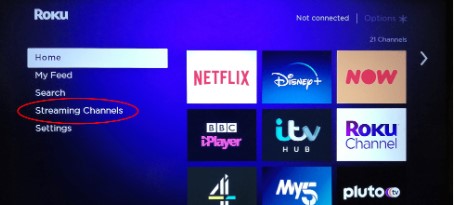
- From the Home screen, Choose the streaming Channel tabs.
- Hit the option from the search Channels.

- By using the Search bar, Type the keyword “Comedy Central” and click ok to find the application.
- Hit the application from the list.
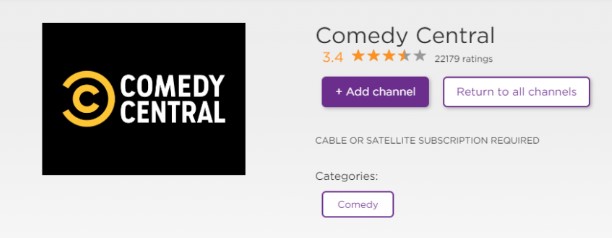
- Click the Add Channel button and it starts to download the application on your Comedy Central app on your Roku TV.
Install Comedy Central on Roku through the Website
This is one of the methods to watch Comedy Central on roku by using its website.
The steps are:

- Navigate to the website of Channelstore.Roku.com by using any browser on your Smartphone or PC.
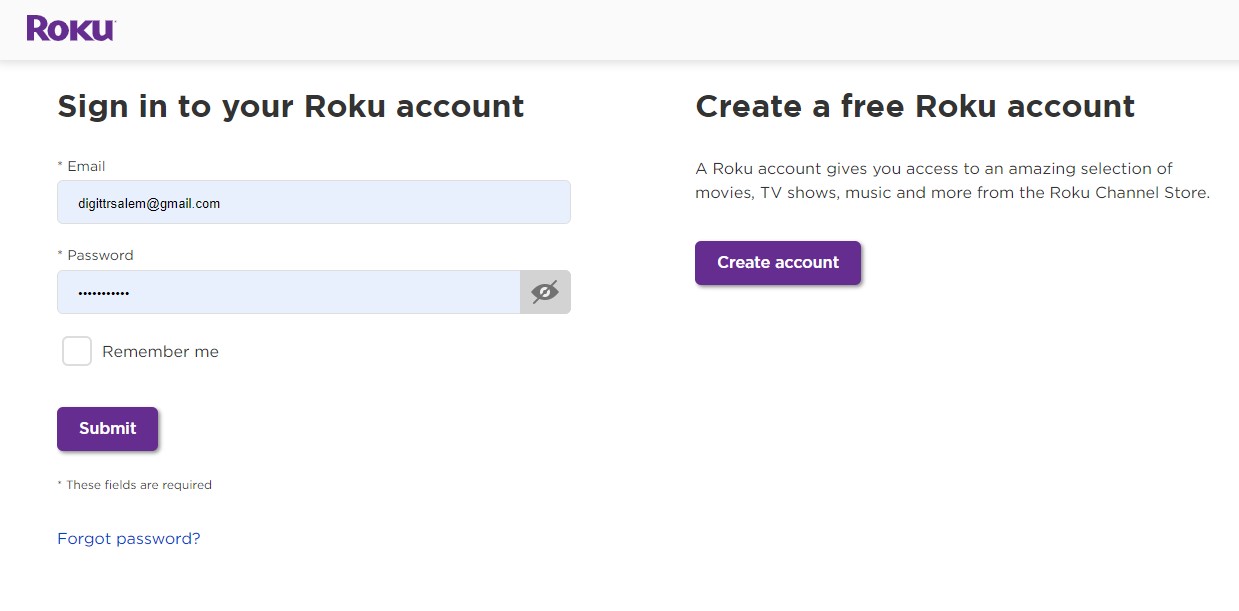
- Sign in by using your Roku Account.
- Then Move and click the search bar and type “Comedy Central” and click the Find button.
- Tap the Application from the suggestion list and Press the Add Channel option.
- Now, you have to direct to the settings section on your Roku TV and press the system tabs.
- After that, choose the option System updates and update your Roku device to the current version.
- Atlast, you can get the Comedy Central Channel application on the Home Page of Roku.
For Cable users, Do Check Out: What Channel is Comedy Central on Optimum?
How to Activate the Comedy Central on Roku?
Once you installed the application then you have to activate the application to access its content. It is an easy process to activate the app. Once you activate the app then you can get permission to access Comedy Central’s shows and TV programs.
The steps are:
- Open the installed Comedy Central application on Roku. Then the screen will show the activation code.
- Note it Down.
- After that, you have to navigate to the website for activating the Comedy Central Channel using any browser on your PC or SmartPhone.
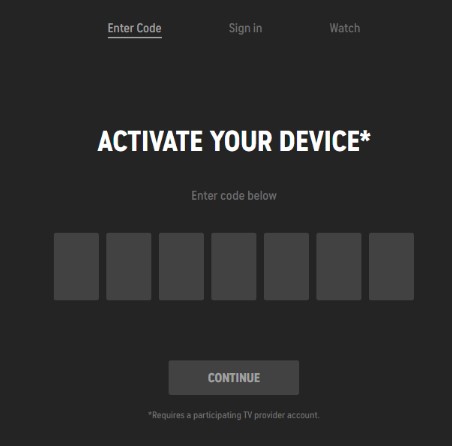
- Now you have to enter the activation code in the respective field.
- Then you have to choose the TV provider and log in to your Comedy Central Channel account.
- The process is over now you have to again open the Comedy Central application and stream all your favorite videos and movies.
Also, Read How to install & Stream Paramount Plus on Roku
How to Cast Comedy Central on Roku?
You can use the screen Mirroring method if the Roku Device doesn’t have a Comedy Central Channel on the Channel app store. You have to use the screen mirroring method to get the Comedy Central content on the Roku Device. Moreover, the Roku device supports both screen mirroring and Airplay options.
The steps are:
- Fix the Roku device and your smartphone with the same internet connection.
- After that, you have to install the Comedy Central application from the play store if you have to Smartphone or download it from the App Store if you have an iPhone.
- If you have installed the application then you have to sign in with your account.
- After that, Move to the Notification panel (For Android) or Control Center panel (For the iPhone user).

- Select the Cast icon on your smartphone or click the Screen Mirroring option for iOS devices.
- Now, you have to select your device and click to pair the devices.
- Once the device gets paired then you have to watch all your favorite Comedy Central TV programs or movies on the Big Screen.
How to Stream Comedy Central Online?
This is an alternate and the best way to get the Comedy Central Channel using a Streaming service. Because the streaming services have lots of Channels in their lineups.
All you have to install the streaming service on the Roku device and get a variety of Channels along with the Comedy Central Channel.
Fubo TV

This is the most popular streaming service especially since it broadcast all the popular sports events and shows. There are four types of subscription packages available on the Fubo TV service.
Among the four packages, the Comedy Central channel is available on the pro plan package. Along with the subscription you can get more than 1000 hours of Cloud DVR storage space. And three users can stream the content at the same time.
DirecTV stream

Of Course, the DirecTV Stream streaming service gives a Comedy Central Channel. You can install the DirecTV stream on your Roku device and get to watch your favorite programs from Comedy Central. Click the link to get a DirecTV stream on Roku. Once you install the service then you have to open the application and sign in with your account and choose the subscription package and get the service and select the categories option and hit the Comedy Central application and watch all the comedy shows and events.
Hulu

You can be able to install Hulu on Roku from the channel store. In this way, you can get the Comedy Central Channel in the Hulu Channel line. So you can install Hulu on a Roku device and pay the subscription amount and watch all your favorite channels. The Hulu subscription is at the rate of $69.99 for one month and you can get the Comedy Central Channels. Along with the package you can get more than 70+ Channels.
Check the post, How to Watch Tinyzone on Roku
Philo

This is the best and most cost-efficient streaming service. It gives the Comedy Central Channel at the cost of $25 for one month. With the subscription package, you can get 60+ Live Channels and it includes the Comedy Central Channels. Additionally, it gives a seven-day free trial offer and unlimited DVR storage space. Install the Philo app on roku and sign in with your account and get to stream the Comedy Central Channel.
Sling TV

The Sling TV is available on the Roku Channel store. So you have to install the sling TV on your device. For More Details Read and get the Sling TV on Roku.
Ending Words
Here in this article, We have lots of information related to getting Comedy Central on roku. You can get the app in a direct way or otherwise, you can use the Roku website to install the application. Refer to this article and get the screen mirroring method and also use streaming services to watch Comedy Central Channel content. If you need any additional information. Let me know in this Comment section.