

To play multimedia content, you must need Wi-Fi for streaming sticks. Another essential thing is the remote. If you want to play any videos, music, and whatever, you must have a remote. What will you do if you lose the remote to change Wi-Fi on the fire stick?. Much newer TVs today can go ahead and move over to “My set up” and try to use Amazon FireStick without the Wi-Fi by using a remote application or actual remote for the FireStick. So let us learn how to Change Wi-Fi on FireStick without a Remote through this article.

Similar post, How To Fix SmartCast TV Not Available? Definitive Guide
Table of Contents
Method 1 – How to Change Wi-Fi on FireStick without Remote by using the fire TV application
If your remote is not working or you lost your remote, you can use the remote applications to change Wi-Fi. There are some remote apps available for Android devices. The only thing is you must have the same Wi-Fi connection. To connect Wi-Fi to your FireStick, you can use this app. Install the fire TV application. After installing, your Fire TV app will display on your screen and click it. This method is valuable and easy to connect to Wi-Fi on FireStick.
- Launch the Fire TV app on your device.
- Go to the “Settings”
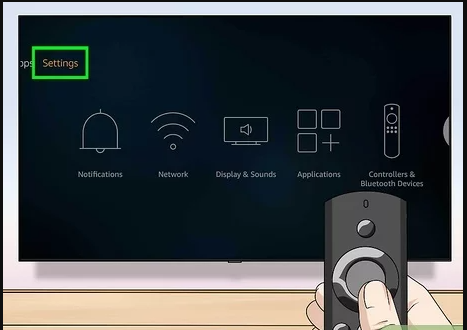
3. From settings, find for “Network” option and click it.
Also, search STOP BUFFERING ON FIRESTICK.
Method 2 – How to Change Wi-Fi on FireStick without Remote by using an Identical hotspot
You cannot use the remote if you are outside an office or hotel. Instead of that, you can use the application.
- Take your first phone and create a hotspot network with the same Wi-Fi connection as your previous network.
- Now switch on your TV, and see that your FireStick is connected to the hotspot.

3. Using your second phone, install the “Fire TV app” and connect this application to the new hotspot you have newly created.
4. Check whether your fire TV and fire TV app are connected with the same Wi-Fi.
5. Then move to the “settings” option.

6. Tap the “Network” option to get the updated Wi-Fi.
7. Turn off the hotspot on your phone once you connect your fire TV with a new Wi-Fi network.
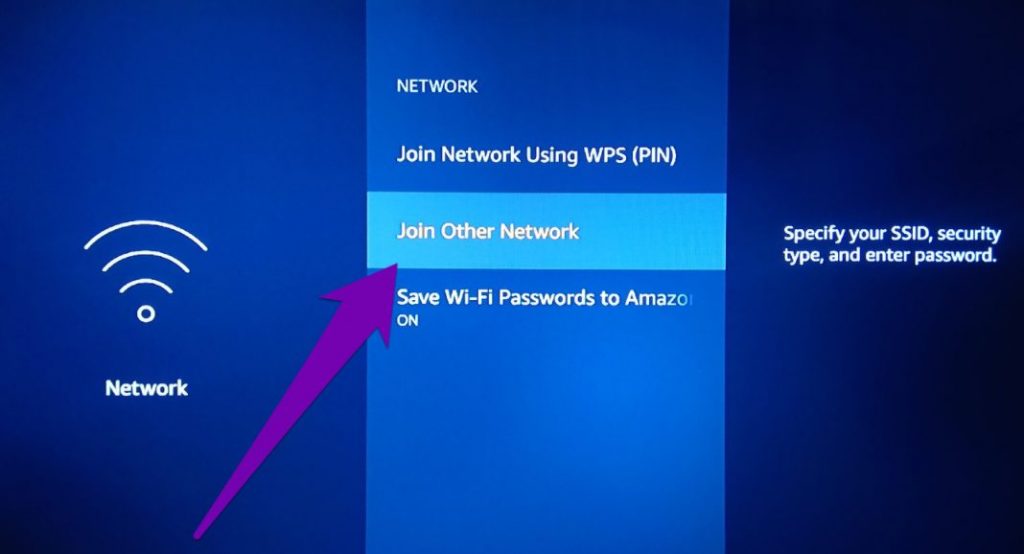
Method 3 – Use Your TV remote
Some people do not know the thing that they can use for FireStick. It has an HDMI-CEC feature on the remote. You can control your TV and HDMI connected devices using a single remote. You have to enable the ‘HDMI – CEC setting’ on your TV.
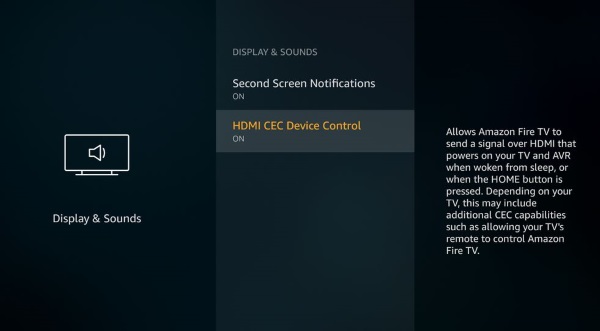
Method 4 – Use Another Fire TV remote
You can use another Fire TV remote to change Wi-Fi on FireStick. If your friend or neighbour’s family has their FireStick remote with them, you can use that to connect Wi-Fi to your FireStick. Press the ‘home button on your remote to get a pairing confirmation message.

Wrapping Up:
To Change Wi-Fi on your FireStick without a Remote, you can use the above-given technique and methods. By using these procedures, you can connect and change Wi-Fi on FireStick. We hope this article will help you to change Wi-Fi on FireStick.
You may like, How to Use Phone as Firestick Remote? Quick Guide