
Snapchat is one of the best and most popular Applications all over the world. Snapchat allow the user to use special filters on their photos and videos. In the modern era, Snapchat plays a major role and nearly millions of users like teenagers and middle age people are using this app frequently. You guys can make a call or you can chat with your loved ones and also you guys can maintain the streaks as well as the bond with your loved one using the Snapchat app. In this article, we find the answer to Can you use filters on Snapchat video calls?

The only app which makes you fun with the filter on Snapchat. You guys can change the look of yours by clicking once at a time. Snapchat is a powerful tool to use, to change the look. To know more about the filters on Snapchat video calls read this article fully.
Table of Contents
Can you use filters on Snapchat video calls?
Yes, You guys can use the special filters and effects while you are on a call and also you can change the filter while you are in a call. At the same time, you can able to see the reaction of your friend in real-time.
Also read: How to Fix Snapchat Camera not working problem?
How to use the Filters on Snapchat?
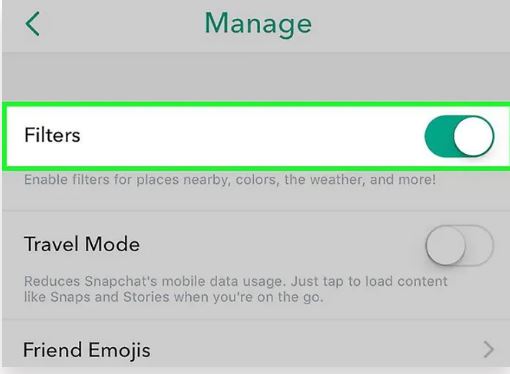
You can use the filters to take the picture or video. Before that you should enable the filters on settings. It’s a simple step that you can enable the filters on settings. The steps are, Open Snapchat >> go to the message icon >> select the bitmoji photo/profile >> go to settings available on the top right >> Tap on additional service >> select manage preference >> filters >> Turn the slider >> if it is green get back to the home page of the Snapchat. Now you can use the filters on Snapchat video calls.
How to use filters on Snapchat video calls?
After enabling the filters, we can use the filters on Snapchat video calls and we can see the live reaction from your loved one. To make a call just go to that id and tap on that id. You will get a chat page, from that chat page, you can see the video call option on the right side of Snapchat. Or else, Search the Friend id and tap on that id, Chat box will get open, and touch the Profile icon and you will get the Video Call option if you click that video call image, the call get started.
Use Filters on Snapchat
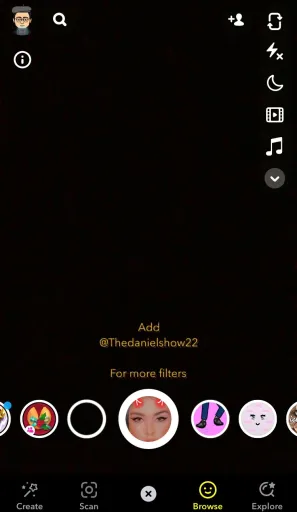
- once you push the call on Snapchat, it will notify your friend on the other side.
- Wait for some time until he picks up the call.
- Once you made the call, the filters will get below the face.
- You guys can use all the filters while you are on video call, You guys can change the filter from one to one regularly at the same time.
- So keep the video call interesting by changing the filters on Snapchat video calls.
Does Snapchat video call show your face while ringing?
Probably it depends upon the settings. If you have the “Answer incoming calls with video ” settings turned on, then the other side of the call can see you before attending the call. If the setting is turned off, the opposite party did not know the face before attending the call. Suppose you start to call a friend on video chat, your friend will be able to see your face.
Prefer this also: What is Quick Add on Snapchat and How to Disable it?
How to get Filters on Facebook video call as same as filters on Snapchat video call?
Just go to the Facebook messenger app >> select your friend >> chat box will get open >> On the top right side video call button will be available >> Select the raindrop button >> You can enjoy chatting with the funny filters.
Conclusion
In this article, You guys will get a complete idea about the filters on Snapchat video calls. I hope this article will make you know, how to use the filters, and how to change the filter while you are on call. However, You guys can enjoy yourself with your loved ones using Snapchat filters. And maintain your bonds and streaks at the same level. To know more Tech articles, follow the Techthanos website. This website helps you to change your boring time into precious time.