
If you need help watching Blaze TV Content on Roku. Now the service is available on a Roku device. But don’t know the way to install it and have any related doubts. Then you can refer to this entire article and get the steps and Solutions to all your Doubts. We hope this article will help you How to Watch Blaze TV on Roku. Whereas Blaze TV is similar to FrankSpeech and the service is available in the United States and it is the most popular conservative media service.
You can get various Different Categories of content from this Blaze TV application such as News Content, Shows, programs, and many entertaining events. In addition, you can access On-demand Content from famous titles such as Glenn Beck, Mark Levin, Phil Robertson, Dave Rubin, Pat Gray, and more.
Table of Contents
How much is Blaze TV Subscription?
Blaze is a Subscription Based Streaming Application. Moreover, it has Three types of subscription packages. So you can select any one of the packages according to your wish.
There are;
Monthly Package: This service is available at the cost of $9.99.
Annual package: The Annual Subscription package is available at the price of $99. This means you have to pay $8.25 for one month. Additionally, it gives two Month free trial.
For a Three-year Subscription package:
For the Total of Three Years, you have to pay at the rate of $199. According to this Plan you have to pay only $5.53 every month.
For doing the subscription for this service. you have to visit the Site for a blaze tv subscription.
Check the Post: How to Install Cinemax App on Roku
How to Watch Blaze TV on Roku?
Blaze TV is the best streaming application and it gives a variety of entertainment and News Content. And it broadcast programs and Shows around America. The Blaze TV is Officially available on the Roku Channel Store. So it has a Direct method to Download the app to your Roku device.
The Steps are;
- Initally, Switch on your TV and Connect a Roku device to the HDMI port on your Smart TV.
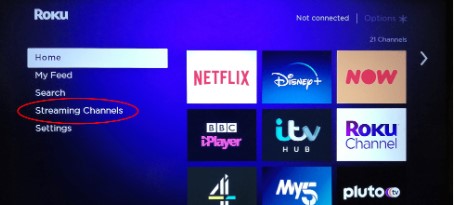
- Choose the Streaming Channel option.

- Move to select the Search Channel option.
- And using your Remote Type the keyword “Blaze TV” and Click to Find the app.
- Then you have to select the application from the result.
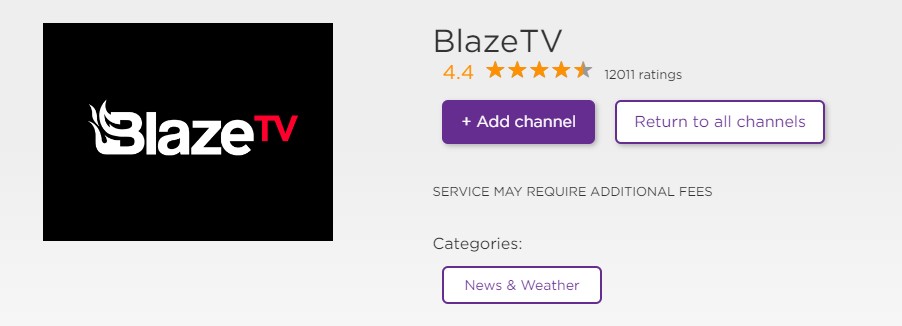
- After that, Click the Add Channel option.
- Once the channel is added to your Roku device then click the OK Button.
Now the Blaze application is ready to stream the content. Before streaming the content you should Update your device.
Steps to Activate Blaze TV on Roku
Once you installed the application on your device then you have to activate the application by entering the activation code for getting permission to access its content.
The steps are;
- Open the Blaze TV application on your Roku device.

- And the screen will show the activation code. Make a Note of it.
- Then Visit the official site on any browser on another device for activating the Blaze tv.
- After that, you have to enter the Blaze TV account and Click the Login button.
- Now, you should enter the activation code in the required field and Hit the activation button.
Also, Read How to Install tennis TV on Roku
How to Install Blaze TV on Roku Through Roku Website?
You can use a Roku Channel Store Website to install the application officially onto your device. And it is an easy process to download the Blaze TV on Roku.
The steps are:
- Move to the Official Website for Roku Channel Store by using any browser.

- Press the sign-in button and enter your Sign-in details (Fill in your Roku account details).
- After that, Press the Search Box and Type the keyword “Blaze TV” Channel.
- Select the application from the result.
- And press the Add Channel option.
- The Application will appear within 24 hours. Suppose you need an application instantly then you have to update to a Roku device.
For More Info, How to Watch Talk TV on Roku
Add Blaze TV on Roku using your Android Device
This is an alternate way to watch Blaze TV content on roku on your Android device. However, the Roku application is officially available on Android or iOS devices.
The steps are:
- Open the Roku application on your Android or iOS devices.
- Then you must sign in by using your Roku account.
- Next, Click the Device tab and It will be located at the bottom lower right corner.
- From that, choose the Roku device and pair the device with the Roku app.
( Only the Roku device appears on your Android or iOS device if the Roku is connected with the same internet Connection).
- Click on the Channel Tab.

- Select the Channel Store tab and find the Blaze TV.
- Now use the search bar type “Blaze TV”.
- Hit the application from the result.
- Then Press the Add Channel option.
The Application appears within 24 hours. If you update your Roku device then you get the Blaze TV immediately on your device.
Closing Off
We have mentioned the possible ways to download the Blaze TV on Roku. It has a direct method. but we have included additional alternate methods. Most important, Blaze TV is a subscription Pay TV service. You can also get the subscription details. If you need any additional information related to this article. Let me know in this comment section.
Frequently Asked Questions
1) Can I Watch Blaze TV on Streaming Service?
Yes! You can stream Blaze TV on Some Streaming Platforms such as Paramount Plus, Prime Video, Sling TV, Live Sports, News, Shows +, Vudu, Apple TV, and Freestream. And these are accessible on your Roku device.
2) Can I Get Blaze TV on Firestick?
You can get Blaze content on Firestick. It is available on the Firestick Amazon App Store. But only you can download the latest version application called Blaze TV. And You can be able to Watch News, shows, and more entertainment programs.