
![AXS TV on Verizon FiOS.[AXS TV App | FiOS TV app]](https://techthanos.com/wp-content/uploads/2023/04/AXS-TV-on-Verizon-FiOS.AXS-TV-App-FiOS-TV-app.jpg)
Do you like Music Concerts, Interviews, wrestling, and Music programs? Watch all of them on the AXS TV channel. You can access this channel through cable service providers like Verizon FiOS, DIRECTV, Spectrum TV, and more. Get the channel number to watch AXS TV on your FiOS TV from this article. You can also get to know about the AXS TV app and its features from here.
Table of Contents
What Channel Is AXS TV On Verizon FiOS?

FiOS TV is one of the best TV service providers to watch AXS TV channels. You can easily navigate to this channel with the help of your FiOS TV Voice Remote. Just press the mic button and speak the name of the channel. You will get directed to the AXS TV channel on your FiOS TV box. In case of not have a voice remote, you can use the channel number to find the channel. You can watch AXS TV on channel number 215 or 569 on your FiOS TV Subscription.

| SERVICE PROVIDER | CHANNEL NAME | CHANNEL NUMBER |
| FiOS | AXS TV | 215 / 569 |
You can access AXS TV on FiOS TV by subscribing to the More FiOS TV and The Most FiOS TV plan. The subscription plans offered by Verizon FiOS are as follows,

You may also like to learn about What Channel is HGTV on FiOS?
AXSTV on FiOS TV

The official app from Verizon FiOS, the FiOS TV Mobile app can be used to watch TV from anywhere you want with yoru FiOS TV subscription. You can also access Live TV channels and on-demand movies and TV shows on this app. Since the AXS TV channel is available on the FiOS TV Subscription channel lineup you can easily live stream it on the FiOS TV Mobile App.
You can easily find the AXS TV channel on the FiOS TV app by searching for it through the search tab from the home page. Teh DVR feature helps you save your favorite shows from AXS TV and watch them later at any time you like. The devices on which you can use the FiOS TV app are as follows,
Android TV | Fire TV | Smartphones | Tablets
You may also like to learn about How to Get FiOS TV on Apple TV?
How to Watch AXS TV for free?

You can watch all of AXS TV for free with the AXS TV app by creating a free account. There is no need for a TV Provider or any other subscription credentials required to access the AXS TV app. You can get the AXS TV app on devices like,
Android | iPhone | Apple TV | Roku TV | Amazon Fire TV
By creating a free account you can continue your show or series from where you left off. Follow the simple procedure to create an account on AXS TV,
- Go to AXS TV’s official site www.axs.tv.
- Select the Login option and tap on the Sign-Up option.

- Either use your Google or Facebook account credentials or use your Email ID to create an account.
How to Activate AXS TV Roku, FireStick, and Apple TV?
On Streaming devices, you need to activate the AXS TV app to access its contents. Follow the simple procedure here to activate the AXS TV app on Roku, FireStick, and Apple TV.
NOTE: For Smartphones, you can just type in the Credentials to Login.
- Visit www.axs.tv/activate site on any of your devices.
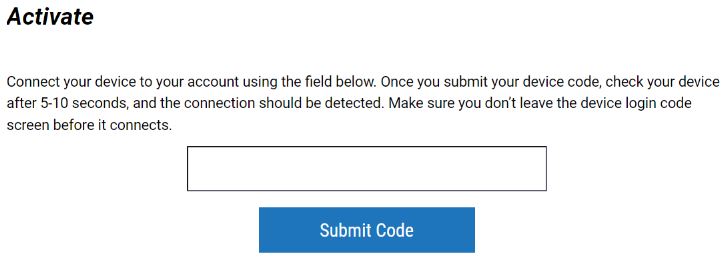
- Log In with your AXS TV account.
- Type the Activation Code and press Sumit Code
With this, the AXS TV app is activated on your Roku, FireStick, and Apple TV devices.
Suggestions
If you are here to access the AXS TV channel on FiOS TV, you need to pay for the subscription plans. But all of the AXS TV programs can be watched for free with the AXS TV app on your favorite device. Go for the AXS TV app to get free access to its content and create a free account to access everything in its library. Check axs. tv/tv-schedule to find out the ongoing programs broadcast on the AXS TV channel.