
If you are facing lagging issues or freezing with your Roku streaming device, whether it’s Roku TV, Roku Express, Or Roku streaming stick, you want to do troubleshooting. To solve the troubleshooting, just do one basic thing called resetting the device. If You guys are searching for How to Reset Roku TV? you are in the right place. I will guide you to solve the problem and show you the steps to reset the Roku devices.

Roku is simple software, platform approach the affordable pricing results in some of the most popular streamers on the market. When you have a problem with Roku, the best solution is to reset the device. We can do two types of reset on the Roku device, one is a soft reset and the other is a hard reset. So now we can get into the Steps to reset the Roku device.
Read also: How to Fix Max Not Working on Roku?
Table of Contents
Reset Roku TV- Soft reset
A soft reset is a type by which we can simply restart the Roku without losing data or settings. We can use this soft reset in three ways. the ways are
- Through using remote.
- From button.
- Power Pull.
Power Pull
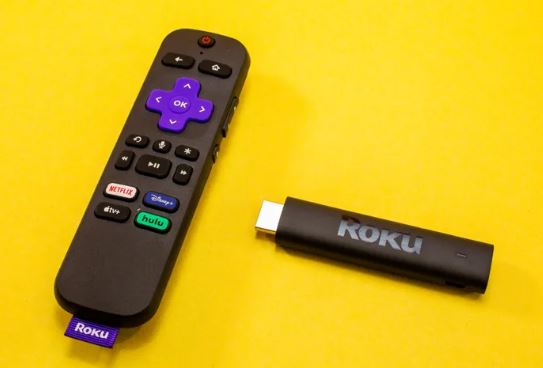
This is mainly used by many people for quick resetting the device. You want to do a simple thing. Just want to pull the power cord from the remote for 20 seconds. And plug it in. This will solve the issue by following this step or else you can follow others.
How to Reset Roku TV – From remote
If Roku is frozen, you can try to reset it using the remote control by using the following instruction.
- Select HOME TAB 5 times.
- Press Up 1 time
- And select the Rewind button 2times
- Press the Fast Forward button 2 times.
This will work in all versions of Roku models. or else you can follow this step in the latest models. just from the home screen page >> go to settings >> system >> power >> system restart.
By using button in older models
Find the reset button in the back of the device, Some models will require a paper clip to press the button. Press the button, then release the button after 1 second. This will get reset successfully.
Reset Roku TV – Hard Reset
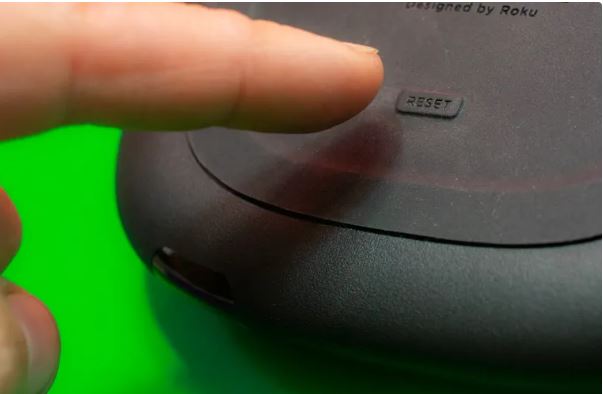
- Remove all the cables except the power cord.
- Press and hold the RESET option on the backside of the device for 20 seconds. Some older models have paper clips.
- Hold the reset button and remove the Power cord from the Back of the device.
- Release the button and plug in the all cords of the device.
Factory Reset
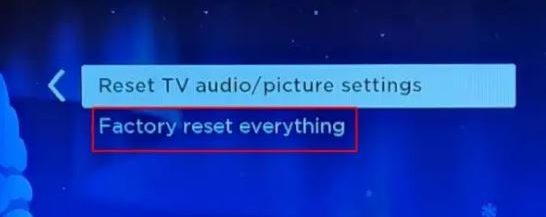
Factory reset will clear all settings from the device and reset it to the factory defaults. If soft reset doesn’t fix your problem Factory reset will fix your problem.
You guys can just try this step to reset the device. The steps are,
Method 1:
- Homepage >> Settings >> System>> Advanced system settings>> Factory reset.
Method 2 :
- Settings>> Factory reset >> Factory reset >> Yes.OR
Method 3 :
- Settings >> Factory reset >> Enter the code >> Ok.
Read also: Why is Hulu Not Working on Roku?
Roku device streams in black-screen
To solve the problem of black screen. You can reset the device once you have the black-screen tv. For resetting you can just follow the simple steps.
Just hold the reset button located on the backside of the Roku device. Press and hold the reset button for 20 seconds or until you see the LED light on the front of the tv is to flash. And once you see the flash you can release the reset button and wait for the tv to restart. You can follow these steps once you are stuck on the black screen.
Device got Stuck while Screen mirroring?
If the Roku device got stuck while doing Screen mirroring. You can do the Reset on Roku for solving this issue. It may cause because of connectivity issues. You can disconnect the gadget from which you are getting connected to the Roku device. Just switch off and remove all the plugins for 10 seconds. And after 10 seconds you can plug in the device. So you can solve the issue by using this trick and you also reset the Roku device.
Changing or resetting the Roku TV password?
- Go to the Roku account page on your computer or mobile and sign in.
- Select Update profile from the account menu.
- Scroll down to the change password option.
- Enter your current password and enter your new password twice for confirmation.
- Click the save button and update the password.
How to reset the Network connection on a Roku device?
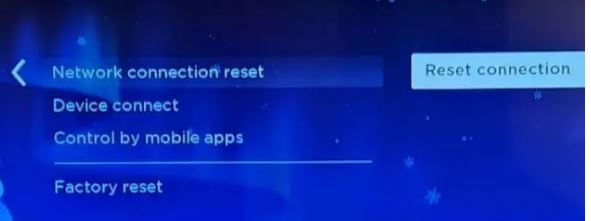
For many people, the network is a main issue. The buffering issue will occur. So to solve this you can follow the Basic and simple steps.
- Go to the home page
- Open settings >> System >> Advanced system settings
- Just tap on Network connection reset
- Select reset connection.
Why is Roku tv is slow and how to fix it?
If your Roku device is running slow and you don’t know to fix the problem. I am here to guide you, just follow the steps.
- Restart your Roku TV
- Clear the cache
- Update the software
- Uninstall unused channel
- Check the Network speed.
Restart the Roku device
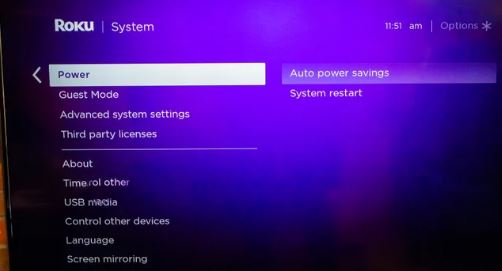
Still facing some issues, while enjoying the streaming. You just restart the Roku device by following the guidelines. Open your homepage on the Roku device >> Go to settings >> system >> Select power >> Tap on system restart.
Advantage of resetting the Roku device
- Change your device from slow performance to fast performance.
- If you clear the cache, you can improve overall functions in the device
- Can solve the error message.
The disadvantage of resetting the Roku device
The only disadvantage of resetting the Roku is, sometime it will delete the channel which is in use. So you should install the track again to enjoy the streaming visuals. And personalized settings and preferences such as screen savers and themes will be lost.
NOTE: Before resetting your device make sure you unplug the power source to avoid the damage to device.
Conclusion
Solve the problem by using these steps. But still, if you are facing a problem you just contact Roku’s official website, Or else sometime the Roku team will upgrade the device. So you can get the error for some time. That is about Resetting the Roku device. If you guys have any doubts or ideas, comment down in the box.