
Some TV Channels are so popular worldwide. That, the RT News channel is so popular worldwide. It telecasts the true news till now. So, the people who are all in the RT Geo-Restricted areas also like to watch this channel in their country. So, I am here to give you some possible tips to access it. Check out, How to Watch RT in the UK?

If you are in the United Kingdom, then this article is most useful to you. Because in this article, we are going to see, How to Access and Watch the RT News Channel in the United Kingdom. Pay keen observation, and Grab all the details by getting right into the content below…
Table of Contents
About RT News
Russia Today or Russia Segodnya is formerly called RT. It is a Russian State-Controlled Propaganda type of channel. And it is an International News Television Network based in Russia. Russian Government totally funded this RT Television network. The RT Television Network Operates the Free to Air Channels as well as Pay Television straight to audiences outside of Russia.
Also, you can watch the content on RT News channels in Russian, English, Arabic, Spanish, German, and France languages. RT America, RT France, RT UK, RT DE, and RT have more sister channels. You can access this RT News channel worldwide. But we have to know the way to stream the RT in UK. And, if you looking for the best guide to watch LIV Golf in The UK, click this link and grab the details you need.
Is RT in UK?
No. Not Available. The RT News and RT UK Channel is available in the United Kingdom from 2010 to 2022. During the war, the RT Channels stopped streaming in the UK. If still, you would like to watch the RT in UK, then the next topic will explain everything about streaming.
How to Watch RT in UK?
So, RT News or RT UK Channel is not officially available in the United Kingdom. Due to its absence, we are going to Sideload the RT News Channel in the United Kingdom. I have chosen two devices which are Smart TV and Amazon Firestick devices to watch the RT in the UK. The installation and streaming procedures were mentioned in the upcoming section,
1). Install RT News on Smart TV
So, everyone had a Smart TV at their home. In this topic, we are going to learn, How to access the RT in UK on Smart TV. To do this, we have two methods. They are;
Install VPN on TV
We all know, that the RT News or RT UK Channel is banned in the United Kingdom. So, we have to change the location server to access RT. To do that, you have to install the VPN services.
- Turn On the Smart TV.
- Grab the Smart TV Remote.
- Click the Home Button.
- Locate the System Settings page.
- Visit the Network section.
- Select your home Wi-Fi network from the list.
- Enter the Wi-Fi password and connect your Smart TV with a high-speed and stable Wi-Fi Internet connection.
- Then, Click the Home Button on the remote.
- Launch the App Store on your Smart TV.
- And search for “VPN Name” in the given search space.
- Now, select VPN from the search result.
- And, click on the Install button.
Wait for a while, until the VPN gets installed on your Smart TV. Once, it gets installed, please check out the next topic for the further process. Are you a Cable TV subscriber, then proceed to this article to learn, What Channel is NBA in UK.
Watch RT in UK
- Tap the Home Button on your Smart TV Remote.
- Then, Open the Apps and Games page on Smart TV.
- Launch the VPN app.
- And, log in with valid credentials.
- Or, Sign Up by providing the required details.
- And, Set the Geo-Location to Russia.
- And then, get back to your Smart TV Home Screen.
- Launch the Web Browser app.
- Search for RT News in the given search space.
- Select the Official RT Channel website from the search result.
And, start watching the RT in UK. Not only the RT News or RT UK platform but also, you can watch any streaming site which is not available in the United Kingdom.
2). How to Watch RT on Firestick in UK?
Still, you can not be able to access the RT in UK while using the VPN service on Smart TV directly. Do not worry about it. The Amazon Firestick is available in the UK. You can use the streaming device to watch the RT News channel at your location.
- Initially, you have to fix the Fire TV Stick with your Smart TV HDMI Port.

- And, click the Home Button on the remote.

- Select the Settings Icon on the homepage.

- Next, select the Network option.

- And then, choose your Wi-Fi Network from the list.

Then, connect your Amazon Fire TV Stick with a high-speed Wi-Fi Internet connection. Now, move to the next topic to go further. Not only the news channels but also you can watch the Community Shield on TV UK.
Install Silk Browser on Firestick
- Press the Home Button on Firestick remote.
- Select the Find option.

- Type “Silk Browser” in the given search space.
- Discover and highlight the Official Silk Browser app from the search result.
- Now, click on the Download/ Get option.

- Once, the Silk browser app gets installed on your Firestick,
- Go back to the Firestick home screen.
- And, launch the Apps and Games section.
There, you can find the installed Silk Browser app on Amazon Fire TV Stick.
Download VPN and Watch RT in UK
- So, next, you have to install the best VPN service for Firestick.
- Tap on the Find option on the home screen.
- Type “VPN” in the given search bar.
- Select the VPN app from the search result.
- Then, tap the Download/ Get button.
- And, Launch the VPN app after it is installed.
- Login or Sign Up with the VPN service.
- Now, connect the server to Russia.
- And then, go back to the Apps and Games section.
- Launch the installed Internet ( Silk Browser ) app.
- Navigate to the Bing panel.

- Browse for RT News/ RT UK Official Website on the browser.
- Launch the Official RT Website from the search result.
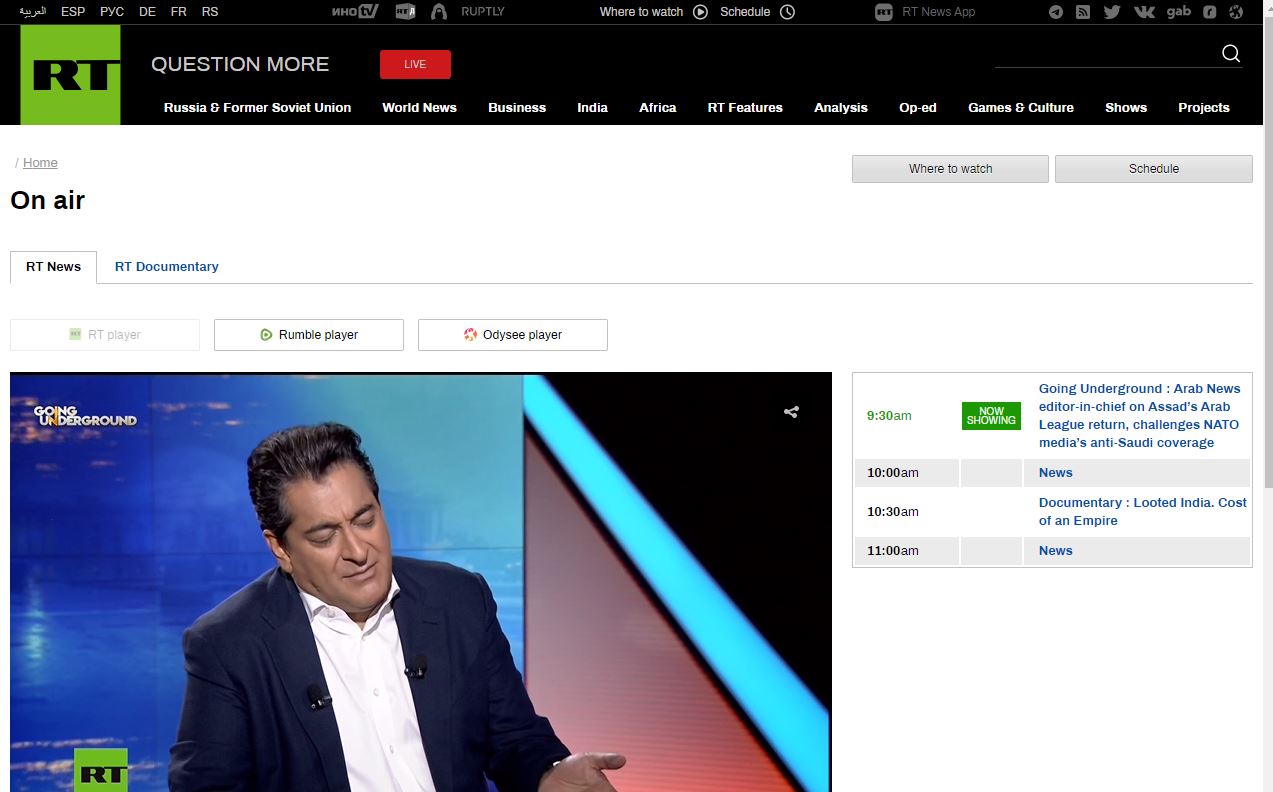
- And, Login or Sign Up with valid details.
Then, start watching the RT News channel on your Location. I hope, this and the above topics will let you know, How to Watch RT in UK. Follow the same procedure as given.
RT News Alternatives
If you are doesn’t able to access the RT in the UK, then go for the alternatives. Check out the list given in the following;
- News as Facts
- ProPublica
- BBC News
- AP News
- The Guardian
- NBC News
- ABC News
- USA Today
- DW
- The Intercept
And more like this. Here, BBC News, NBC News, ABC News, and USA Today are all official news streaming services. They are all available on the official App Store. Others are third-party apps. Use the VPN service, if you have selected the third-party app.
Conclusion
Learn How to Watch RT in UK in this article. All you need is the best VPN Service. And it must be trusted too. I have suggested the two best and most trusted VPN services in this article. You can use that, or if you have an account with any other VPN, follow the steps mentioned in the given topics.