
GAAGO is an official Sports streaming service based in Ireland. Also, it is popular in the United Kingdom. If you would like to access this GAAGO on Firestick, this article will guide you through the end.
First, we have to know whether the GAAGO Game app is available on Amazon Firestick or not. And what devices are all compatible with it? Then move to the installation and streaming process. Now, get driven into the content below…
Table of Contents
About GAAGO
GAAGO is an official Sports Streaming Service popular in Ireland. It is dedicated to streaming Gaelic Games Worldwide. It provides GAA Live Games as well as On-Demand content on its platform. You can watch both live and on-demand in HD Picture Quality. Also, it allows you to download the GAAGO app on your device.
As well as you can cast this app on your Smart TV using a Google Chromecast device. The GAAGO app supports Android, iOS, Google Chromecast, Apple TV, and more devices like this. Now, we have to know, can download GAAGO on Firestick? Check out the answer in the next topic.
Is GAAGO on Firestick?
Yes. Fortunately, the GAAGO app is available on Amazon Firestick. You can download this app officially from the Amazon App Store. It allows its users to watch over 150 Games each year. And, you can stream the Highlights TV Programs and “The Sunday Game” on GAAGO App. Yes, we know, it is available on the Firestick. So, move to the next topic to learn How to Install GAAGO on Firestick. Also, you can watch live sports from Dofu Sports on Firestick. Click the link to know more about it.
How to Download GAAGO on Firestick?
As we have discussed in the above section, the GAAGO app is available on the Amazon Firestick device. Follow the steps given below to install the GAAGO on Firestick…
- First, connect your Amazon Firestick device with the Smart TV HDMI port.

- Then, Power On the Smart TV and Firestick.
- Now, click the Home Button on Firestick remote.

- Then, select the Settings icon from the menu bar.

- Head toward the My Fire TV option.
- Following that, click on the Network tab.

- Now, Select your Wi-Fi Network from the list.

- Click Done and Connect the Wi-Fi to your TV.
Install GAAGO on Firestick
Once play any online content on Firestick and check that your home Wi-Fi network is connected properly. If not, restart the device and connect it again. After that, follow the process as given here;
- Again, Click the Home Button on the Firestick remote.
- Select the Find button from the menu toolbar.

- Navigate to the search board.
- Type “GAAGO” in the required space on the Search panel.
- Browse for it.
- Now, discover the official GAAGO App from the search result.
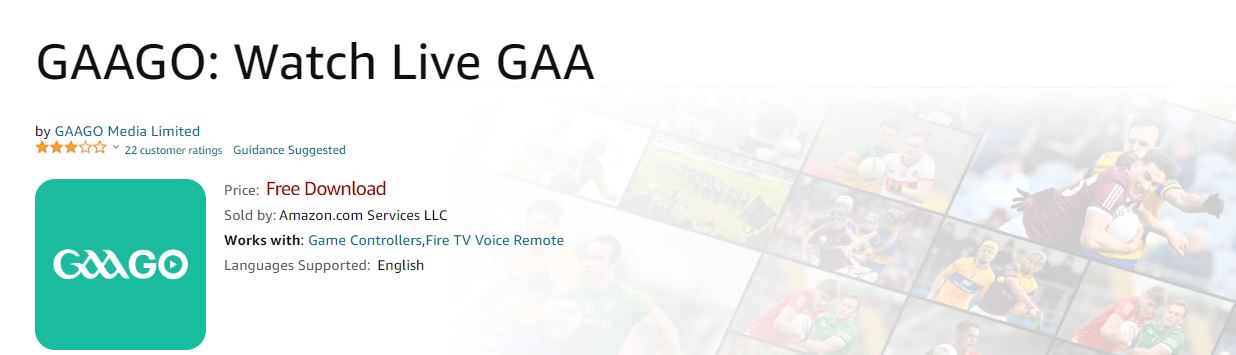
- And, click the Download button.
- Wait until the app gets installed on the Firestick device.
- Once, the installation is completed,
- Launch the GAAGO App on Firestick.
- And, Sign In with the GAAGO User Credentials.
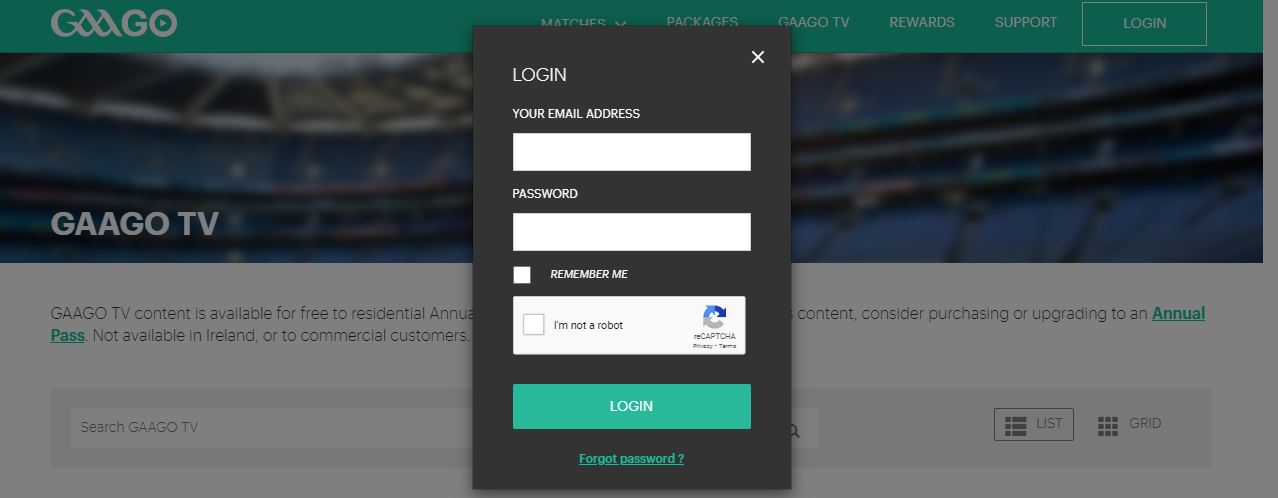
Go to the Live section or Upcoming games. Select the game and Click the play icon. Enjoy streaming the GAA Live Game on your Amazon Firestick device. This is the installation process for GAAGO on Firestick. And this is the installation for all apps which is available on the Amazon App Store. Also, refer to this linked article to watch the US Open 2023 on Firestick.
How Much is the GAAGO Subscription Cost?
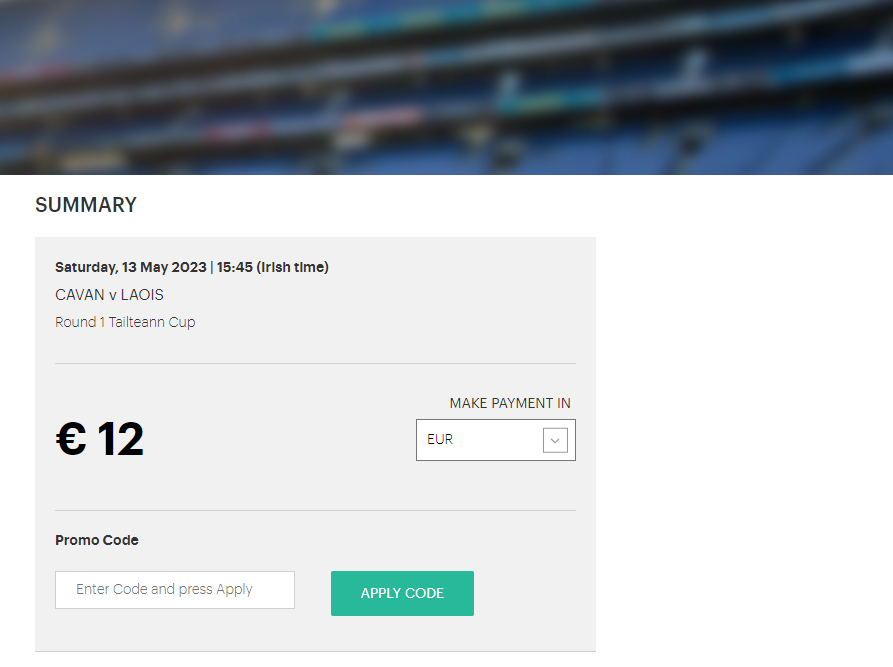
GAAGO is a Subscription-based streaming service. To watch all exclusive content and Shows on its platform, you have to purchase a subscription. Here, check the image for reference…


Create an Account and Subscribe with GAAGO
If you are an existing user, you do not need to create an account. Or, if you are a new user, then you have to Create a New Account with GAAGO. It will remind you of the live Match and On-demand notification.
- First, go to the Firestick Home Screen.
- Launch the Apps and Games section.
- Search for the installed GAAGO App.
- Go to the Matches section.
- And, click the Buy Now button on the Content.
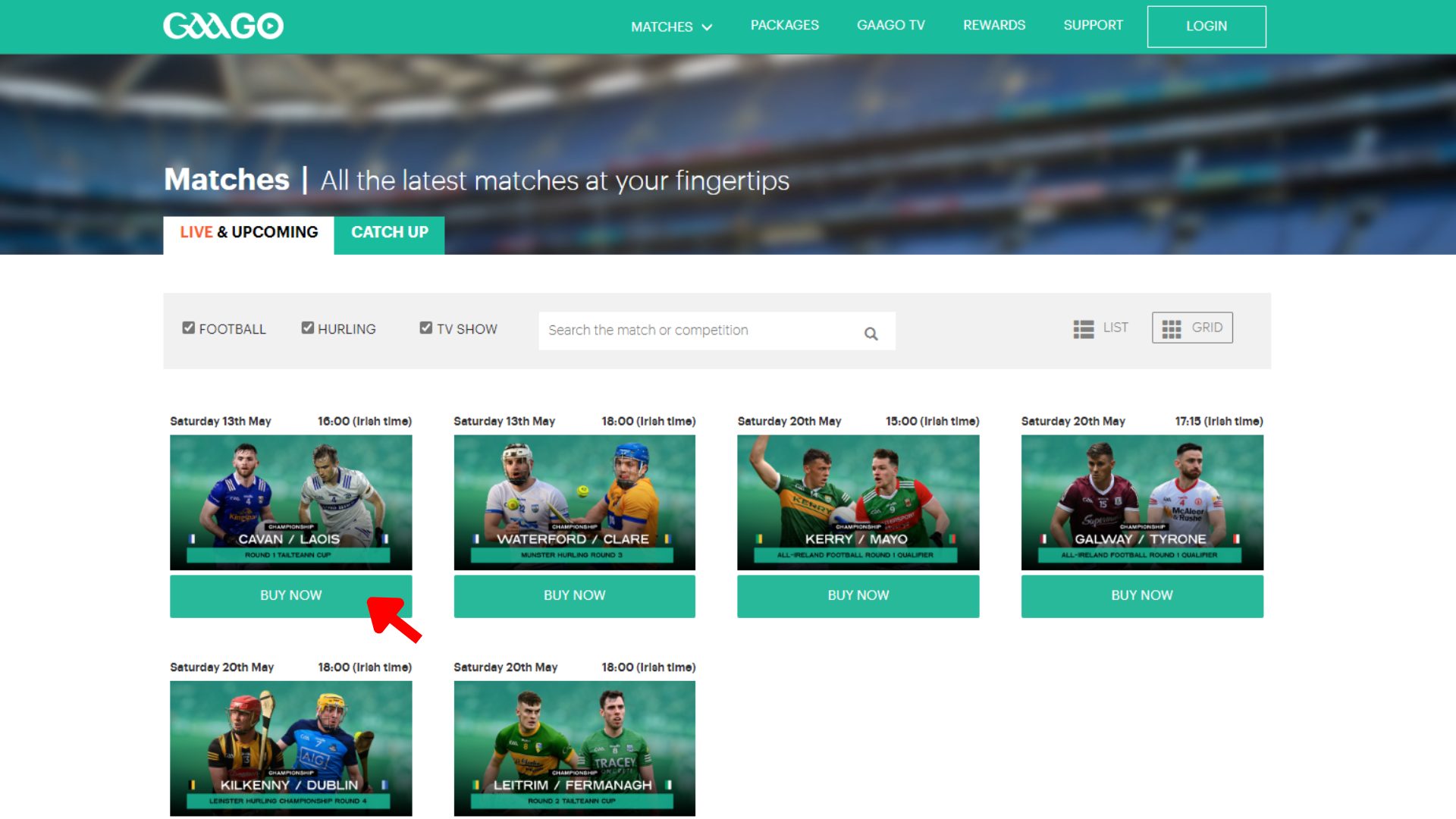
- Now, it will redirect you to the Subscription page.
- There you can see three Packages on the screen.
- Select anyone from that.
- And click the “Buy Now” button.
- If you are a new user, it will directly redirect you to the Sign Up page.
- There, Enter your Correct Email Address, Password, Payment Method, and all other required information.
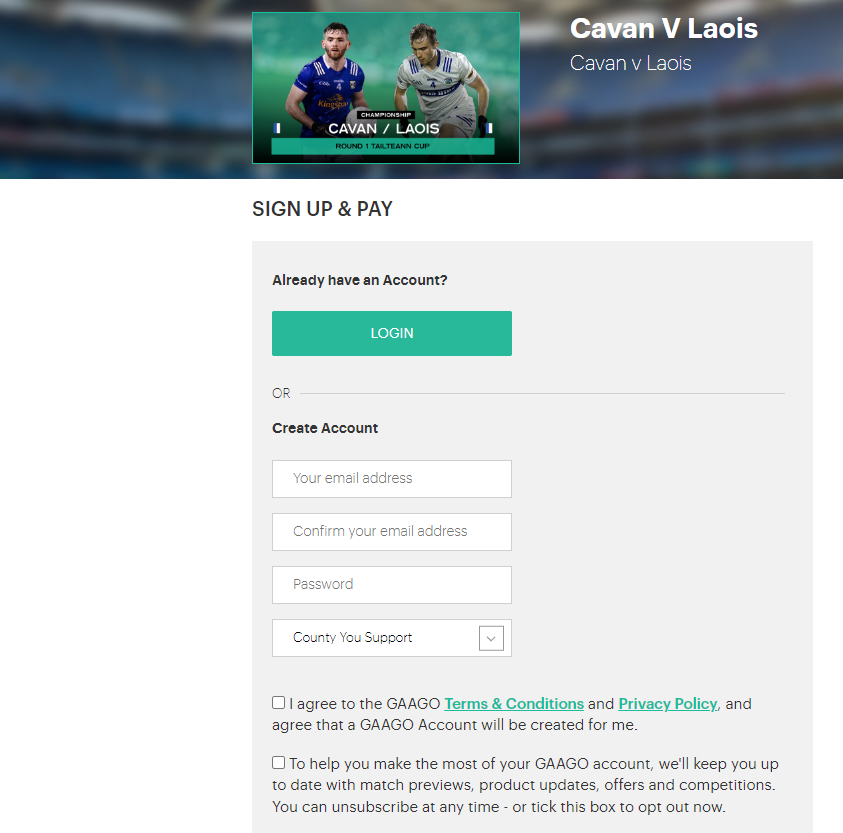
- Or, if you already have a GAAGO user account,
- Enter the registered email address and Password in the Login section.
- Next, if you have any Discount Code,
- Enter the Code in Promo Code section.
- And, click the Apple Code button.
- Next, Enter your Card Details in the given space.
- Now, click the Create Account & Buy tab.
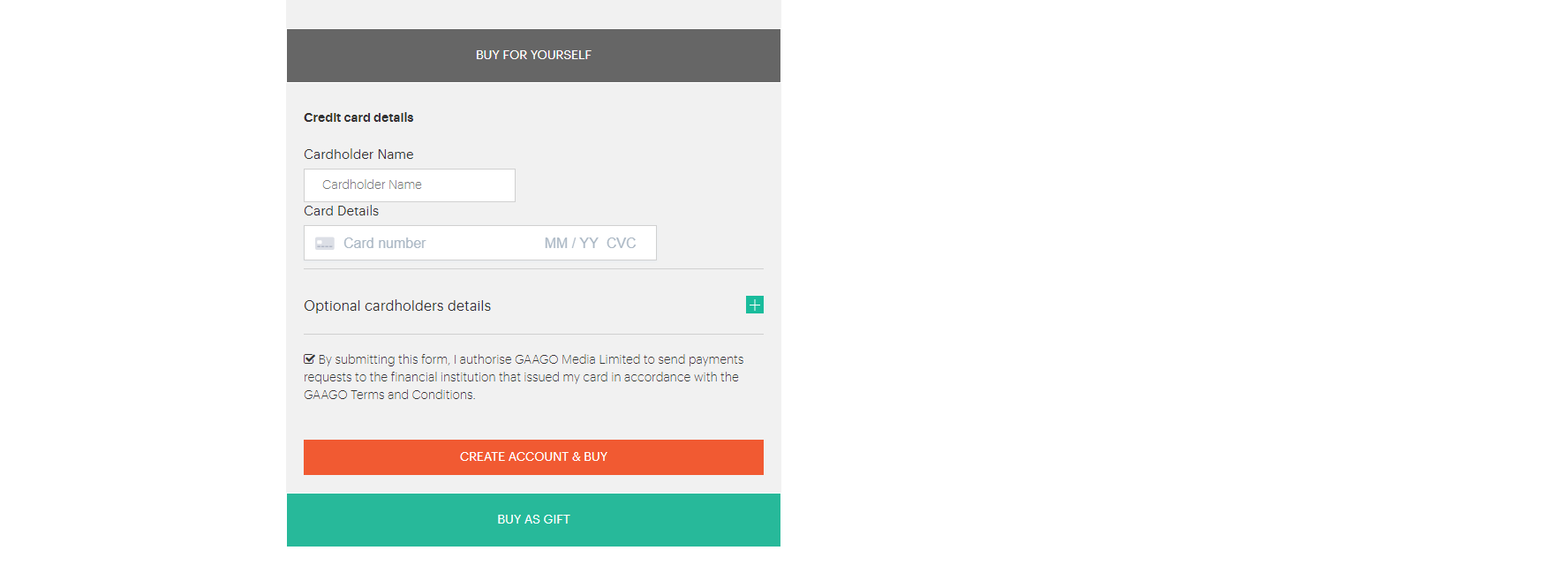
- The Payment is processing.
- Approve the Payment Process in your online banking app.
- Once it is done, you will receive the confirmation mail to your registered mail address.
Now, launch the GAAGO on Firestick or any device and Login in with the email address you have registered, and enter the password you have created. Now, you can watch the GAA 2023 Live Games on your TV. Not only sports but also you can watch Horror and Thriller movies and shows from Shudder on Firestick.
GAAGO 2023 Schedule
You can watch Football and Herling Games on GAAGO. As well as you can watch The Sunday Game every Sunday along with the live games. Here you can see the Upcoming match schedule of the GAA Game in Football and Herlin in July.
| 2023 GAAGO Games | ||||
| Month and Date | Day | Game | Teams | Irish Tiime |
| 8 July | Saturday | Hurling Semi-Finals | Limerick vs Galway | 18. 00 |
| 9 July | Sunday | Minor Football Final | Derry vs Monaghan | 13. 00 |
| 9 July | Sunday | Hurling Semi-Finals | Kilkenny vs Clare | 16. 00 |
| 9 July | Sunday | The Sunday Game | – | 21. 30 |
| 15 July | Saturday | Tailteann Cup Final | Down vs Meath | 15. 00 |
| 15 July | Saturday | Football Semi-Finals | Dublin vs Monaghan | 17. 30 |
| 16 July | Sunday | Football Semi-Finals | Kerry vs Derry | 15. 30 |
| 16 July | Sunday | The Sunday Game | – | 21. 30 |
| 23 July | Sunday | TBA | TBA vs TBA | |
| 23 July | Sunday | The Sunday Game | – | 21. 30 |
| 30 July | Sunday | TBA | TBA vs TBA | 15. 30 |
| 30 July | Sunday | The Sunday Game | – | 21. 30 |
Note down the date and time. Do not miss watching the live game on your TV. If you have missed it, do not worry about it. GAAGO allows us to watch the previous matches’ highlights and the whole matches in the on-demand section. The important thing is, you need an active subscription plan for a particular game or for a whole season.
Conclusion
The GAAGO is available on the Firestick. So, you can install the GAAGO on Firestick directly from the Amazon App Store. If the app is not shown on your Firestick device, or the device does not support downloading the app, you can go with the alternatives. Just install the GAAGO app on your Smartphone, tablet, or in any device. Then, Screen Mirror or Screen cast to Amazon Firestick. Or, you can restart, reboot, uninstall, and reinstall GAAGO on Amazon Firestick, and Powercycle TV and Router while the GAAGO Not Working on Firestick.