
![SNY on Roku.[Install | Activate | New York Mets]](https://techthanos.com/wp-content/uploads/2023/04/SNY-on-Roku.Install-Activate-New-York-Mets.jpg)
Are you a Sports Fan residing in New York? You can now watch all your favorite New York Sports Teams Live Games and Highlights on SNY. The SNY app can be easily accessed on Smartphones and Streaming Devices. Roku Users can get the SNY app from its Channel Store. From this article, you can learn the procedures to install and activate the Regional Sports Network, SportsNet New York (SNY) on Roku. TV Provider Credentials to required to access Live Games, NY Sports News, Events, Originals, and archived shows with SNY on Roku.
Table of Contents
How to Get SNY on Roku?

You can easily add SNY to your Roku device from its official Store. After installation, you can Activate it with the participating TV Provider and access its features. If you are not able to get SNY on your model or Roku device, you can just cast it from other supported devices to yoru Roku TV screen. With the SNY app, you can watch live Games of New York Based Sports Teams like,
New York Mets | New York Yankees | New York Jets | New York Giants | New York Knicks
Brooklyn Nets | New York Rangers | New York Islanders | New Jersey Devils
Uconn Women’s Basketball
The TV Providers by which you can activate SNY on Roku are as follows,
COX | DIRECTV | DIRECTV Stream | Fubo TV | Hulu | Optimum | Optimum TV | Spectrum
Verizon FiOS | YouTube TV
You may also like to learn about How to Watch Sportsnet on Roku?
How to Install SNY on Roku?

- Take your Roku remote and press the Home button on it.
- Select the streaming channels option to launch Channel Store.
- Choose the Search Channels option.
- Using the virtual keyboard type “SNY” in the search tab to initiate the search.
- Select the SNY app from the search results and go to its information page.

- Here select the Add Channel option and wait for a few seconds.
- The SNY app is now installed on your Roku device.
NOTE: Make sure to get your Roku device a good Intenet Service with High Speed to make the installation process go smoother and faster, without any errors.
How to Activate SNY?
NOTE: Make sure that you have subscription account credentials at the above-mentioned TV providers.
- Launch the SNY app on your Roku device.
- Select Sign In and note down the activation code.
- Now go to your Phone or PC web browser and go to the sny.tv/activate site.
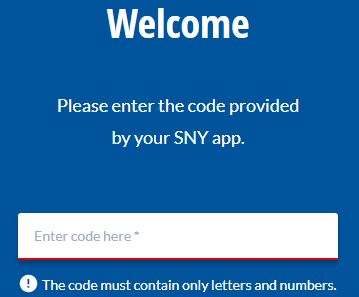
- Enter the Activation Code in the given field.
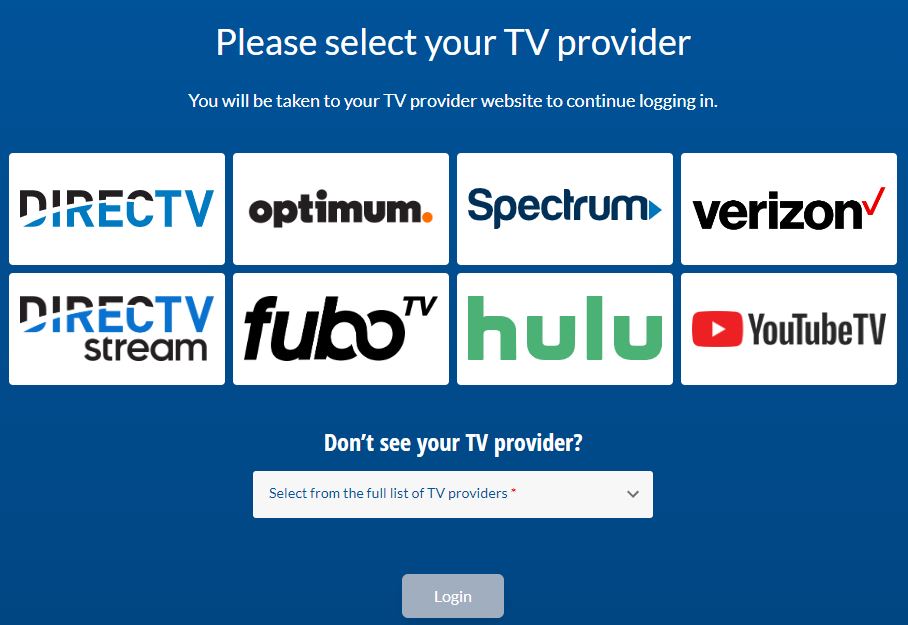
- Now choose a TV Provider and select Login.
- From the TV Provider website follow the instructions and continue to log in.
- Complete the Activation Procedures and wait for a few seconds.
- The SNY App refreshes and you can access its content on your Roku device.
You may also like to learn about How to Add Willow TV on Roku?
Live Games to Watch with SNY on Roku
Currently, there are no sports events available till March 30th. You cna watch on-demand sports events, Highlights, and programs broadcast on the SNY TV channel on the SNY app. The Sports Events you can get to watch with SNY are as follows,
Baseball | Football | Hockey | Basketball
Some of the upcoming live sports events you can watch on your Roku devices, using the SNY app are as follows,
New York Mets Schedule May 2023


With the above-mentioned schedule, you can watch all the live baseball games of the New York Mets on your Roku devices with the SNY app. You may also like to learn about What Channel is the Mets game on Spectrum?
Alternate Ways to Watch SNY on Roku
YouTube
You can subscribe to the official page or SNY on YouTube and watch videos, shorts, live and listen to Podcasts. YouTube can be easily added to your Roku device from the channel store. All you have to do is sign in with yoru YouTube account credentials and access SNY on Roku for free.
Streaming Service Apps on Roku
The SNY TV channel can be live streaming on some of the streaming services apps compatible with your Roku device. You need to subscribe to these services to access live TV on your Roku devices. The application with the SNY TV channel and available on Roku is as follows,
DIRECTV Stream | Fubo TV | Hulu+Live TV | YouTube TV
Suggestions
The SNY app is a Regional Sports Network available only in New York but with the SNY app, you can carry the SNY TV channel along with you anywhere and watch it anytime you like. Currently, you can only watch the Mets MLB game live through the SNY TV channel and App. The easiest way to watch SNY on your big screen would be by screencasting. But doing so can reduce the clarity of the video and can cause buffering issues.
Frequently Asked Questions
What Channel is SNY on DIRECTV?
You cna watch the SportsNet New York channel on your DIRECTV and DIRECTV Stream subscription. The Voice Remote makes it easier to live to navigate to the channel. The SNY Channel is on channel number 639 on your DIRECTV.
What are the Sports Channels on Roku?
From Roku Channel Store, you can access sports channels like NLF App, ESPN, FOX Sports, Peacock, Paramount+, SNY, Bally Sports, SportsNet, NBC Sports, and more.