
![Amazon Music on Roku. [Install|Activate|Listen]](https://techthanos.com/wp-content/uploads/2023/04/Amazon-Music-on-Roku.-InstallActivateListen.jpg)
Music has always been a part of our life, it can bring you joy, resurface your sadness, makes you think deeply, and can calm down your soul. Amazon Music app brings you the music of your choice right to your ears through its supported devices. Roku is one of Amazon Music’s app-supported devices, which can enrich the quality of the music or podcast you listen to. Follow this article to learn the procedure to add Amazon Music on Roku devices and how to listen to it on The Roku Streambar.
Table of Contents
How to Get Amazon Music on Roku?

Your Roku device is very much compatible with the Amazon Music app. You can easily add it to your device from Roku Channel Store. If you are an Amazon Prime subscriber, you can listen to Amazon Music without any ad interruptions. You can also subscribe to Amazon Music Unlimited and use all features offered by the app. After getting Amazon Music on your device, you need to Activate it for the first time using the Activation code from your TV screen. Follow to know the detailed procedure to listen to your favorite music from Amazon Music on your Roku device.
How to Add Amazon Music to Roku?

- Go to your Roku device Home page and select the Streaming Channels option.
- Select the Search icon and type “Amazon music” with the virtual keyboard and start the search.
- Tap on the Amazon Music app from the search results on Channel Store.

- On its details page select Add Channel option to get Amazon Music on your Roku device.
How to Activate Amazon Music?
- Launch the Amazon Music app on your Roku device.
- Select the Register or Get Started option to get a 5-digit Activations code on your TV screen.
- Visit the www.amazon.com/code site on web browsers on your Phone or PC.
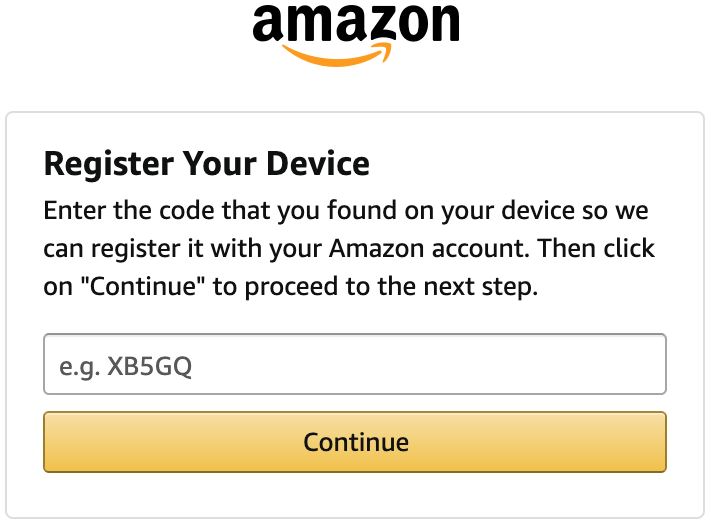
- Sign in with your Amazon Account credentials and enter the 5-digit code to activate Amazon Music on your device.
You can now access all the music libraries within Amazon Music on your device. Listen to podcasts along with trending and popular music now on your device.
Amazon Prime Membership

Monthly – $14.99
Annual – $139
Amazon Music Unlimited

Monthly – $9.99
You may also like to learn about How to Use Apple Music on Roku?
How to Listen to Amazon Music on Roku Streambar?
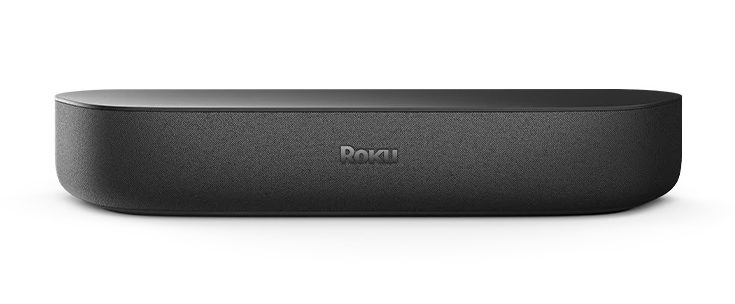
You can easily connect Bluetooth-compatible devices to your Roku Streambar. Now the Amazon Music app-supported devices can be connected to your Roku Strembar via Bluetooth and listen to music in Premium quality. You can get Amazon Music on devices like Smartphones, Tablets, and PC easily. Follow the simple procedure to stream your favorite music from this app and enjoy it through your Roku Streambar device.
How to Pair Amazon Music with Streambar?
You need to first connect your Bluetooth device to your Roku device by a process called Pairing. Without pairing, it is not possible to get Amazon Music audio on your device. Follow the simple procedure to pair your device to Roku Streambar.
- Go to the Roku Home screen and select Settings.
- Under the Remotes & Devices option, choose Pair Bluetooth device.
- Now open Bluetooth settings on your device with Amazon Music.
- Turn on Bluetooth and wait for it to discover your Roku device.
- Now select your Roku Streambar and complete the pairing process.
Now you can play any music from the Amazon Music app on your device and listen to it on your Strembar. You can find information like the device’s name, track name, and artist name of the song you are listening to. Audio can be adjusted from your Device or using your Roku remote. You may also like to learn about Listening to SoundCloud on Roku.
Trending Playlists on Amazon Music:
Music:
- Country Heat | Cole Swindell, Sam Hunt, Lainey Wilson, and more.
- Mellow ’70s Gold | Eagles, Jim Croce, Joni Mitchell, and more.
- Mellow ’80s Gold | The Police, Eurythmics, Annie Lennox, and more.
- All Hits | Coi Leray, Morgan Wallen, Ed Sheeran, and more.
- Classic Rock Hits.
- Pop Culture
- Certified Country
- Solo Classical Piano
You may also like to learn about How to Add & Listen to Pandora on Roku?
Podcasts:
- On Purpose with Jay Shetty. iHeartPodcasts.
- Huberman Lab. Scicomm Media.
- 7 Good Minutes Daily Self-Improvement Podcast. Radio America.
- Feel Better, Live More with Dr. Rangan Chatterjee. …
- Calm it Down. …
- The Habit Coach with Ashdin Doctor. …
- The Mindset Mentor
You may also like to learn about How to Get Spotify on Roku?
THE END
Enjoy listening to your favorite music and podcasts on premium audio quality on your Roku device. You can also cast audio from other supported devices to Roku, but the quality of the audio will go down. Instead of directly accessing Amazon Music on Roku, using Bluetooth to get music on Roku can save your data.
Frequently Asked Questions:
Is Amazon Music Free?
Yes, Amazon Music is a free application and you can listen to music for free with ads. To remove ads, you will need either Amazon Music Unlimited or Amazon Prime membership.
Which is better Amazon Music or Spotify?
Between Amazon Music and Spotify, all of its services are somewhat similar to each other. But it all comes down to your preference in music, if you have Alexa Amazon Music will be convenient, for desktop listening or on a smartphone, Spotify can be the best option.