
If you are a cord cutter yet want to watch all the live news, sports, and entertainment, then read this amazing article. In this article, we will let you know how to watch Jio TV on Firestick in detail. Since firestick offers more streaming apps in their Amazon App Store to download and stream, you have to know whether it is available or not. If it is possible, then get to know all the ways to get and stream through this article.
Jio TV is a standalone app, and it is available to stream various TV channels through your mobile phone for those who are Jio users. Regardless, it is the most popular entertainment app to catch up on all the content. Since it is an Indian TV streaming platform that Jio Platforms own. Moreover, it offers more than 800 live TV channels and also lets you stream over 200 HD TV channels in 15+ languages. Jio customers can watch live sports, TV shows, Movies, entertainment, and news content to stream.
Amazon Firestick is the most popular streaming device to watch all live TV and on-demand content with HD streaming. Get to know whether the Jio TV app is available on your Amazon App Store or not through the below session.
Table of Contents
Is Jio TV on Firestick?
Regrettably, you won’t be able to install the Jio TV app on your Firestick since it doesn’t carry in their Amazon App Store. But you can get and stream its content on your Fire TV screen by sideloading the app. In Firestick, jailbreaking is easy and quick steps so you can install any third-party apps easily without any hassle. So we will teach you to sideload Jio TV app on your Fire TV device from the further below session.
How to Get Jio TV on Firestick?

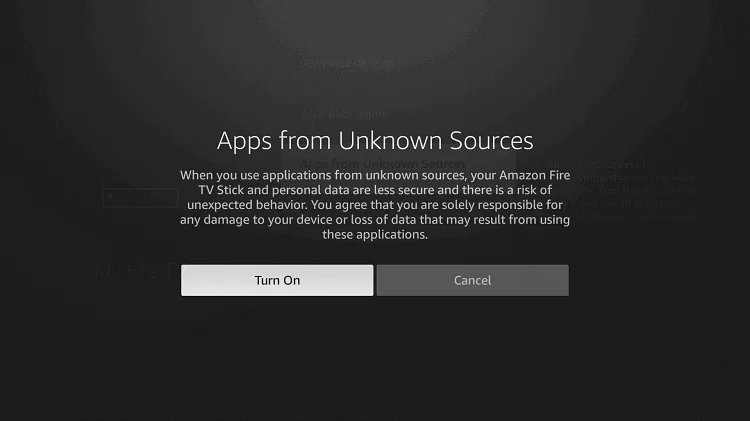
As we said earlier, you cannot get the Jio TV app directly from the Amazon App Store. Nevertheless, you get it from the downloader and other sideloading apps that are available from the official app store to install on your Firestick. Before you install any third-party apps, you have to enable the unknown sources under the developer options
Mandatory Steps:
- Head to the Settings menu under the Fire TV’s main menu.
- Navigate to the My Fire TV menu, then choose the Developer Options.
- Tap the Turn on a tab to enable the App from Unknown Sources.

- Now you can install any third-party apps on your Firestick by using any sideload apps.
1. Install the Jio TV on Firestick Via Downloader:
The Downloader app is officially available on Firestick instantly by following the given below simple procedures.
- Move to the Find menu and then hover over the Search bar.
- Look for the downloader app using the search field.
- Tap on the Get button in order to install the app.
- Once it gets installed, then launch it.
- Click on the Home key and then enter the Jio TV’s download URL.
- Once you have entered, then tap on the Go tab to start the download process.
- Tap on the Next key to install the apk file on your Firestick.
- Further, tap on the Install tab, and then it will be installed.
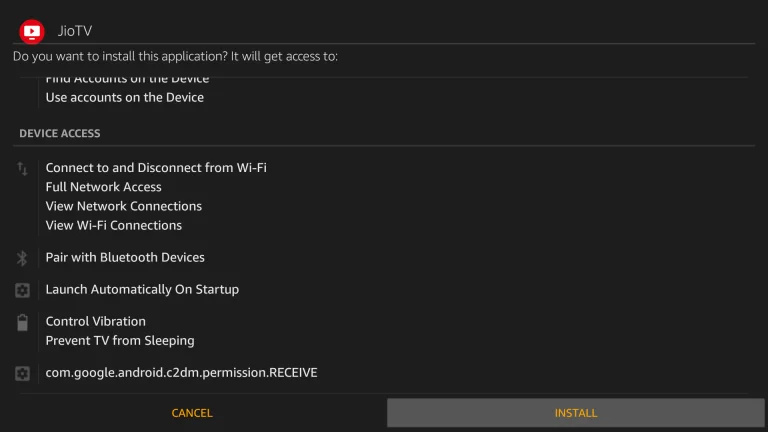
- After that, tap on the Open tab and then launch on your Fire TV device successfully.
- Once you have installed the Jio TV, you need to install the Mouse toggle.
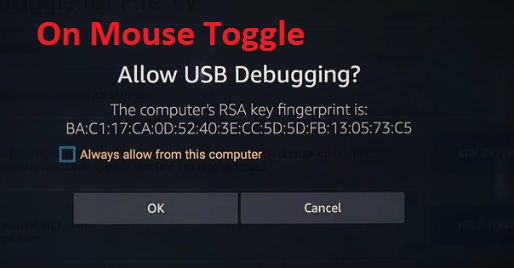
- When it gets installed, then allow it to access the USB debugging on your mouse toggle.
- Now enable the mouse service by tapping on it.
- Next, it will be shown as the status started.
- Furthermore, return to the apps and open the Mouse toggles and downloader app.
- After that, tap and hold the home ket using your TV remote.
- And then navigate to the main menu.
- Finally, move to the Jio TV and then enter the login information.
- You can start streaming Jio TV content on your Fire TV screen.
2. Get the Jio TV app on Firestick using ES File Explorer:
ES File Explorer is also one of the side-loading apps that is available on Amazon Firestick. So let’s get into the steps to install the app on your Firestick.
- Avail of the ES File Explorer app on your Firestick and Android device.
- Tap on the Downloader app icon from your Window.
- Furthermore, click on the +New icon from the window screen.
- Now Add the official URL of the Jio TV apps in the respective space.
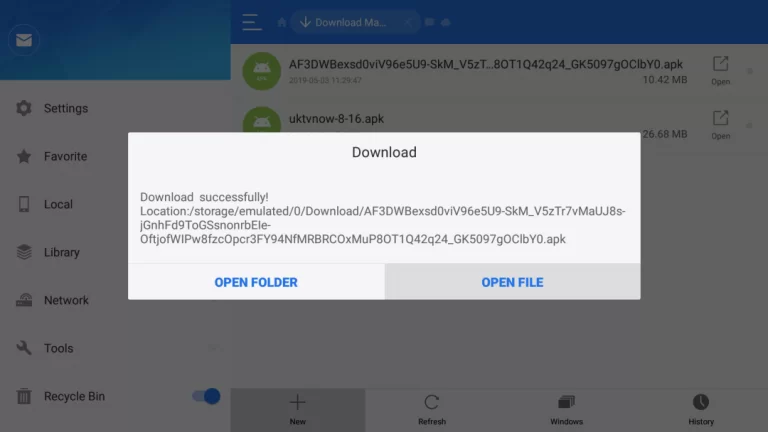
- Hit the Download Now button, and then it will be installed on your device.
- Again tap on the Open File tab from the popup notification.
- After that, tap on to Install tab and then click on the Open tab.
- That’s it. Now you can watch Jio TV app content on your Fire TV screen.

Highlights of the Jio TV App:
- Avail 600 live TV channels and over 100 HD channels to stream.
- It is categorized into movies, sports, news, education, business, kids, infotainment, and so on.
- It updates regularly and also catches previous live events as well.
- Pick your liked channels and make them on a favorite list.
- Watch all the trending and popular events.
- Record your favorite shows to watch them offline.
- Catch up for up to seven days without missing your favorite shows.
- On the Featured tab, you can get all trending and popular shows.
- From the News tab, you will get all the exclusive and updated news around India.
Reason for using Mouse Toggler with Jio TV:
Because the Jio TV app is not available on the Firestick official app store. It means the Jio TV is not supported by Firestick devices. Due to it being only available on Android and iOS SmartPhones. But you can install the app even if it is not compatible with your device by using the Mouse Toggle on your Firestick device.
So using this app will help you to use the Jio TV app on your device to stream on the big screen.
Another Way to watch Jio TV on Firestick:
Suppose you don’t want to install any third-party apps to your Firestick, then you can choose the casting method to stream its content on your screen from the smartphone.
- Link your smartphone and Fire TV to a stable internet service.
- Then long, press the Home key using the Firestick remote to get the Menu screen.
- Further, pick the Mirroring option from the on-screen.

From Android SmartPhone:
- Install the Jio TV app on your mobile device from Play Store.
- From your smartphone, swipe down to the Notification Panel and tap on the Cast option.
- Choose the Fire TV device from the available listed device.
- Get into the Jio TV app from your mobile and then proceed to sign in using its credentials.
- Play any of your favorite content from Jio TV, and it will be mirrored on your Fire TV screen.
Wrapping Up:
From this article, you will get to know all the possible ways to get and stream the Jio TV app on your Fire TV device. In the above guide, we have mentioned three more ways to watch its content on the big screen. Additionally, you will know why you want to use a mouse toggle on your Firestick. In case you have any queries regarding this article, use the comment box below.