
Your FireStick is more potent than you think. You can use all the additional functions of your FrieStick by accessing the Developer Options on it. By using the Developers option, you can access ADB Debugging and Apps from Unknown Sources. But usually, people use the Developers Option on FireStick to install a third-party app on it.
The Developer’s Options on FireStick have been hidden from the users. But don’t worry, it has not been removed; you just need to find it. This article will help you to find the exact location of the Developer Options on your FireStick device.
Table of Contents
What are Developer Options on FireStick?
The Developer options on your FireStick will let you configure the system behaviors that help you profile and debug your installed app’s performance. On FireStick, this option can be used to debug and allow apps from Unknown sources.
Where are the Developer Options on FireStick?
You can find the Developer Options on your FireStick device in the About section. Under Developers Options, you can find two options you can choose from. Get to the Developer Options on your FireStick by following the steps provided here,
- Use your FireStick remote Home button to go to FireStick Home Screen.
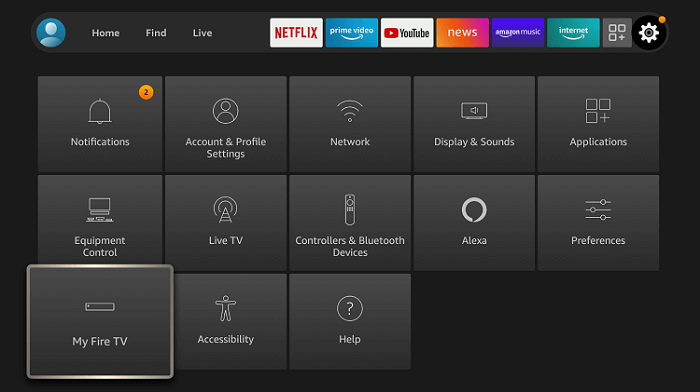
- You can see the Gear icon on the home page, which will lead to the Settings menu of your FireStick.
- Here you can find many settings options in tiles; you need to highlight the My Fire TV tile and press OK on your remote.
- Now go to your FireStick About page and select your FireStick device Name seven times.
- When you see the “No Need, You Are Already a Developer” message, your Developer Options get unlocked on your FireStick device.
- On your way back to the My Fire TV section, you can find the Developer Options enabled.

- Open the Developer Options to find the ADB Debugging and Apps from Unknown Sources options.

What is “ADB Debugging”?
ADB stands for Android Debug Bridge. ADB Debugging helps you to connect with other devices; you can install and debug apps on that device.
What is “Apps from Unknown Sources”?
This option helps your device to download apps that are not recognized by its app store. You can get the APK file from Unknown Sources and install it on your device.
The End
You now know where the Developer Options are on your FireStick device. Get to it now and access the options available there to get third-party apps on your FireStick. After enabling this, you can download any app supported on FireStick but not available on its App Store using the Downloader and ES File Explorer app.
Frequently Asked Questions:
Where can I find my downloaded APK file on FireStick?
You can find the APK file you downloaded at your Fire TV internal Storage.
Are there any other apps to Sideload Third Party apps on FireStick?
Other than the Downloader and ES File Explorer app from the FireStick app store. You can use the Apps2Fire app for Android devices to sideload third-party apps on FireStick using its IP address.