
Want to unlock your Facebook account? Then either reset your password or use a trusted person’s account and recover your account. If you are unable to find your account, then you can either use your registered phone number or email id to find your account using facebook.com/login/identify. You can learn more by reading this article to the end.
![How to Unlock My Facebook Account [Simple Guide]](https://techthanos.com/wp-content/uploads/2022/07/How-to-Unlock-My-Facebook-Account-Simple-Guide.jpg)
We will be discussing,
- Why does your account gets locked or disabled?
- Steps to unlock it using different methods.
- Steps to replace your Facebook password?
Table of Contents
Why is the Reason for My Facebook Account to Get Locked or Disabled?
Your Facebook account will be disabled if the terms and conditions are not followed or if you are using a fake account. Some examples are,
- Posts that are not under the terms of Facebook.
- If your account seems to be fake.
- Not following community guidelines and repeating this behaviour often.
- If you are found harassing, advertising or promoting by contacting others.
You may also like to read about, How to Delete Order History on Your Amazon Account?
How to Unlock my Facebook Account?
Facebook can lock your account if it is not secure or if you have not followed the terms and conditions imposed.
[Method: 1]
To unlock your Facebook account, you have to reset or change your account password. To do so, the steps to be followed are
- Go to facebook.com/login/identify
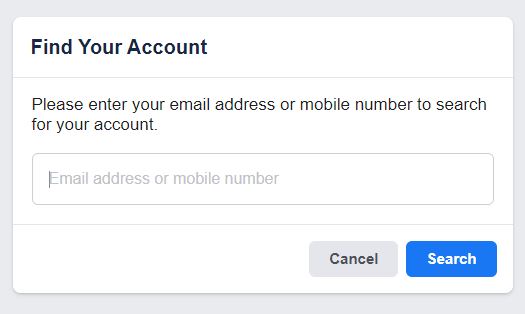
- Now enter your phone number, mail ID or User name
- After entering the press Search.
- Now press continue to get a code on your phone number
- Type the 8-digit code sent to your registered number and tap on continue.
- Type the new password and tap Next.
- Now choose the Review other devices or the Stay logged in option and press continue.
- On the next page, press OK to save your password to log in to the future.
Your account password is now changed and signed out on all devices where you stored your account details.
[Method: 2]
If you are having trouble using the methods given above, then you can also recover your Facebook account using your fried or family members’ account. The steps to be followed are,
- On your computer, go to the Facebook account you want to recover.
- Select the three-dotted option on your profile page.
- Now tap on the Find support or report profile option.
- Select the option Something else and press Next.
- Now go to the Recover this account option and tap on it.
- From here on, follow the instructions provided.
You will now be able to access your Facebook account by unlocking it using the methods mentioned.
How to Unlock Your Account by Resetting Facebook Password?
If you can reset your password for your account, you can unlock your Facebook account. Follow the instruction to reset your account password.
- Go to facebook.com/login/identify
- Now enter your phone number, mail ID or User name
- After entering the press Search.
- Now tap on continue to get the code sent to the registered phone number
- Type the 8-digit code sent to your registered number and tap on continue.
- Type the new password to secure your account and press Next
- Now choose the Review other devices or the Stay logged in option and press continue.
With the following steps, you have now successfully reset the password of your Facebook account.
If you are already logged in, then you can follow these steps,
- On the top right corner of the Facebook page, select the dropdown option.
- Go to the Settings and Privacy menu and select the settings option.
- Now go to Security and login.
- Press the edit option and then select Change Password.
- Type your current password, and after that, type your new password.
- Now tap on the Save changes option.
With the following steps, you have now successfully changed your Facebook account password.
You may also like to read about, How to cancel Philo Subscription?
Frequently Asked Questions:
How Can I Unlock My Facebook account?
You can unlock your Facebook account by either resetting your password or by using a trusted friend or family member’s account and recovering your account. To know more, you can read this article.
How to find my Facebook account?
You can find your Facebook account by using the website facebook.com/login/identify and by entering your phone number or email id, you can find your Facebook account.
The End
You can now unlock your Facebook account if it gets locked by following the methods and steps given in this article. You can either reset your password or use a trusted account to recover your account. All your doubts will be clarified; please ask them in the comment section at the end of the page.
Thank You