
Use Trending Songs for Instagram Reels and get a heap of followers, likes and views for your account. All you have to do is use the songs that are currently in trend and use them to make reels and share them on your Instagram profile.
![Trending Songs For Instagram Reels. [Top 50 Songs]](https://techthanos.com/wp-content/uploads/2022/06/Trending-Songs-For-Instagram-Reels.-Top-50-Songs.png)
Here we will be discussing,
- Trending Songs For Instagram Reels
- Finding Trending songs on Instagram
- Making Instagram Reels
Table of Contents
Trending Songs For Instagram Reels:
Here is the list of songs that are now trending in Instagram Reels.
- As it was by Harry Styles
- A glimpse of Us by Joji
- Running Up That Hill by Kate Bush
- Get Lucky by Daft Punk
- Hold me Closer by Cornelia Jakobs
- Stolen Dance by Milky Chance
- About Damn Time by Lizzo
- I Like You by Post Malone
- Primadonna by Marina
- Wait a Minute by Willow
- Dopamine by Purple Disco Machine
- Potion by Calvin Harris
- Sweater Weather by The Neighbourhood
- First Class by Jack Harlow
- Bam Bam by Camila Cabello
- Where are you Now by Lost Frequencies
- Hey Boy by Iselin Leine
- The Motto by Ava Max
- Heat Waves by Glass Animals
- Riverside by Kevin Lake.
- Cold Heart by Elton John
- When I’m Gone by Alesso
- Relax, Take It Easy by Mika
- Better Days by Neiked
- Enemy (with JID) by Imagine Dragons
- “abcdefu” by Gayle
- Don’t Be Shy by Karol G
- Stay by Justin Bieber and The Kid Laroi
- Leave Before You Love Me by Marshmello
- I can’t touch this by BIA
- Industry Baby by Lil Nas X
- Love Tonight by Shouse
- Rasputin by Majestic
- Your Love (9 PM) by ATB
- Kiss me More by Doja Cat
- Sacrifice by Bebe RExha
- Ily by Surf Mesa
- So damn low by Iselin Leine
- Yet to come by BTS
- In the name of Love by Felax
- Lost Forever by Sergio Valentino
- Disaster by KSLV Noh
- Sea Shanty Medley by Home Free
- Jiggle Jiggle by Duke & Jones
- Bad Blood by Taylor Swift
- All that Glitters by Earl
- Numb by Mizgin
- Let’s Go by Ark Patrol
- They Don,t know by Elia Berthoud
- High School by Nicki Minaj
How to Find Trending Songs for Instagram Reels?
Suppose you are an Instagram Reels fanatic and want to get more views and likes for your Reels. Then use the trending songs on Instagram to make your reels and become a famous personality overnight.
Exploring Trending Songs for Instagram reels:
When you go through the reels section of Instagram, you will come across some trending songs used by others. You can find that there will be an upward arrow indicating that the Audio is now trending on Instagram.
Save Trending Audio for Instagram Reels:
You can select the Audio and save it for later use on your Instagram. To Save the Audio, the steps to be followed are,
- Tap on the Audio file on the Reels page.
- On the Audio page, select the option Save Audio
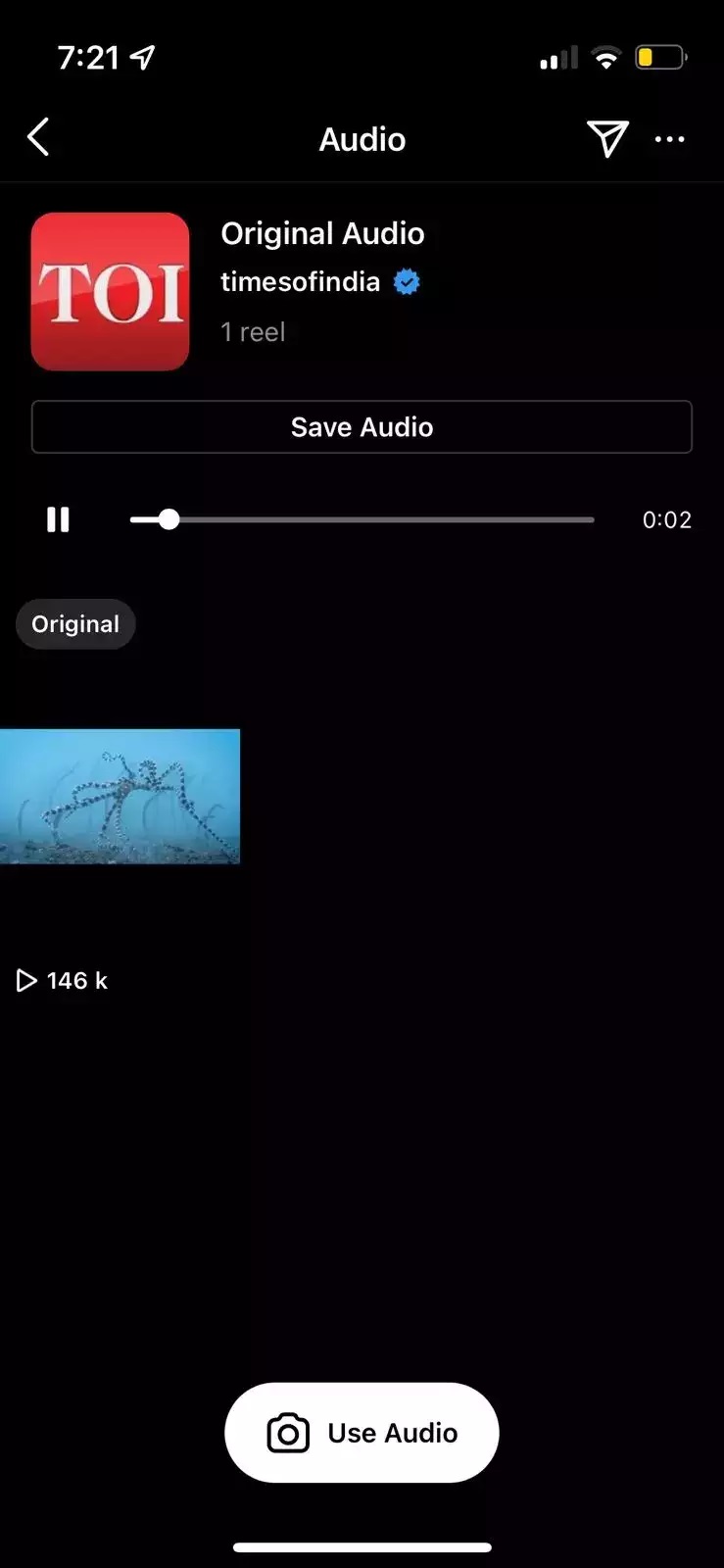
- Instagram will save the Audio for future use.
If you are to find something specific, use the search option and the hashtag to find reels, get trending audios from those reels, and save them to use in the future.
How to make Instagram Reels with Trending Songs?
To make an Instagram Reel using the songs that are Trending, follow the instructions carefully,
1. Grasping The Concept:
Before making reels, it would be best to observe other users who have made them with the same Audio for reference. To get started,
- Know the topic on which you are going to make the reel.
- Find if the topic works along with your other posts.
- Select your target audience
The reference to other reels to get a feel to use the Trending Song for Instagram Reels.
2. Make your Instagram Reel:
This is the fun part, where you will be taking videos and adding Audio to your reels. You can either imitate other reels or think of your concept and start making your content.
How to Shoot Videos for Reels on Instagram?
Follow the step to start shooting the video for your Instagram Reel,
- Tap on the reels icon on the Hoem screen and press the camera icon on the top right corner to start taking videos.
- You can also select the plus icon on the top right corner of the home screen and select reel to start taking videos.
- The other way is by going to the Story page and selecting the Reel option to start making reels.
- Press and hold the record button to start taking videos
How to Add Audio to Your Reel?
- After taking the video, press the music icon on the left side of the screen.
- You can either search for trending songs or find them in the For you section and add select Import to add the Audio.
- Now crop the Audio to the part which you like and press Done.
You can also control the playback time of your reel.
3. Add Effects, Texts and watch Preview:
You can watch the Preview by tapping the preview option. If you like to add additional effects, then,
- Add Texts to your Reels to make them easier to understand.
- Use the draw tool and make some art.
- Add Captions and GIFs to your reels
- You can add filters by swiping to your left.
- If Audio does not get added again, add the trending Audio you like.
4. Post or Share your Reel:
After you are satisfied with your results, select Next to share your reel to get noted by your followers.
- Give a good description.
- To share to feed toggle, the Allow share to feed option.
- Crop a profile image for your reel
- You can also tag the people you like
Now select Share to post your Reel on Instagram with the Trending Song you like.
Frequently Asked Questions:
What are the Top 5 Trending Instagram Reels songs?
The top 5 trending songs, in my opinion, are,
- Sea Shanty Medley by Home Free
- Heat Waves by Glass Animals
- Jiggle Jiggle by Duke & Jones
- Stay by Justin Bieber and The Kid Laroi
- Industry Baby by Lil Nas X
What are the Things to be Considered While Creating an Instagram Reel?
The Things to be Taken into Account While Creating an Instagram Reel are,
- Concept
- Making video and adding audio
- Adding effects
- Sharing the Reel
The End
Get millions of like by following the instructions and combining your creativity to use Trending Songs for Instagram Reels. You can get many views if you are using a trending song or Audio because Instagram provides reels to views with respect to the trend. So, You can become a model or an influencer by making reels.
Your doubts are welcomed and will get answered if you ask in the comment section below.
Thank You