
Tidal is a music streaming application. you can get many songs from various languages. Also, you can acquire songs in high-quality. With the Roku device, the Tidal application gives 90+ million songs in various audio formats. It will have various categories such as Music Videos, podcasts, and Live Concert Recordings. Are you looking for an article on How to Install Tidal on Roku? Moreover, the Tidal application was established in the year of 2019 in the Roku Channel Store.

Table of Contents
Price Tag to Get Tidal on Roku
Whereas the Tidal application gives three types of membership offers. There are Tidal Free, Tidal Hifi, and Tidal Hifi Plus. In addition, all these offers give 100 million songs. Additionally, you can get a three-month free trial offer in the package of Tidal Hifi or Tidal Hifi Plus. Based on your wish select the package.
- First- Tidal Free, it is free of cost to stream the music. Free for family
- Second- Tidal Hifi, At the cost of $9.99 for one month. $ 14.99 per month for the family package.
- Third- Tidal Hifi Plus, You can get this service at the rate of $19.99 for one month. $29.99 for one month for a family subscription package.
Additional Info, How to Watch TinyZonetv on Roku
How to Install Tidal on Roku?
If you need to listen to Music on a Roku device. Then you have to install the Tidal application on Roku. In this section, we will share the steps to download the Tidal Application on the Roku Device.
The Steps are:
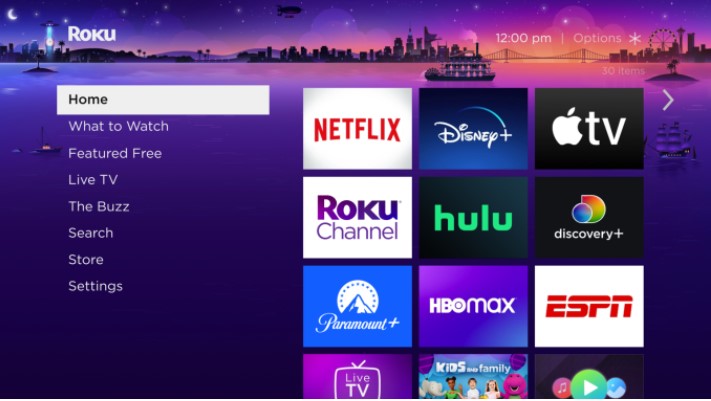
- Switch on your Roku device and navigate to the Home page.
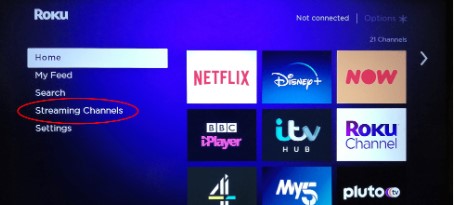
- Then you have to press the Streaming Channel on the menu.

- After that, choose the search channel option.
- By using the search bar type “Tidal” and click to find it.
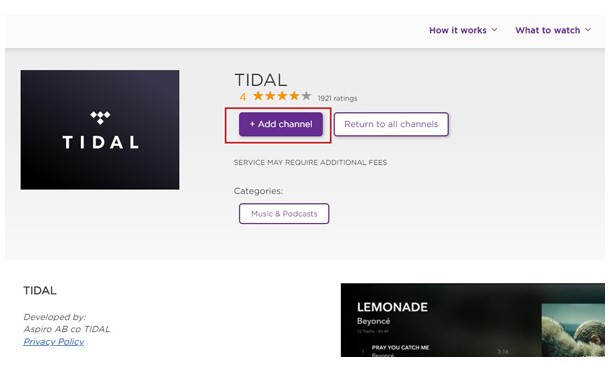
- Hit the application from the result and Press the Add Channel tab.
- Next, the Tidal application will be installed on your device, and Press the Ok button to prompt it.
- Choose the Go to Channel tab and open the Application.
- Atlast listed all your favorite music from the Tidal application after signing in with your account.
Steps to Activate the Tidal on Roku
Once you downloaded the application then you have to activate the application to stream its content. Tidal is a music application so you can listen to music only by activating the application.
- Open the Tidal application on roku.
- The screen will show the activation code. Note it down.
- After that, you have to move to visit the browser on your smartphone or PC. And browse for the official site to activate the Tidal application.
- Now, you have to enter the activation code in the required field.
- Once it verifies your code and it gives access to listen to your favorite music from the Tidal Application.
Also, Read How to Install Paramount Plus on Roku
Alternate Way to Get Tidal on Roku
You can also use these alternative ways to download the Tidal application and listen to music. These methods are also easy to access and get the application on a Roku device. Here we are going to demonstrate two tricks.
- By using a Roku Website.
- Using a screen mirroring method.
Steps to download Tidal on Roku by using a Roku Website
- launch the Web browser from your PC.
- After that, you have to search for the Roku Channels Website.
- Then, Press the sign-in button and log in by using your account.
- Now, use the search bar and find for tidal application.
- From the result select the Tidal application.
- Next, press the Add Channel option from the screen.
- It’s started installed on your device. If the process is completed then you have to listen to music on the Roku Device.
Check the post, How to Get Pluto TV on Roku
Steps to Screen Mirror Tidal on Roku
Screen mirroring the Tidal application on Roku is also access to get Tidal music on Roku. For this process, you have to use your Smartphone or iPhone. Follow the upcoming steps.
- First of all, you have to enable the Screen Mirroring option from the Roku device.
- After that, Download the Tidal application from the Google play store for Android users. Install Tidal App from the App Store for iOS users.
- If the application is installed then you have to sign in by using your account.
- Swipe the notification panel.

- Then Click the cast icon for Android users. Tap Screen mirroring option for iOS users.
- Afterward, you should click your device name from the list.
- Pair the devices and then play the Song from the Tidal application and listen to the Roku device.
Final Words
This article contains the information to install the Tidal application on the Roku device. The Tidall application is officially available on the Roku Channel Store, so it is easy to download the app directly from the roku Store. Additionally, we included alternate ways to get the music application on the Roku device. Refer to the above article and install the application and listen to various music on the Tidal app. We hope you like this article. If you need any related information to this guide, Let me know in this comment section.
Frequently Asked Questions
1) Who owned the tidal Application?
Tidal is an American streaming subscription-based Music streaming application also you can access both audio and Video songs. And this service Application was launched in 2014 by the Swedish public company Aspiro. Now the majority is owned by Block an American payment processing Company.
2) What is the High quality of Songs on the tidal application?
- Tidal application, you can get 160kbps quality normally. Based on your data usage.
- In the Hifi section, you can obtain the lossless quality of nearly 1411kbps.
- Master High Res Quality at 2304-9216 Kbps.
3) What songs are Hifi on Tidal?
- My Life. Dido, Dido.
- Otas in the Water. Ben Howard. ben Howard.
- Crime of the Century.
- You win, Lose. Supertramp. Supertramp.
- Daydreamer. Adele. Adele.
- Insomnia. Faithless. Faithless.