
![What is SSTV IPTV [Read to Know More]](https://techthanos.com/wp-content/uploads/2022/07/What-is-SSTV-IPTV-Read-to-Know-More.jpg)
SSTV IPTV is an IPTV service provider that offers more than 8000 live channels on most android, ios and amazon devices. The app cannot be downloaded from any of the available app stores and can only be got through a secure third party. You can learn more about it with the help of the contents of this article.
Table of Contents
What is SSTV IPTV?

It is one of the best IPTV service providers that offer more than 8000 live channels on most android, ios and amazon devices. The app cannot be downloaded from any of the available app stores and can only be got through a secure third party. The category of channels offered by it are as follows,
- News
- Sports
- Entertainment
- Documentaries
- Movies
- Kids
- Food
- International
And more other categories.

What are the Features of SSTV IPTV?
The features offered by it are as follows,
- 8,000+ Live Channels
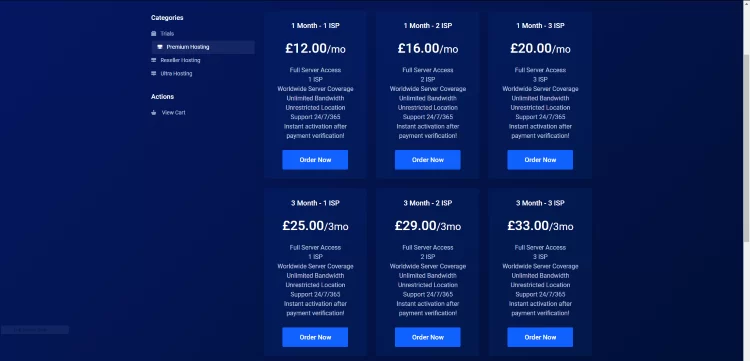
- Lowest subscription plan of £12.00 per month.
- Access to PPV content
- Video On Deman services
- Access to International channels
- Supports external and IPTV players
- Accessible on FireStick and Fire TV
- Comes with Electronic Program Guide (EPG)
- There are Adult options
- Can watch Major News Channels
- Watch Mahor Sports Channels
You may also like to read about Purple IPTV.
What are the Plans Offered by SSTV IPTV?
The subscription plan chargers are proportional to the time period and the number of connections you want. The plans offered are,
What are the Devices Compatible with SSTV IPTV?
The devices on which you can have access to it are as follows,
- Android
- FireStick
- Nvidia
Compatible IPTV players:
The IPTV players that are compatible with it are,
- Tivimate
- IPTV Smarters
- Smart IPTV
And much more players. You may also like to read about Progo IPTV
How to get SSTV IPTV on my Device?
To get it on your device, you need to follow the simple steps given below.
- Open browser on your Device with good internet.
- Type SSTV IPTV in the search box.
- Now select a secure and valid website with the link to get the apk file.
- Get the apk file on your device.
- Go to the downloaded location and tap on it.
- Select Install to get the SSTV IPTV app on your Device.
- Create an account and then choose a subscription plan.
- Finish the payment procedures and sign in.
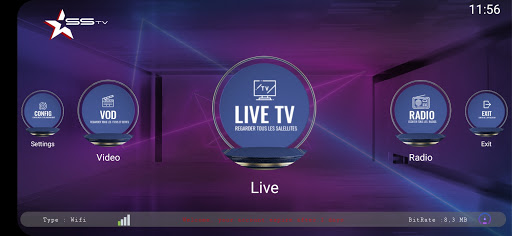
By following these instructions, you can now have access to it and its contents. You may also like to read about Flix IPTV
The End
We have discussed SSTV IPTVs supported devices and the different subscription plans offered by it. Read this article to learn more about the procedure to get it on your Device. If you have any doubts are there, ask me through the comment section, and we can discuss them.
Frequently Asked Questions:
Is VPN needed to Watch SSTV IPTV?
Since it is a third-party app, you are subjected to use a VPN service to secure your information stored on the Device your use by hiding your IP address.
What are the Other IPTV services Similar to SSTV IPTV?
Some IPTV services that are similar to SSTV IPTV and can be used as an alternative for it are, Falcon TV IPTV, Joker, King, Necro, Nikon, Kemo and other IPTV services.