
Watch free movies with the help of the Sofa TV app on all compatible devices with the methods and steps given in this article.
![How to Get Sofa TV App on Your TV [Simple Guide]](https://techthanos.com/wp-content/uploads/2022/05/How-to-Get-Sofa-TV-App-on-Your-TV-Simple-Guide.jpg)
In this article, we have discussed topics such as the installation process of the SofaTV app on devices like your smartphone, Android TV and Fire TV. To know the methods and steps, read this article without skipping any content until the end.
Table of Contents
What is Sofa TV?

With the help of the Sofa TV app, you can watch free movies in HD quality. Movies get uploaded when only HD-quality video is available, excluding all CAM-quality movies. This app is available for free on your Smartphone, Android TV, and Fire TV stick. There is also no need for any subscription plan, but there may be ads since it is a free app.
How to Get The Sofa TV?
The SofaTV app is not available on any app stores, so you can only download it from a third party as and file. Follow the installation process for the different devices that you can use.
1). Sofa TV on SmartPhone:
You can download the Free SofaTV on your Smartphone by following the simple steps below.
- Make sure that the smartphone gets connected to a good WiFi network.
- Open any internet browser on your smartphone
- On the search tab, type “SofaTV.”
- From the results, select a reliable source.
- Go to the page and download the APK file on your Smartphone.
- After the download is complete, please navigate to the app and Install it.
- When the installation is complete, press Done.
You have now successfully installed the app on your smartphone and can now enjoy watching your favorite Bollywood and Hollywood movies in HD quality on your Smartphone.
2). Sofa TV on Android TV:

To install SofaTV on your Android TV, follow the instructions to sideload the app, so don’t skip any steps because the app is not available in Google Play Store.
How to Get the Sofa TV app on Android TV?
#1). How to Enable Android TV to Install Third-Party Apps?
- Go to the “Settings” on your Android TV.
- You can find the option “Security & Restrictions.”
- Now toggle the option on Unknown Sources to accept third-party apps.
You need the Downloader app to download the app on your Android TV. Follow the steps to do so.
#2). Steps to Get the Downloader App:
- Select the Apps option on your Android TV home page.
- Now tap on “Get More Apps.”
- Tap the search icon and type “Downloader,” and press ok to start the search.
- Select the Downloader app from the results and install the app.

- After installation, open the app
#3). Download and Install the Sofa TV app:
- Enter the URL of the SofaTV app from a reliable source.
- Click Go and wait to get the APK file downloaded.
- Once downloaded, Install the app on your Android TV.
- Wait for some time until the installation process finishes. Click “Done.”
Note: Delete the downloaded APK file on your Android TV to clear space. As it will not affect the app you have installed.
The SofaTV app is now successfully downloaded on your Android TV by sideloading using the Downloader app. Please navigate the app and select it to open and enjoy your favorite movies in HD quality.
3). Sofa TV on Fire TV:
The Sofa TV app is not available in the Amazon App Store, so the only way to get the app on Fire TV is by using the sideloading method. Follow the steps without omitting any steps.
How to Get Sofa TV on Fire TV?
#1). How to Enable Fire TV to Install Third-Party Apps?
You need to change the settings of Fire TV to download third-party apps. The steps to make it happen are,
- Navigate to Settings on your Fire TV screen and select it.
- Now select Developers Options from the My Fire TV option.

- Click on the option Apps from Unknow Sources and Turn it on.
Your Fire TV is now ready to download apps from unknown sources.
You need the Downloader app to sideload the SofaTV app on your Fire TV. Follow the steps to get the app on Fire TV with the help of the Downloader App.
#2). Steps to Get the Downloader App:
- Select the Search Icon and type “Downloader” with the help of the on-screen keyboard.
- Click on the app from the search results obtained.
- Press “Download” and wait for some time.
- Wait for the download to complete. Click on Open to launch the app.
- On the prompt pop-up, please press “Allow.”
You have now successfully downloaded the Downloader App on your Fire TV.
#3). Download and Install Sofa TV App:
- When the Downloader App is open, you can find a text box.
- Enter the URL of the Sofa TV app in the box and click “Go.”
- Download the APK file and wait for some time.
- Wait for the download to get completed and click “Install.”
- When Installation gets completed, press “Done.”
Note: Delete the downloaded APK file on your Fire TV to clear space. As it will not affect the app you have installed.
The SofaTV app is now successfully downloaded to your Fire TV. Now watch the latest Bollywood and Hollywood Movies in HD quality on your Fire TV’s big screen.
Features:
It takes a long time to know about the streaming service which is newly used. But you do not have to worry about knowing about the Sofa Television streaming service. In this section, you can easily learn the advantages of this app. Please go through the following section.
- Watch New Movies in Hollywood and Bollywood.
- And stream it in HD Quality.
- Also, it allows you to watch all content for Free.
- Stream the movies and Shows on your TV Big Screen.
- You can get this app on Amazon Fire TV, Android TV, and Android TV Box.
- No Cam Quality content is uploaded on this platform.
- Only High-Quality videos are on this site.
- Also, it lets us access the site on our Smartphones.
- Download the Sofa TV app from its Official Site.
These are all the most prominent features of the Sofa Television streaming service. If you want to know more about this streaming service, Install the app right now and learn more about it.
Is Sofa TV Safe to Use?
Yes. Of course, the Sofa TV streaming service is very safe to use on your Streaming devices. If you have any doubt about my words, you can check whether Sofa TV is safe or not. Open the Web Browser and visit VirusTotal and search for the Sofa TV. For reference, I have uploaded the image below. Check it out.
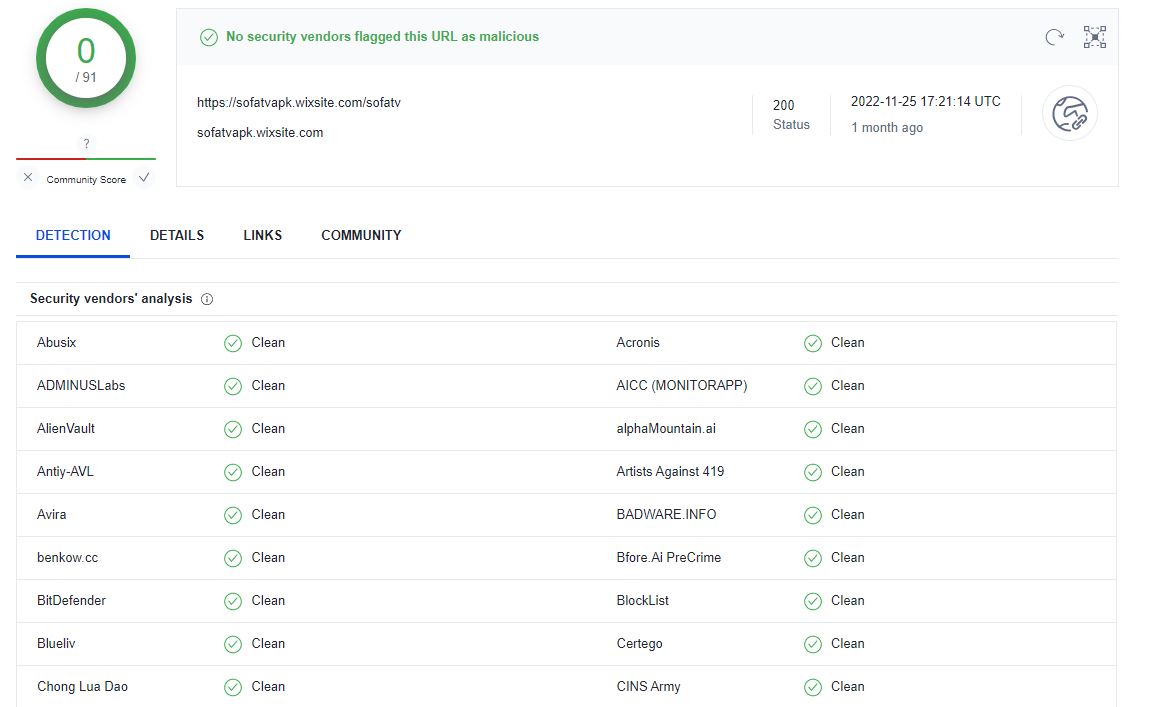
, you can also verify the safety of the Sofa TV streaming service on your device before installing the streaming service.
Frequently Asked Questions:
1). Is Sofa TV free?
Yes, the app is free to download and has no subscription plans. But you are to watch ads while watching movies for free.
2). Are The Contents of The Sofa TV legal?
The usage of SofaTV is legal, but it’s not the same for its contents. As long it is copyright-free content, it is legal. So, Use a VPN to hide your IP address while using this app for your safety.
3). What are the Devices That can Use The Sofa TV App?
The device that you can use is Android TV, Nvidia Shield, Fire TV, Smartphones, Mi Box, etc.
With the help of this article, download the Sofa TV app and enjoy watching your favorite movie on your devices, such as your smartphone, Android TV and Fire TV. Thank you for the valuable time you spent reading this article. If there are any doubts regarding the article’s content, you can ask them in the comment section.