
You can watch Pure Flix on FireStick by downloading the Pure Flix app from the Amazon App Store. If not available you need to update yoru FireStick Firmware. All the details you need to know are given in this article.
![How to Get Pure Flix on FireStick [Complete Guide]](https://techthanos.com/wp-content/uploads/2022/07/How-to-Get-Pure-Flix-on-FireStick-Complete-Guide.jpg)
We will be discussing the details of,
- Pure Flix
- Steps to get Pure Flix on FireStick
- Advantages of using Pure Flix
- The contents offered by Pure Flix.
Table of Contents
Pure Flix:

You can watch faith-filled and family-friendly movies and shows on your favourite device. All the contents of Pure Flix are available for a subscription plan of $5.84/month. You can create an account on Pure Flix by following the simple steps given.
- On your PC connected to a WiFi network open Chrome Browser.
- Go to pureflix.com and select the Sign In option.

- Tap on Create an Account under the Sing In icon.
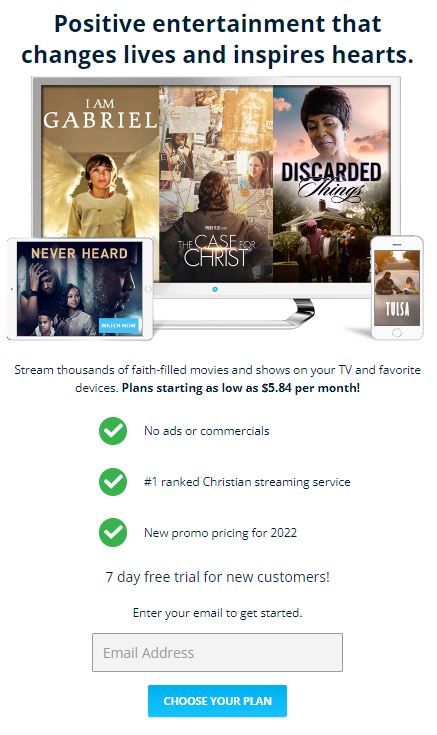
- Enter your email ID and press Choose your plan.
- The plans offered are,
- Monthly – $7.99/month
- Yearly – $5.84/month
- After choosing the plan and other information
- Give a secure password for your account.
- Finish the process by following the instructions.
You have now successfully created credentials for Pure Flix. This information can be used to sign in on any device.
How to Get Pure Flix on FireStick?
You can watch Pure Flix on FireStick by easily downloading it from the FireStick app store. To get Pure Flix on your FireStick follow the instructions given below,
- Go to FireStick home and select the search icon on the top left corner.
- Type Pure Flix in the search tab using the virtual keyboard.
- From the results tap on the app to go to its details page.
- Tap on the Downlaod icon and wait for the download to start.
- After installation tap on the Open icon.
- Now enter yoru Pure Flix credentials and tap on Sign in.
You have now successfully downloaded the Pure Flix app on your FireStick and you can now watch all the contents offered by Pure Flix on yoru Fire TV.
Pure Flix Advantages:
Below given are the advantages of using the Pure Flix app on your FireStick,
- When subscribed to the premium you can access Pure Flix anywhere and at any time.
- All the shows are family-friendly and god-honouring.
- You can engage with people who have the same faith as your and becomes friends through this community.
- There is a seven-day free trial period when subscribing.
- It is possible to cancel the subscription plan any time you like.
Contents offered by Pure Flix:
Pure Flix gives its subscribers many contents from genres like,
- Action & Adventure
- Comedy
- Classics
- Documentaries
- Dramas
- Educational
- Faith
- VeggieTales
- Kids & Family
- Kids only Ages 1 to 10
- Pure Flix
- Romance
- Thrillers
- Westerns
- Musicals
- Spanis
And some purely for Kids shows like
- Kids 1 to 7 – Home
- Kids 8 to 13 – Home
- Kids 4 Jesus
- Brave Hearts
- Animal Friends
- Kindness
- Teamwork
- Follow your Heart
- Life Lessons
You may also like to read about,
How to Get DIRECTV App on FireStick
How to Download Terrarium TV on Firestick
Frequently Asked Questions:
Where is Pure Flix Available?
You can watch Pure Flix in the United States and Canada and are not available at any location due to licensing agreements.
How to Get Pure Flix on the FireStick Device?
You can download the Pure Flix app on your FireStick from Amazon App Store. Simply press the search icon type the name of the app and tap on download to get it on your FireStick.
The End
You can now watch the family-friendly contents of Pure Flix on yoru FireStick device with the help of the simple steps given in this article. And you have also known more about Pure Flix. All your doubts will be cleared if mentioned in the comment section below.
Thank You