
The MLB Regular Season 2023 Started on March 30 and going to end on October 1 (2023). Continuing this, the MLB League Baseball All-Star Game is Scheduled on July 11th (2023). Back-to-back live matches are scheduled on MLB Network. So, refer to this article to learn How to Install and Watch MLB on Firestick.

If you are really searching for the guidelines to Install the MLB Network, then this article will help you to grab all details you need. First, read the below topic to check whether the MLB App is available on the Firestick device or not. Here it is…
Table of Contents
Is MLB on Firestick?
Of Course, YES. The MLB is a big American Live Baseball streaming service. And it is available on many official app stores. In that list, the MLB Network is available on Firestick devices. But the important thing is, Major League Baseball TV is the Paid Streaming Service. Move to the upcoming topic to grab the installation method and the MLB TV Cost. Are you using the Firestick device on Samsung Smart TV, then you can Install and watch the MLB App on Samsung TV.
How to Download MLB on Firestick?
So, the Major League Baseball Streaming service is officially available on the Firestick device. And you can download the app directly from the Amazon App Store. If you want to check the steps to install the app on Firestick, here are the;
Instructions to Download MLB on Firestick:
- Connect the Firestick with your Smart TV HDMI port.
- And, Switch On the Firestick and Smart TV.
- Go to the Wireless Network section.
- And select the home Wi-Fi network for both Smart TV and Firestick.

- Click the Home Button on Firestick remote.

- Select the Find option from the menu.

- Navigate to the Search panel and type “MLB TV” in the field.
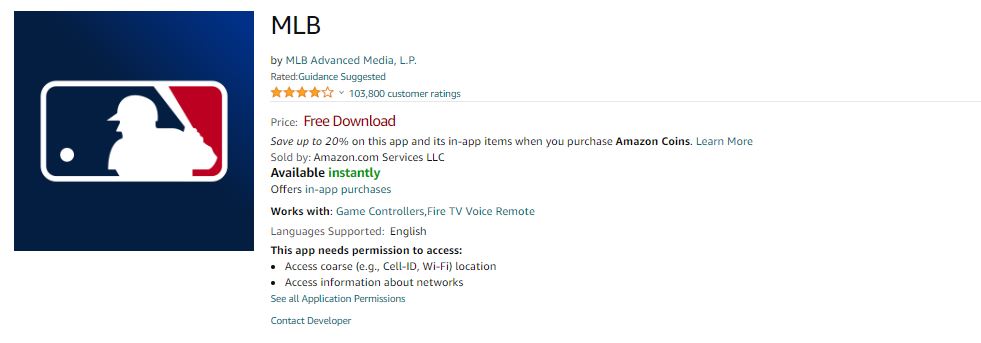
- Discover the Official MLB App from the search result.
- And click the Download button.
Based on your home Wi-Fi Network speed, the MLB TV app gets installed on the Firestick device. If you know how to activate the MLB App on the Firestick device, do it and watch the live MLB Regular Season 2023 on your TV. Or, check the next topic to grab the Activation process.
How to Activate and Watch MLB on Firestick?
Activation is the second process to watch the MLB on Firestick. Do this process, after the MLB app gets installed on the device. Here are the steps for your reference;
- Tap the Home Icon key on Firestick remote to return to the home screen.
- Then, launch the Apps and Games page.
- Select the installed MLB App on the Firestick device.
- Move to the Sign in Page on MLB App.
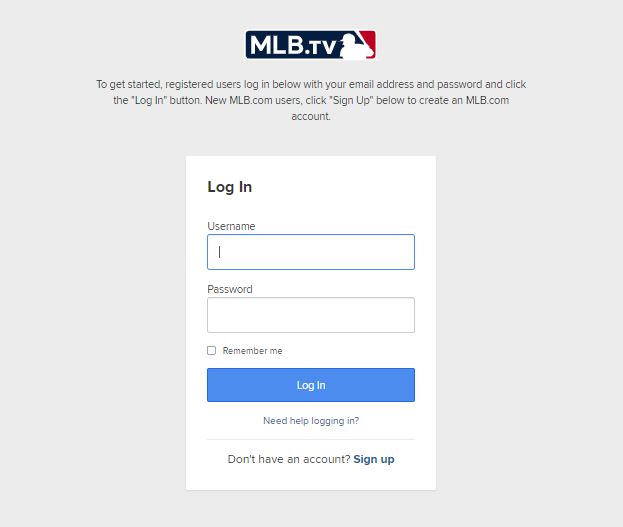
- Enter your MLB Email Address and Password in the given space.
- And tap the Sign In button.
- Then, the Activation Code will appear on Firestick Screen.
- Launch the Web Browser on any device.
- And launch the MLB App Activation page.
- Now, Enter the Activation Code in the given space.
- Click Activate or Submit button.
That’s all. Now, the MLB App gets activated on the Amazon Firestick device. Also, you can Activate it through the TV Provider. Here the details are; if you have an LG TV, then click this link to learn How to Watch the MLB on LG Smart TV.
Activate MLB through TV Provider:
If you are an active cable or Satellite TV provider, then you can use the TV Provider credentials to Activate the MLB App on the Firestick device. Check how;
- Launch the MLB App on a Firestick device.
- Click, and log in with the TV Provider option.
- Select the TV Provider from the list.
- Enter your TV Provider Credentials in the given box.
- Now, you will receive the Activation Code on the screen.

- Visit the MLB Official Activation page on Browser.
- Enter the Activation Code in the given space.
Or, you can also scan the Bar Code shown on your TV screen. And follow the on-screen instructions to complete the activation process.
MLB TV Cost:
As I have told you in the initial section, the MLB Streaming service is a paid app. You have to pay monthly or it allows its users to purchase the package for a particular season or the particular. Here is the image for your reference;
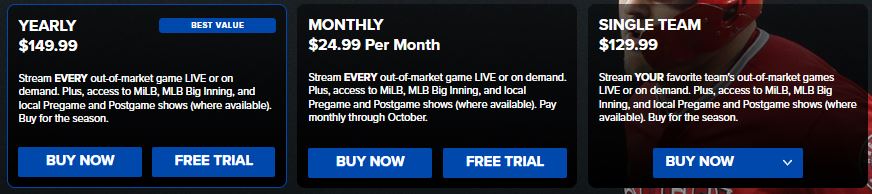
Here, check the three Subscription packages offered in the MLB TV app. Visit the Official MLB Website and log in with your MLB Credentials. Then, purchase the plan which you choosed. Also, the MLB app is accessible on the PlayStation console. Tap the link to get the MLB App on PS5.
How to Watch MLB Regular Season 2023 for Free on Firestick?
Yes, in the above section, you have seen the MLB Subscription Plan. But, You can watch some Live Matches for free on MLB TV. In the following, I have given the details about it;
| MLB.TV Free Game of the Day | ||
| DATE | TIME (ET) | GAME |
| March 30, 2023 | 02.10 PM |
Orioles vs. Red Sox
|
| March 31, 2023 | 10.10 PM |
Guardians vs. Mariners
|
| April 2, 2023 | 01.10 PM | Tigers vs. Rays |
| April 5, 2023 | 01.05 PM |
Phillies vs. Yankees
|
| April 6, 2023 | 02.10 PM |
Blue Jays vs. Royals
|
| April 9, 2023 | 01.10 PM |
Athletics vs. Rays
|
| April 10, 2023 | 09.45 PM |
Dodgers vs. Giants
|
| April 12, 2023 | 02.20 PM |
Mariners vs. Cubs
|
| April 13, 2023 | 06.40 PM | Phillies vs. Reds |
| April 15, 2023 | 01.10 PM | Giants vs. Tigers |
| April 16, 2023 | 01.35 PM |
Angels vs. Red Sox
|
| April 17, 2023 | 07.45 PM |
D-backs vs. Cardinals
|
| April 19, 2023 | 01.10 PM |
Guardians vs. Tigers
|
| April 20, 2023 | 06.40 PM |
Rockies vs. Phillies
|
| April 25, 2023 | 07.10 PM |
Nationals vs. Mets
|
| April 26, 2023 | 06.35 PM |
Dodgers vs. Pirates
|
| April 27, 2023 | 04.07 PM |
Athletics vs. Angels
|
Up to April 27th (2023), the above-listed matches are broadcast live on the MLB TV app for free. The other matches are only available for subscription users. Also, you have one more method to watch the MLB Regular Season Live on TV.
What Channel is the 2023 MLB Regular Season today?
Instead of login in using the TV Provider, you can watch live Major League Baseball Matches directly on your TV Provider. Here are the channel’s name and number.
| MLB Channel Number | ||||
| FOX | FS1 | TBS | ESPN | |
| DIRECTV | 22 | 219 | 247 | 206 |
| DISH Network | 2-70 | 150 | 139 | 140 |
| Xfinity | 1061 | 1208 | 421/842/651/735 and depends on the location | 202/724 |
| Spectrum | depends on location | 65/779 | 2/50 | 8 |
| Optimum | 5 | 69/213 | 39 | 36/210 |
| COX Contour | depends on location | 1031 | 49/1049 and depends on the location | 1033 |
| Mediacom | 810 | 58/861 | 836 | 830 |
| Verizon FiOS | 505 | 83/583 | 552 | 70/570 |
On these four cable tv channels, you can watch live MLB Games on your TV. But, you must be an active subscriber to any one of these TV providers. If you are searching for What Channel is MLB on FiOS, then here is the answer.
Conclusion:
Install the MLB on Firestick from the Amazon App Store. Then, activate the MLB App on the Amazon Firestick device. Not only the Amazon Firestick device, but also the MLB App supports other streaming devices such as Android, iOS, Roku, Smart TVs, and more like this. But, you do not get the same features on MLB App for all Streaming devices. For each device, MLB offers different features. Install and experience the amazing feature and the hd live broadcast on the MLB streaming service.